8
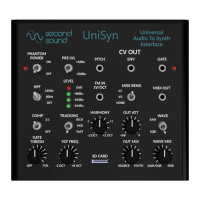
UniSyn Universal Audio to Synth Interface User’s Manual
Quick Start Guide
Here are some basic instrucons to make the most out of your
UniSyn:
Basic Setup
1) Apply power via the included 9v power supply unit (PSU). This
unit can handle 100-240VAC at its input so will work worldwide,
possibly with only an adapter for your local electric socket
required.
2) Connect any audio to the INPUT Neutrik combo jack (XLR or ¼”
balanced or unbalanced).
3) Play your audio source at a comfortable volume and observe
that AGC should automacally adjust to nd the opmum preamp
gain. Try both 3:1 compression and no compression sengs.
4) Adjust the gate threshold so that the gate LED turns on when
no audio is being played. With plucked string instruments like
guitar it may take some tuning to get the gate to dierenate
exactly when a note is being played from the low-level transients
that occur when you mute the strings. Try to set the gate high
enough so that the LED remains on when those quiet transient
events occur.
5) For almost all cases the HPF can be le in its default, “open”
seng (HPF OFF). In some cases more high-pass ltering can
help, for example if you use a contact mic with a handheld
instrument and want to lter out potenal low-frequency knocks
or percussive eects.
Listening to UniSyn Internal Synth Outputs
6) Listen to the main ¼” SYNTH output. To hear the dry + wet
sound, adjust the OUT MIX knob to get the desired mix (fully CCW
for dry, fully CW for wet). Adjust the OUT ATT knob to get the
desired level coming out of the SYNTH output.


 To Next Page
 Loading...