User manual for Doorbell M523
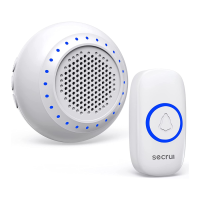
1X Secrui wireless doorbell receiver
1X Secrui transmitter button
1X Double-side adhesive table
1X Secrui User manual
1. 4 levels of adjustable volume.
2. 32 ringtones options
3. Memory function
4. Fixed tone buttons settable
5. Each doorbell receiver works with up to
20 transmitter buttons at most.
Short press---press button for <3S
Long press---press button for >3S
Do not let children play with it .
Do not expose the doorbell receiver to
rain, fire, excess moisture or snow.
Do not disassemble.
Do not operate product with damage
cord or plug.
Do not throw or shake the product.
1. Short press【 】 to increase or decrease
the volume
2. The volume will turn to maximum
automatically when the doorbell receiver
reboots.
1. Long press【 】on doorbell receiver,
the LED light flashes and beeps once,
the doorbell receiver has entered the
pairing state.
2. Short press transmitter button.
3. Short press【 】, the doorbell receiver
LED light is off.
4. Short press transmitter button, the
pairing is done.
( 1 doorbell receiver with 2 or more
transmitter buttons)
1. Short Press【 】, select a tone, long
press【 】and【 】, do not release
them until the doorbell receiver LED
light is green and beeps
2. Short press transmitter button A.
3. Short press【 】, the doorbell
receiver LED light is off, then short
press transmitter button A. Done!
4. Short Press【 】, select another tone,
long press【 】and【 】, do not
release them until the doorbell receiver
LED light is green and beeps.
5. Short press transmitter button B.
6. Short press【 】, the doorbell receiver
LED light is off, then short press
transmitter button B.Done!
When the doorbell receiver is in pairing
state: short press any key on the doorbell
receiver or leave it 20 seconds without any
operation, the doorbell receiver will quit
the pairing state automatically.
Plug the doorbell receiver into the AC
Electric outlet. The doorbell receiver will
beep once and LED light will flash in each
color circularly.
1. Short press【 】: Loop tones in
sequence and play the current tones.
2. Long press【 】: Change tones loop
direction.
1. Doorbell receiver power supply:100-240V
2. Doorbell receiver working current:100mA
3. Battery lifetime: 3 years
4. Transmitter button working voltage:12V
(built-in battery)
5. Sound volume:25dB - 130dB
6. Working frequency:433MHZ
7. Wireless range: 1000ft (in open air)
Doorbell receiver Transmitter button
Package:
Product features:
Product Specification:
Operation instruction:
Receiver power on :
Chime setting:
Volume adjustment:
Doorbell Transmitter button pairing
Recommend: Fixed-tone
transmitter button pairing:
Note:
1. Unplug the doorbell receiver.
2. Press and hold【 】button, plug in
doorbell receiver. (Do not release the
【 】button until the doorbell receiver
LED light flashes and beeps 10 times,
then beeps continues )
3. Delete pairing is done!
Delete pairing method:
Attention:
Foranyproductissue, wesincerely
appreciateifyoucouldcontactus.
Email: support@secrui.com
Setting
Tone
Volume


 To Next Page
 Loading...