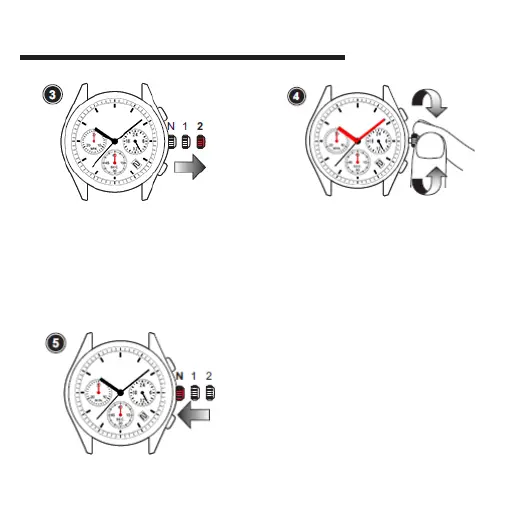
• Pull the crown out to the 2nd click
position when the second hand is at the
12 o'clock position.
Note: When the stopwatch is or has been
measuring or is stopped, if the crown is pulled
out to the 2nd click position, it will automatically
reset the Stopwatch hands to "0".
• Turn the crown to set the hour and minute
hands.
• Turn the crown clockwise to advance the
hour and minute hands past 12:00 midnight.
This will advance the date to the current date.
• Take AM/PM into consideration when
setting
HOW TO SET TIME AND DATE
• Push the crown back to the
normal position.
Push back
to normal
postition
Recommend:
• When setting the minute hand, first advance
it 4 to 5 minutes ahead of the desired time
and then turn it back to the exact minute.
Pull out to
2nd position



 To Next Page