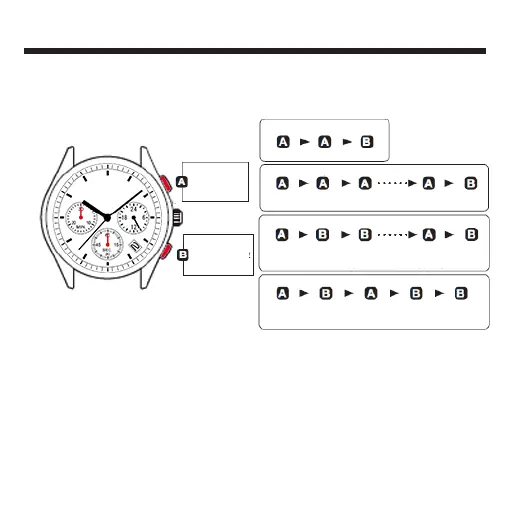
HOW TO USE THE STOPWATCH FUNCTIONS
• The stopwatch can measure up to 29'59" in one-second increments.
• When the measurement reaches 30 minutes, the stopwatch automatically stops counting.
• The stopwatch second hand is capable of timing 30 minutes. (60 seconds x 30 times)
• The stopwatch minute hand is capable of timing 30 minutes.
• Whether the stopwatch hands return to the "0" position in a clockwise rotation or in a
counterclockwise rotation is decided depending on the elapsed time the stopwatch has
measured.
* Before using the stopwatch, be sure to check that the crown is set at the normal position and that the
stopwatch hands are reset to the “0” position.
Note: If the stopwatch hands do not return to the “0” position when the stopwatch is reset to “0”, follow the
procedure in "Stopwatch hand position adjustment".
STOPWATCH minute hand
STOPWATCH second hand
START
STOP
RESTART
SPLIT
SPLIT RELEASE
RESET
Standard Measurement
Accumulated Elapsed Time Measurement
Split Time Measurement
Measurement of Two Competitors
START
START
START
START
STOP
STOP
STOP
STOP
SPLIT
FINISH TIME
OF 1ST
COMPETITOR
FINISH TIME
OF 2nd
COMPETITOR
2nd
COMPETITOR
FINISHES
SPLIT RELEASE
RESET
RESET
RESET
RESET
RESTART
Note: Restart and stop of the stopwatch can be repeated by pressing Button “A.”
Note: Measurement and release of split time can be repeated by pressing Button “B.”



 To Next Page