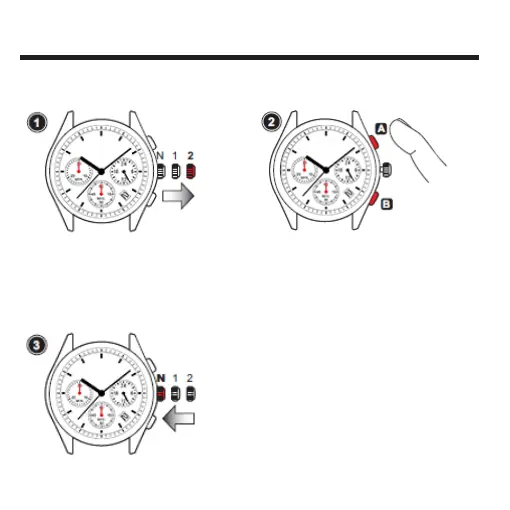
Pull out to
2nd
position
• Pull the crown out to the 2nd click position.
Note: While the stopwatch is running or has been
stopped while running, if the crown is pulled out to the
2nd click position, the stopwatch will be automatically
reset.
STOPWATCH HAND POSITION ADjUSTMENT
If the stopwatch hands are not in the “0” position, follow the procedures below to set them to
the “0” position.
Push
back to
Normal
position
Press A to move
the stopwatch
hands clockwise
Press B to move
the stopwatch hands
counterclockwise
• Press Button “A” or “B” to set the stopwatch
hands tothe “0” position.
• The movements of the stopwatch
minute hand and stopwatch second hand
areinterlocked. To set the stopwatch minute
hand to the "0" position, continue to move the
stopwatch second hand until the stopwatch
minute hand reaches the "0" position.
Note: The stopwatch minute and second hand move
quickly if Button “A” or “B” is kept pressed.
• Push the crown back to the
normal position.



 To Next Page