for Bluetooth R7_BT3.0 will automatically pop up on the
phone, just click pairing. The Bluetooth icon in the drop-down
bar will be blue-orange, indicating that both Bluetooth 5.0
and 3.0 are successfully bound. If there is no automatic
pop-up pairing request on the phone, please refer to the
connection method of IPhone users.
(You need to use Android 5.0+ or iOS 11.0+ and above and
the watch can only be paired with one mobile phone. To pair
other mobile phones, please unbind the current one before
pairing.)
User Manual
Version1.1
2. Sports
The R7 watch supports 10 sport modes including:
running, walking, cycling, climbing, treadmills,
yoga, spinning, basketball, football, badminton.
3. Call Mode
R7 watch support bluetooth phone, it will be able
to connect with your mobile phone via bluetooth,
address book to read on the watch, also can
choose to make and receive, reject, or mute.
Introduction
Thank you for choosing our product R7. R7 is a smart sport
watch. It can help you to achieve your sport goals.
Content in box:
• R7 smart watch x 1
• User manual x 1
• Charging dock x 1
Setting up your R7
The first step is to download and install the APP SMART-
TIME PRO indicated on the color box and shown up on the
watch. Enter the APP and create an account for info sync.
The app allows you to check data analysis every day and to
personalize some functionalities, such as setting sedentary,
calls notication, exercise goals and so on.
Connect R7 to your smartphone
SMART-TIME PRO APP supports the operating system of
IOS 11.0 and Android 5.0 or above, and BT 3.0&5.0. It is
available for more than 150 mobile devices.
1. Turn on Bluetooth on the mobile;
2. Download APP: SMART-TIME PRO;
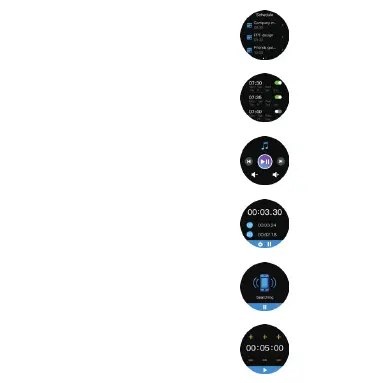
4. Schedule
Schedule synchronization can be
added to the watch on the APP to
remind the time of arrival.
5. Alarm Clock
Set the alarms in APP and sync to
watch, maximum 8 alarms.
6. Music Control
Control the music player of mobile
phone to play the music,as well
as song switching and volume
adjustment.
7. Stopwatch
Electronic timer can record one time
or record multiple times.
8. Find Phone
Under Bluetooth connection, cilck
"Find phone" on the watch, the phone
ringing, click pause to stop.
9. Countdown
The same way to calculate the
remaining time.
3. Install the APP, register and log in to enter the homepage;
4. When pairing the watch with the APP, make sure that
the watch and APP can communicate with each other
(synchronize data);
5. In the APP, click "Device"> "Bind Device", in the searched
binding list, select the "R7" with the strongest signal, and
press the phone prompt to click the pairing button that
appears on the watch screen to confirm pairing. The
Bluetooth icon in the drop-down bar will be blue. Indicates
that you are connected to Bluetooth 5.0.
Bluetooth 3.0 connection method for iPhone users: Open
"Settings"> "Bluetooth" on the mobile phone, nd R7_BT3.0
in the search list, and click Connect to pair. The Bluetooth
icon in the drop-down bar will display blue-orange, indicating
that both Bluetooth 5.0 and 3.0 are successfully bound.
Bluetooth 3.0 connection method for Android users: After
successfully connecting to Bluetooth 5.0, a pairing request
Troubleshooting
Heart-rate signal missing
The R7 smart watch keeps paying attention to your
heart rate data during your exercise and your daily life.
Sometime the watch may not get a suitable heart rate
signal. At this time, the missing heart rate data will appear
at the dotted line.
If you can't get the heart rate signal, first you should
confirm that you wear the watch correctly, adjust it to
avoid being too high or too low, neither too tight or too
loose on your wrist.
After adjustment, turn on real-time heart rate monitoring
to get the data.
If there is still no heart rate data, check if the heart rate
monitoring function is turned on at SMART-TIME PRO
APP.
Other problems
If your mobile cannot pair the watch, click Settings
Bluetooth in your mobile and check if there is signal of
R7. If yes, it means there is no problem with the Bluetooth
signal. Please check if the watch is paired with other
phones, please unbind it. IOS device users should click
Setting - Bluetooth - ignore this device and then pair it.
Exemption Clause
1. The Hear Rate and Blood Pressure data output by R7
are not intended to be a medical or diagnostic basis.
2. Self-diagnosis and self-treatment are dangerous. Only
qualified physicians are allowed to diagnose and treat
high blood pressure or any other heart diseases. Please
contact your physician for more professional diagnostic
Functions
1. Health:
Smartwatch health functions include:
Pedometer, Heart rate, Blood pressure, Sleep monitor
opinions.
3. R7 smartwatch data such as heart rate, blood pressure,
etc. may not be completely accurate due to factors such
as interference with environmental signals, wearing
posture, changes in the climate environment, and physical
condition.
4. DO NOT carry out drugs and treatment on the basis
of the monitoring data provided by R7, and should
follow medical advice when medication and treatment
are required, and we are not liable for the inaccuracy
of monitoring data and the consequences of misuse of
monitoring data and information.
Warranty Clause
Our company always pursues the service concept of
"creating value for customers" .
We offer 1 year warranty period for R7 smart watch. If
there is any damage or malfunction during normal use,
the warranty service will be provided to the customer for
free after confirmation by our technician. The following
conditions are not covered by the warranty:
A. Accident or human damage
B. Testing, repairing or disassembling without
authorization
C. Contamination due to human reasons
D. Damage caused by connection with equipment which
is not compatible
E. Natural aging
F. Damage caused by Force majeure
R7
10. Voice
Assistants
Voice control
can realize the
function.
12. Weather
Weather
forecast
14. Changing Watch Face
13. Shortcut Menu
1. Airplane mode
2. Vibration
3. Bluetooth
4. Settings
5. Do not disturb
6. Brightness
11. Remote
Capture
Control the
mobile phone
camera to take
remote photos.
Wristband length
Wristband width
Weight
Battery
Waterproof
258 mm
22 mm
62g
300 mAh Poly-Li
IP67
Specication
1
)
Pedometer
:
Wear the watch correctly and click the step
counter function to display the number of
steps, calories, distance and other parameters
of the day's exercise.
2
)
Heart rate
Wearing R6 correctly, not too tight or loose,
make sure no green light leak, there is two
measuring ways:
Turn on the heart rate icon on the watch and measuring
heart rate by manual.
Set automatic monitoring time interval in app(monitoring
once every 15/ 30/ 60/ 120 minutes).
3) Blood pressure:
After wearing the watch correctly, open
Health-Blood Pressure, you need to click to
manually measure blood pressure.
4) Sleep monitoring
After wearing the watch correctly, turn on
Health--Sleep monitoring, record your sleep
all night, and press and hold the touch screen
button to return to your health list.
running walking cycling climbing
treadmills spinning yoga basketball
football badminton
Quik Fit Strap
R7 contains two parts(watch body
and wristband), you can purchase
seperately strap and switch as your
preference.
Charging instructions
Charging: Turn the watch over,align
and attach the charging pins to the
magnets gold prongs. You will see the
charging icon on the watch screen
after 5s.
Charging fully may take 2 hours. You
will see the battery icon is full if the
watch have been fully charged.
Please clean the charge interface
before charging for fear that the
remaining sweat erode gold metal
contact or other risks.
1
65
2
7
3
8
4
9


 To Next Page
 Loading...






