3. Install the APP, register and log in to enter the homepage;
4. When pairing the watch with the APP, make sure that
the watch and APP can communicate with each other
(synchronize data);
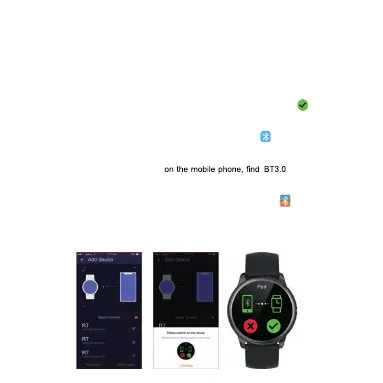
5. In the APP, click "Device"> "Bind Device", in the searched
binding list, select the "SECTOR S-01" with the strongest
signal, and press the phone prompt to click the pairing
button that appears on the watch screen to confirm
pairing.The Bluetooth icon in the drop-down bar will be blue.
Indicates that you are connected to Bluetooth 5.0.
Bluetooth 3.0 connection method for iPhone users: Open
"Settings"> "Bluetooth"
in the search list, and click Connect to pair. The Bluetooth
icon in the drop-down bar will display blue-orange, indicating
that both Bluetooth 5.0 and 3.0 are successfully bound.
Bluetooth 3.0 connection method for Android users: After
successfully connecting to Bluetooth 5.0, a pairing request



 To Next Page