The Grove - 16x2 LCD is a versatile I2C LCD display designed for seamless integration with Arduino and Raspberry Pi platforms. It offers a high-contrast display and simplified deployment, making it an ideal choice for various projects requiring a basic visual output. The "16x2" designation indicates that the display features two lines, with each line capable of showing 16 characters, for a total of 32 characters.
Function Description:
The primary function of the Grove - 16x2 LCD is to provide a visual interface for displaying text and simple information. It utilizes the I2C communication protocol, which significantly reduces the number of pins required for connection. Instead of numerous individual data and control lines, only two signal pins (SDA and SCL) and two power pins (VCC and GND) are needed. This simplifies wiring and reduces the complexity often associated with traditional LCD modules. The display is designed for direct plug-and-play functionality with Grove I2C connectors on Seeeduino, Arduino, or Raspberry Pi base shields, eliminating the need for complicated wiring or soldering. This design also removes the concern of damaging the LCD due to incorrect current limiting resistors, as these are typically managed by the Grove system.
The Grove - 16x2 LCD is particularly well-suited for applications such as temperature displays, time displays, and any other project that requires a straightforward text-based output. It supports both English and Japanese fonts, broadening its applicability for different user bases.
Important Technical Specifications:
- Display Construction: 16 Characters * 2 Lines (32 characters total)
- Display Mode: STN (Super-Twisted Nematic)
- On-board: MCU (Microcontroller Unit)
- Interface: I2C-bus interface
- I2C Address: 0X3E
- Operating Voltage: 3.3V / 5V
- Operating Temperature: 0 to 50°C
- Storage Temperature: -10 to 60°C
- Driving Method: 1/16 duty, ⅓ bias
- Font Support: English and Japanese fonts
Usage Features:
The Grove - 16x2 LCD is designed for ease of use, particularly within the Grove ecosystem.
- Simplified Connection: Thanks to the Grove I2C connector, connecting the LCD to a compatible development board (like Seeeduino or Raspberry Pi with a base shield) is as simple as plugging in a Grove cable. This eliminates the need for breadboards, jumper wires, and careful pin mapping.
- Software Library Compatibility: The module shares a common software library with the Grove - LCD RGB Backlight, which simplifies programming. Users can download the Grove-LCD RGB Backlight Library from Github.
- Arduino Integration: For Arduino users, the setup involves connecting the LCD to the I2C port of a Grove-Base Shield, plugging the shield into a Seeeduino, and connecting the Seeeduino to a PC via a USB cable. The provided examples, such as "HelloWorld," demonstrate basic display functionality.
- ArduPy Integration (Wio Terminal): The device also supports ArduPy on the Wio Terminal. This involves configuring the ArduPy development environment, ensuring the ArduPy firmware includes the Grove - 16x2 LCD ArduPy library (using commands like
aip install Seeed-Studio/seeed-ardupy-lcd1602, aip build, aip flash), and then running Python code (e.g., ArduPy-LCD1602.py) to control the display.
- Monochrome Backlight: The Grove - 16x2 LCD series features monochrome backlights (Black on Yellow, Black on Red, White on Blue). While it shares a library with RGB backlight versions, users should note that the RGB color API (e.g.,
setRGB()) is not supported and should be commented out in example code.
- Pre-reading Recommendation: For new users, it is highly recommended to read an introduction to "What is a Grove - 16 x 2 LCD and How does it work" from the Seeed Studio blog to gain a foundational understanding before diving into implementation.
Maintenance Features:
- Built-in Pull-up Resistors (Newer Versions): Newer versions of the Grove - 16x2 LCD series come with built-in 10kΩ pull-up resistors on the I2C lines (VCC to SCL and VCC to SDA). This eliminates the need for external pull-up resistors, simplifying circuit design and reducing component count.
- Retrofitting Older Versions: For users with older versions of the Grove - 16 x 2 LCD that lack built-in pull-up resistors, there is a provision to solder 10kΩ DIP resistors directly onto the back pad of the Grove connector. This allows older modules to function correctly with I2C communication without requiring a complete module replacement.
- Grove Cable Management: Each Grove module typically includes a Grove cable. Users are advised to handle USB cables gently to prevent port damage. It's also important to use 4-wire USB cables for data transfer, as 2-wire cables are insufficient. Replacements for Grove cables are readily available if lost.
- Software Updates: The documentation notes that library files may be updated. Users are encouraged to use the recommended methods for installing libraries to ensure compatibility and access to the latest features and bug fixes.
- Technical Support: Seeed Studio provides a forum for technical support, encouraging users to submit any issues they encounter for assistance. This ensures that users have a channel for troubleshooting and resolving problems.
- Datasheet Availability: A detailed datasheet (JDH_1804_Datasheet) is available for download, providing comprehensive technical information for advanced users or those requiring in-depth understanding of the display's characteristics.

 Need help?
 General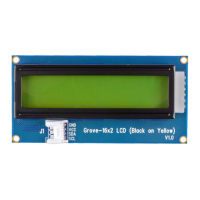

 To Next Page