14 Hardware Installation Guide
Print Server Controls and Technical Data
* The shield connection of the RJ45 connector is connected to the shield of the printer port.
This connection must be taken into account when arranging your network cabling. For more
information, please consult your retailer.
Characteristics Values
Printer Connector - 2 x USB 2.0 Hi-Speed (expandable to 5 ports)
Network Connection
logical:
physical:
- IEEE 802.3
- RJ-45 (STP Cat. 5)
Operating Environment - Ambient temperature: 5 - 40 °C
- Relative humidity: 20 - 80 %
Dimensions - Length: 98 mm
- Width: 81 mm
- Height: 31 mm
- Weight: 100 g
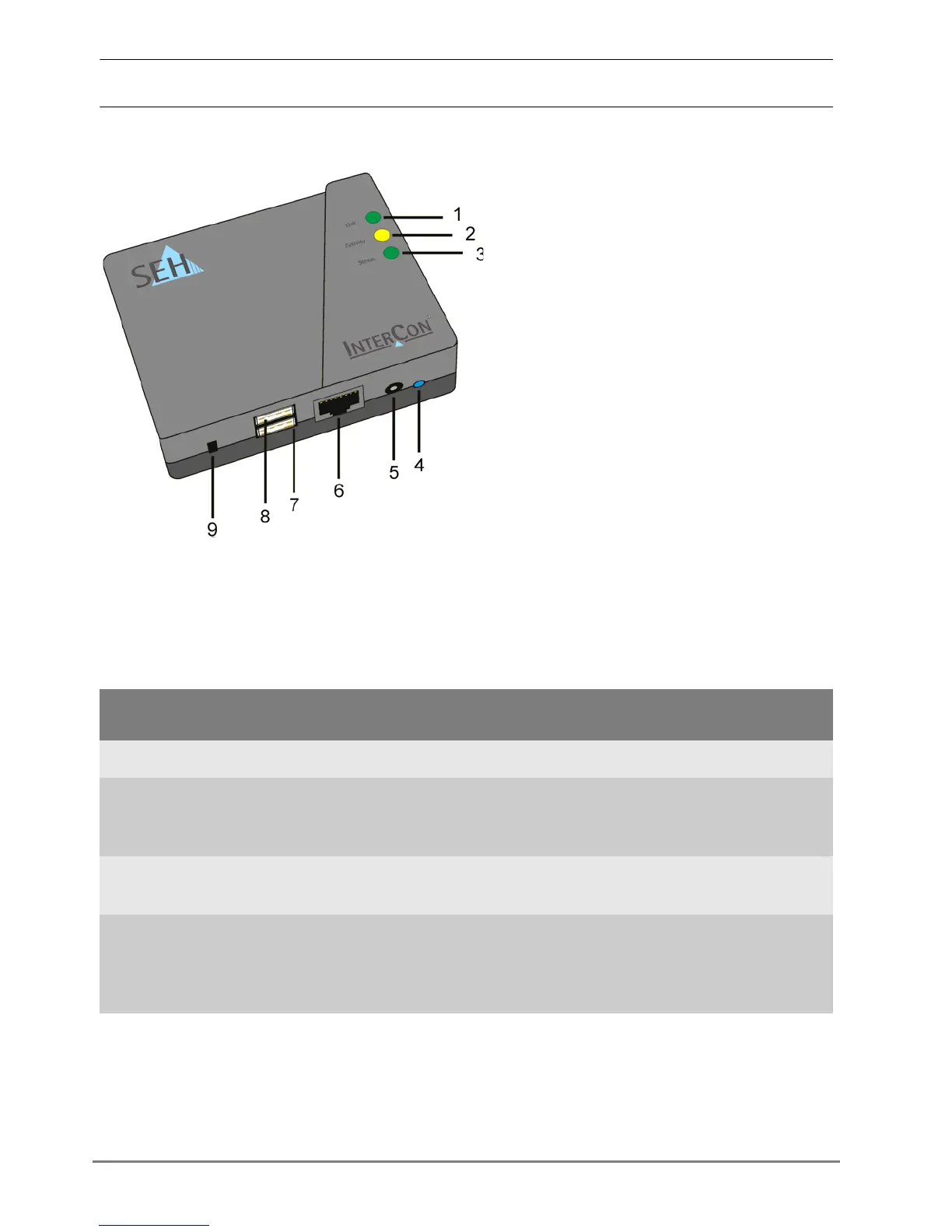
1) Link indicator LED (green):
The LED lights up when a (physical)
connection to the network is available.
2) Network activity LED (yellow):
The LED lights up when data packets
are being received.
3) Status indicator LED (green):
The LED shows that the print server is
operational.
4) Status button
5) Connector for the power pack
6) RJ-45 connector for 1000BaseT,
100BaseTX and 10BaseT *
7) USB port 2
8) USB port 1
9) Slot for security lock



 To Next Page