5
English
PREPARATIONS
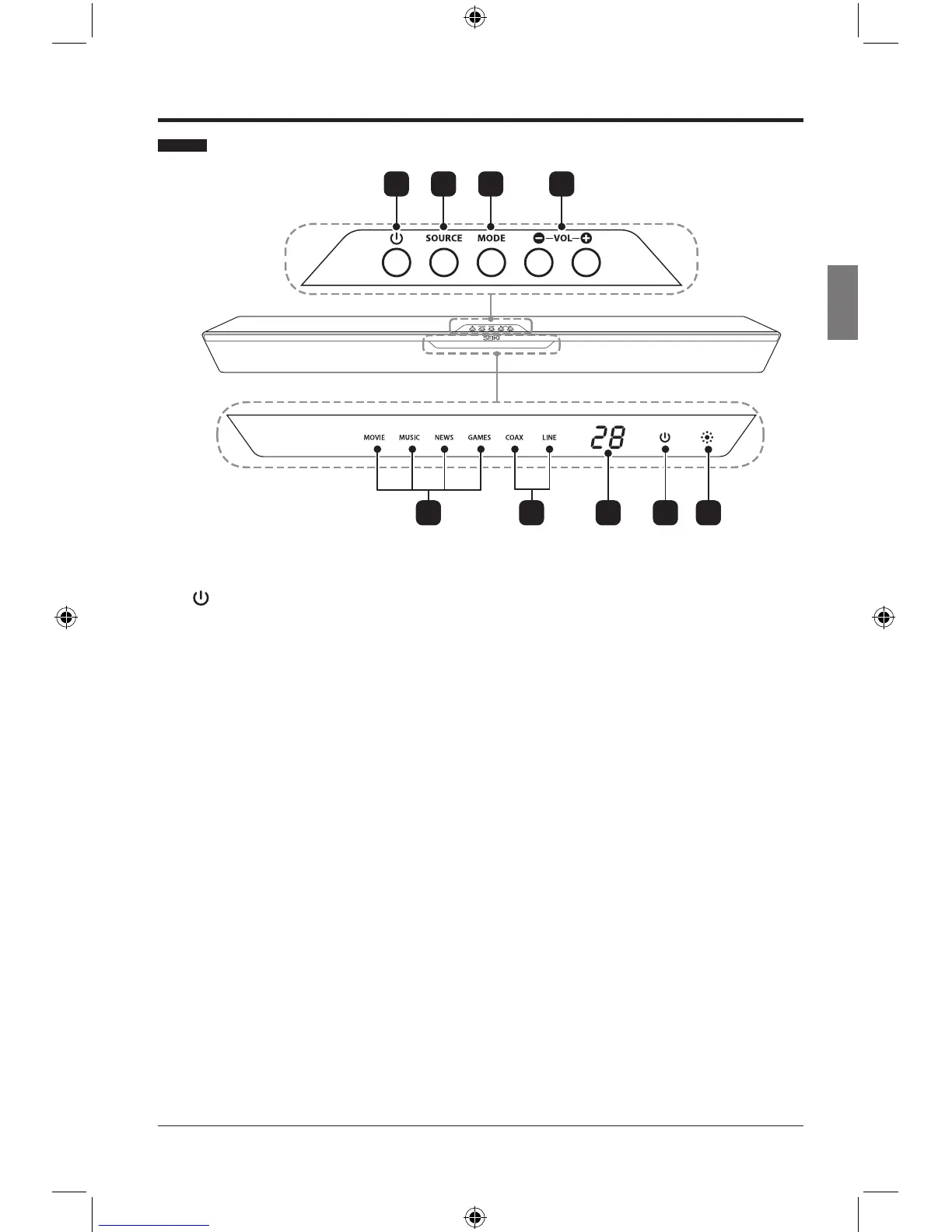
Front View / Controls
21 3 4
1.
Switch the SoundBar on or to standby.
2. SOURCE
Select the audio source between LINE /
COAXIAL.
3. MODE
Select the sound mode among Movie /
Music / News / Games.
4. VOL+ / -
Increase or decrease the volume.
5. Mode Indicators
Lights up correspondingly when you
cycle among MOVIE / MUSIC / NEWS /
GAMES sound modes.
6. Source Indicators
Lights up correspondingly when you
cycle between COAX / LINE input
sources.
7. Volume Indicator
Displays the current volume.
8. Power Indicator
Illuminates Green when the SoundBar is
on. Illuminates Red when the SoundBar
is in standby mode.
9. IR (Infrared Receiver)
Receive IR signals from the remote
control.
5 6 7 8 9
SEIKI_Soundbar UG-English Original_v2.indd 5 2012/8/3 18:58:26



 To Next Page