Need help?
Do you have a question about the Seiki SC4000S and is the answer not in the manual?
Explains cautionary symbols for electric shock hazards and important operating instructions.
Details safe placement, avoiding moisture, heat, and combustible materials, and proper handling.
Strongly recommends anchoring the TV and furniture to prevent injuries from tipping.
Covers positioning requirements, ventilation, and avoiding hazards like liquids and metallic objects.
Step-by-step guide for attaching the TV stand to the unit securely.
Information and VESA pattern for wall mounting, recommending professional installation.
 General
| Display Size | 40 inches |
|---|---|
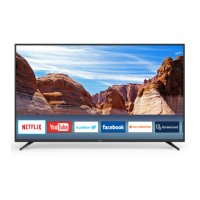
| Smart TV | Yes |
| HDMI Ports | 3 |
| Wi-Fi | Yes |
| Ethernet Port | Yes |
| Audio Output | Optical Digital Audio Output, Headphone Jack |
| Refresh Rate | 60Hz |
| Display Technology | LED |
| Resolution | 1920 x 1080 pixels |
| Built-in Apps | Netflix, YouTube |

 To Next Page