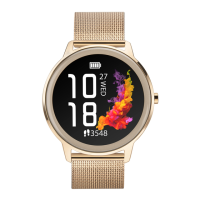
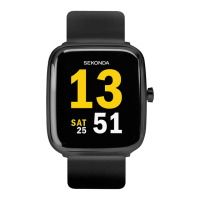
- Tap “Use favorite photos as watch face background”
- Tap the plus symbol under “History”
- You will be given the option to take a photo or access the album within your
phone to select an existing photo.
- Scroll down. Under “Colour” you can select white or black to change the
time/date colour.
- Select whether you would like the time/date to be positioned at the top,
bottom, or center of the dial.
- Tap “Push” to add the dial to your watch.
FUNCTIONS
Swipe right to access the menu. The watch will display a list of the below
functions. Scroll up or down and tap to select an option.
Daily Activity
- The watch will display the user’s total number of steps, the distance walked,
and calories burned for the current day. The data will be cleared at midnight
every day.
- You can also access the daily activity screen by swiping left from the home
screen.
Temperature
- When this is selected, the watch will begin to measure your temperature.
- The top measurement shows your surface skin temperature.
- The bottom measurement shows your body temperature. Your watch will
take 60 seconds to measure this.
- Please note that to accurately measure body temperature the room
temperature must be between 18-30°C
Sports
- In this mode you can select from 14 sports modes to record data during the
activity.
- Data that is recorded can include time, heart rate, steps and calories burned,
depending on which activity is selected.
- Press the lower button to end the recording of data.
- Full sports list: Walking, running, treadmill, hiking, elliptical, exercise bike,
rowing machine, HIIT, football, yoga, fi tness, tennis, cricket, rope skipping.
Sports record
- Shows your sports activity history for the day.
Heart Rate
- When this is selected, the watch will begin to measure your heart rate.
- The watch will vibrate when it has fi nished measuring.
Sleep Monitor
- The watch will display your total sleep time for the previous night, including
the total time of deep sleep and light sleep.
- The watch will measure sleep times between 21:30 – 12:00 the next day
Blood Pressure
- When this is selected, the watch will begin to measure your blood pressure.
- The watch will vibrate when it has fi nished measuring.
Blood Oxygen
- When this is selected, the watch will begin to measure your blood oxygen.
- The watch will vibrate when it has fi nished measuring.
Message
- When connected to your phone via Bluetooth, notifi cations from your phone
will be sent to your watch. View new messages/notifi cations here.
- Make sure to accept the permissions for push notifi cations on your phone
for this to function correctly.
Weather
- After your watch has been connected to the HitFit Pro app, it will display
local weather information.
- Scroll down to see weather for the upcoming week.
- To update the weather information, synchronise the watch with the app.
Please make sure location permissions are turned on within your phone’s
settings.
Alarms
- View your alarms. These can be set from within the HitFit Pro app.
- Once set within the app you can turn them on/off on your watch from this
menu.
- Please note “Disable switch on watch” must be turned off in the app to be
able to turn the alarms on/off on your smart watch.
Calendar
Calculator
Female Care
- In the HitFit Pro app, scroll down on the home screen and tap “Female Care”.
- Enter your details to set up this function.
- This can then be viewed from your smart watch menu.
- Please choose “female” when setting up your profi le for this function to
appear.
Relax
- Select one minute or two minutes. Tap to start.
- The watch will guide your breathing for the duration of the time selected.
Timer
- Tap to start the timer.
- Tap again to pause the timer.
Countdown
- Choose 1 minute, 5 minutes, 10 minutes, or set your own length of time to
countdown.
Music
- With your phone connected via Bluetooth, music can be selected through the
watch interface.
- Volume of the music playing from your phone can be adjusted through the
watch interface.
Find phone
- After the watch has been connected to your phone via Bluetooth, selecting
this option will cause the phone to vibrate and beep so that it can be easily
located.
- You can also access this option by swiping down from the home screen.
Settings
CHANGING THE STRAP
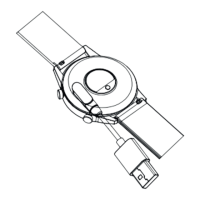
- The strap on the smart watch is removable and interchangeable with other
22mm watch straps.
- Turn the watch over and locate the quick release as pictured.
- Slide the quick release across to separate the strap from the watch.
SAFETY AND CARE INSTRUCTIONS
International Protection Rating (Water Resistance)
Your smart watch is IP68 rated, meaning it has complete protection from
the ingress of dust, and is protected from continuous immersion in water up
to a depth of 1.5metres for a maximum of 30 minutes. Please note that salt
water or certain chemicals in water may damage or weaken the watch seals,
especially with repeated exposure.
To ensure your watch stays in good functioning condition it is recommended
that you:
- Do not press the buttons while your watch is submerged.
- Do not use the watch when swimming, diving, or snorkelling.
- Do not attempt to charge the watch while it is wet.
Please note that the watch’s touch screen will not function while
submerged in water.
If your watch is exposed to water, always dry it fully with a soft cloth.
If your watch is exposed to any other liquids such as salt water,
swimming pool water, soapy water, perfume, sunscreen, hand
sanitiser, cosmetics, or other chemical products; wash it with clean
water and dry it fully with a soft cloth.
The watch’s functionality may be affected if these instructions
are not followed.
- Do not attempt to disassemble your smart watch. This may cause a safety
hazard, could damage your watch, and/or affect the water resistance.
- Do not use hair dryers, blowers, or any other heated equipment to dry your
watch. Don’t operate your watch near radiators or heat sources. This could
cause damage to your watch.
- Do not place heavy objects or exert strong pressure on your smart watch.
- Avoid using the watch in extremely high or low temperature environments.
- Avoid using the watch in high humidity environments. This could affect the
water resistance of the watch.
- Protect your smart watch from long exposure to direct sunlight.
Please note that the measurement results of this device are for reference
only and are not intended for medical use. Users should always follow the
advice of their doctor or other trusted medical professional.
When using your smart watch on aeroplanes, in hospitals, or near medical
electronic systems please follow the authority standards and be aware that
wireless signals transmitted could impact the functionality of sensitive
electronics.
PRODUCT SPECIFICATION
Model Sekonda 30177/30178/30179
CPU Reltek 8762DK
Memory RAM 128KB + ROM 128Mb
Capacitive touch screen 1.52” Round HD screen
360*360 screen
Bluetooth version 5.0
Battery Lithium-ion 3.7V/240mAh
How to unpair your smart watch from your phone
- Open the app and tap on the profi le icon in the top corner of the screen.
-Tap on “Device”.
- Tap “Unpair”. The app will ask if you wish to unpair the watch. Tap “Ok”.
How to restore your watch to factory settings
- To clear all data from your watch and restore it to factory settings please
swipe down from the home screen of your watch and tap on the cog symbol.
- Scroll down to “System”, then tap “Reset”.
If for any reason you need to return your watch to us, please restore your
smart watch to factory settings before sending it.
If your watch is exposed to water, always dry it fully with a soft cloth.


 To Previous Page
 Loading...