TEC Series v 3.2X
Page 27
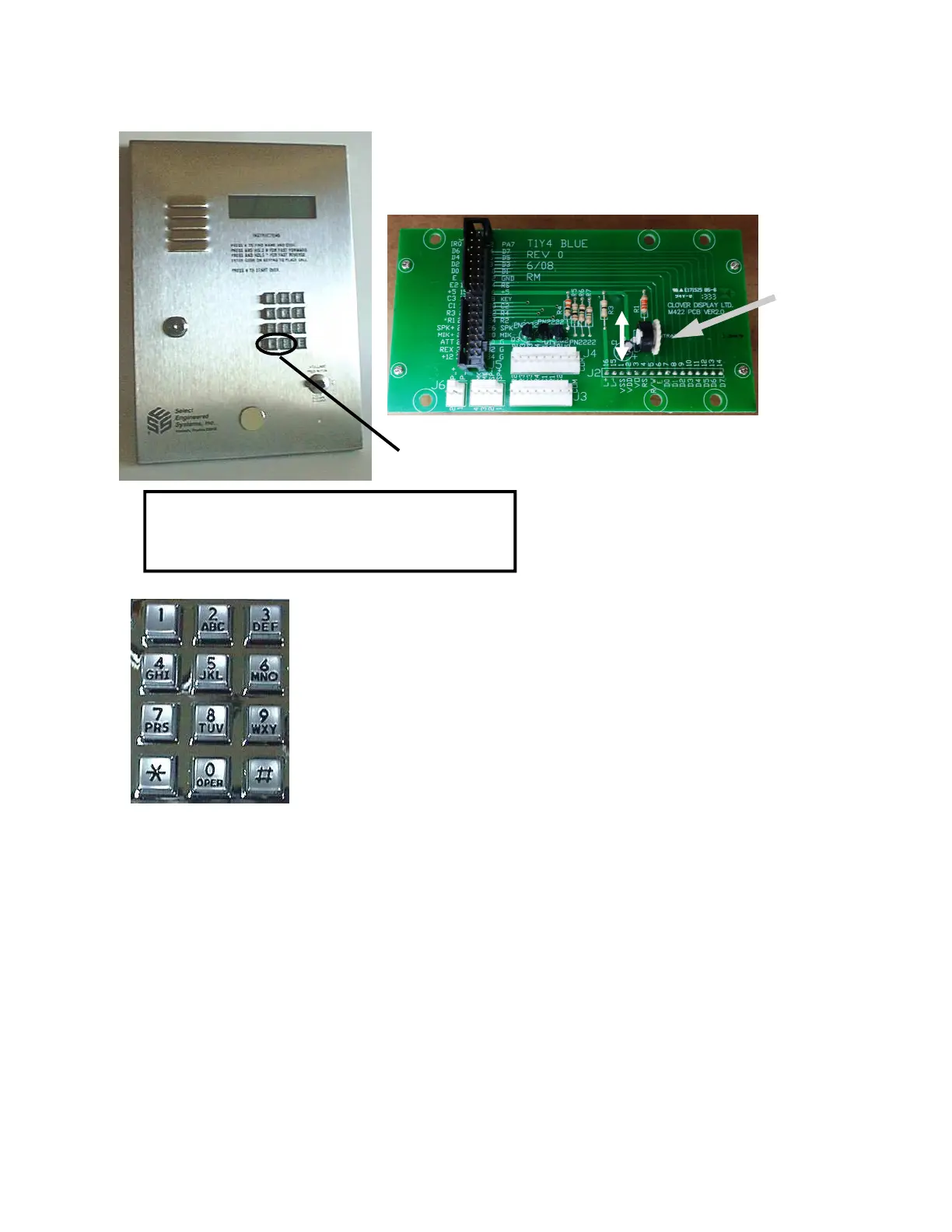
After the TEC first powers on, the message "PRESS # TO VIEW DIRECTORY" will appear in the LCD
display. The contrast control on the LCD board may have to be
adjusted for best contrast, depending on lighting conditions. This
adjustment is on the inside door near the top of the door, above the
keypad. See the diagram below.
SETUP AND PROGRAMMING USING THE KEYPAD
After you see this in the window, you have six seconds to start to press the
six digit pass code. The factory default pass code is 777777. Each time you
press a key, a “*” will appear in the window to keep the pass code
confidential. After entering the sixth key, press the “*” key. This should bring
you to the main menu. If you don't press a key in any 6 second period, the
TEC automatically reverts to operational mode. If during programming, you
don't press any key for 60 seconds, the TEC automatically reverts to
operational mode.
The choices for the main menu are:
1. CODES / NAMES
2. ENT. CONTROL
3. SYSTEM PARAMETERS
4. COMMUNICATIONS SETUP
5. CLOCK SETUP
6. ACCESS CONTROL
7. BUFFER INFO
8. CLEAR DATA
9. DISPLAY DATA
To begin programming press the “*” and the "0" keys
simultaneously
PASSWORD __
«This shows on the display window
Adjust here
LIGHTER
DARKER


 To Next Page
 Loading...