Operation
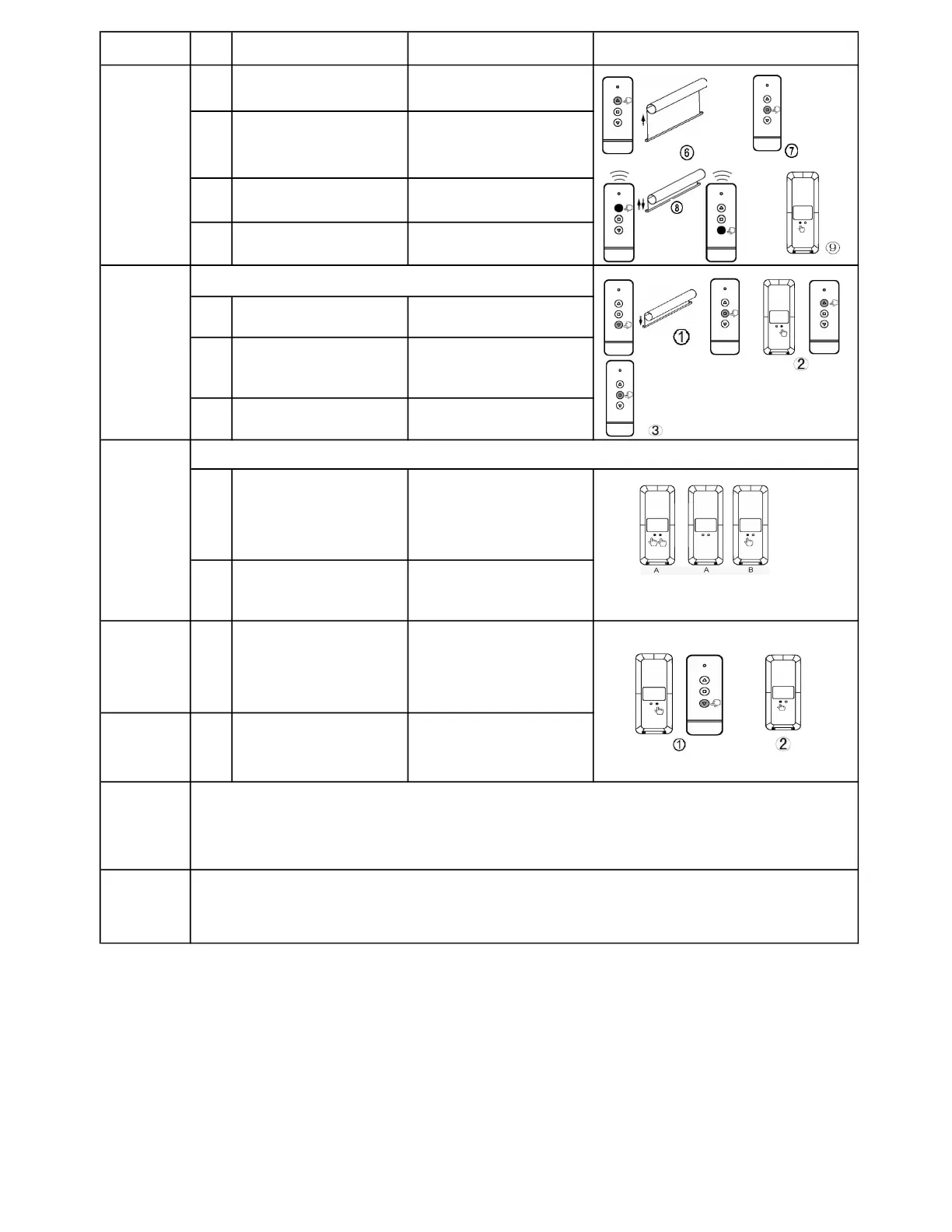
Item Operation Result Illustration
6
Press UP button on
transmitter
Motor runs up
7
Press STOP
motor running close to the
end-point of upper limit
Motor stops
8
Press either UP or
button
Motor runs step by step to
adjust lower limit accurately
9
Press CONFIRM button
on transmitter
Motor jogs, the setting has
completed.
1 Press DOWN button
Stop motor at the position
which you need
2
Press and hold LIMIT
button then press UP
button
Release both buttons when
motor jogs, now the setting
has completed
3
Press STOP button when
motor stop
Motor will run to the setting
position and stops
1
Keep pressing LIMIT
button on the first
programmed transmitter
A, then press CONFIRM
button
Please release both buttons
once motor jogs
2
Press CONFIRM button
on transmitter B
Motor jogs again, now
transmitter B has
programmed with motor
Delete all
other
transmitters
1
Keep pressing LIMIT
button on transmitter A,
then press DOWN button
Please release both buttons
once motor jogs,now all
tramsitters have been
deleted except A
Delete itself
from motor
2
Press CONFIRM button 3
times
This transmitter has been
deleted from the motor
Charging
FAQ
The motor works with Li-ion battery, please charging it when the motor alarms or work faltering. Please
charge the motor using professional charger CH-8.4V/1A
Charging time: Charger 4 hours or indicator change to green 1 hours, please take the charger away
when charging full.
If nothing works, please check:
● please charging the motor battery firstly
● If the motor runs to a direction continually, the user didn't setup limit successfully, please re-set limit.
Set
intermediate
position
This step only can be done after setting motor limit
Program
transmitter
using a
programed
transmitter
● Please skip the step and go to next if the subsidiary transmitter is not needed
limit



 To Previous Page
 Loading...