EasyManua.ls Logo

SelfieWorld Zodiac Pro - User Manual

SelfieWorld Zodiac Pro
13 pages
Print Icon
To Next Page IconTo Next Page
Loading...
INSTRUCTIONS & USER MANUAL
Bluetooth
®
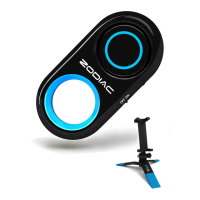
Shutter & Portable Tripod
OFFICIAL PRODUCT
Question and Answer IconNeed help?

Do you have a question about the SelfieWorld Zodiac Pro and is the answer not in the manual?

Summary

About the Zodiac Pro Selfie Kit

Contents Check

Mounting Your Device on the Tripod

Mounting Compact Cameras & Mini Camcorders

Instructions on how to attach compact cameras and mini camcorders to the tripod.

Mounting Cellphones

Steps for mounting smartphones onto the tripod using the provided mount.

Mounting Sports Cameras

Guide for attaching sports cameras directly to the tripod mount.

Bluetooth Shutter - Battery Set Up

Replacing the Battery

Detailed steps on how to replace the battery in the Bluetooth shutter.

Bluetooth Shutter - How to Pair with Smartphones

Important Step for Android Users

Taking Photos with the Remote Shutter

A Note on Compatibility

Discusses compatibility issues between the shutter and various device types.

Switching Off & Disconnecting

Instructions on how to turn off and disconnect the Bluetooth shutter.

Troubleshooting

Specification

Lifetime Warranty

Get More Great Selfie Products

SelfieWorld Zodiac Pro Specifications

General IconGeneral
BrandSelfieWorld
ModelZodiac Pro
CategoryCamera Accessories
LanguageEnglish