6
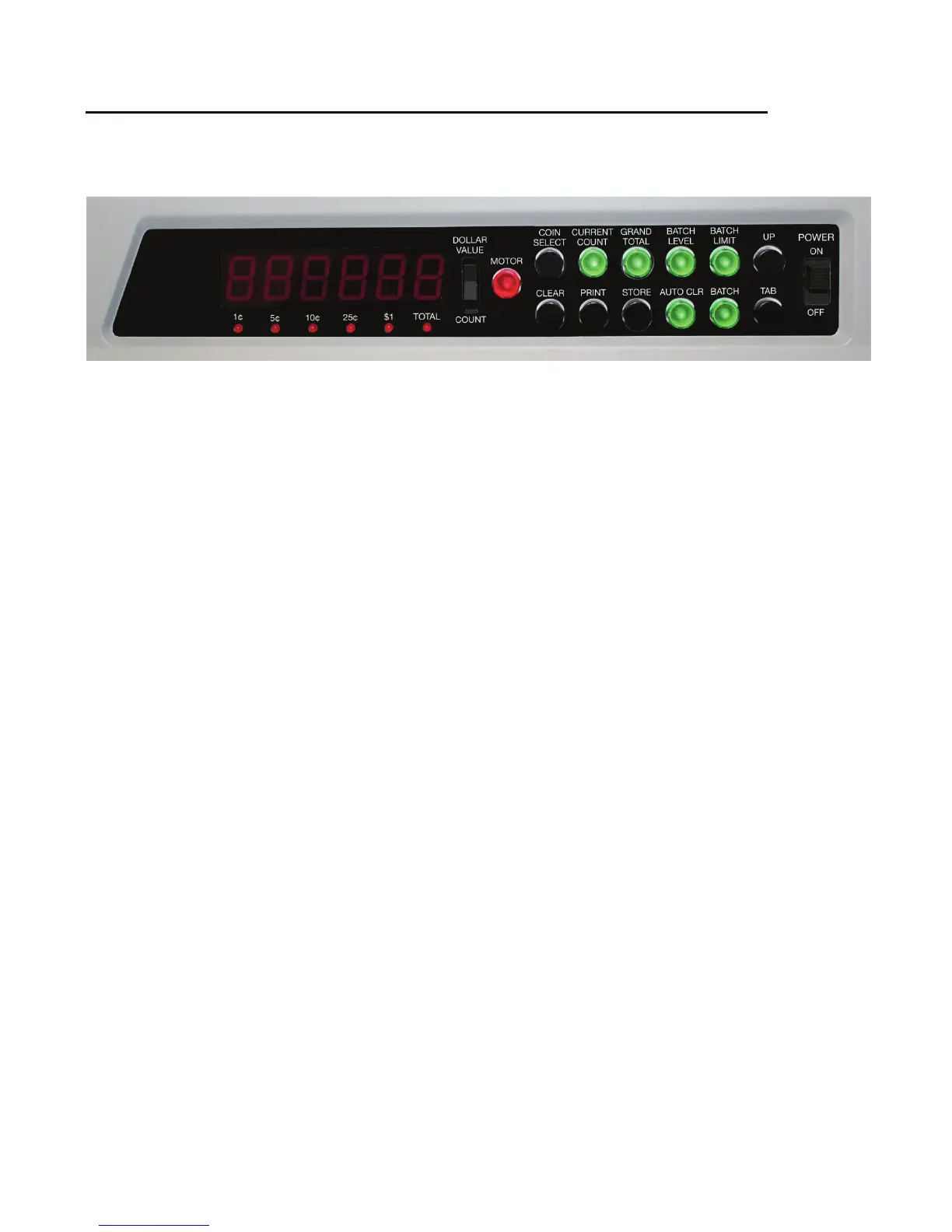
■ Control Panel Functions
● POWER Switch
Turns power ON and OFF.
● MOTOR Button
Starts and stops the sorting and counting operation.
● CURRENT COUNT Button
Selects the CURRENT COUNT to be displayed or
cleared.
● GRAND TOTAL Button
Selects the GRAND TOTAL to be displayed or cleared.
● BATCH LEVEL Button
Selects the BATCH LEVELS to be displayed or cleared.
● BATCH LIMIT Button
Used for setting the BATCH LIMITS. All totals must
be zero to set the BATCH LIMITS.
● BATCH Button
Turns BATCH mode ON and OFF.
● CLEAR Button
Clears the total being displayed (current count, grand
total or batch level). If a single denomination is selected
then only that denomination is cleared. If the TOTAL
indicator is lit then all denominations are cleared. If the
CLEAR button is pressed for four seconds then it will
clear all machine totals (MASTER CLEAR). The CLEAR
button must be pressed twice to clear.
● AUTO CLR Button
Turns AUTO CLEAR mode on and off. When on, full
denominations are cleared automatically (when
changing bags or wrappers or emptying the drawer).
Used in BATCH mode only.
● PRINT Button
Prints a receipt containing the totals displayed
(CURRENT COUNT, GRAND TOTAL or BATCH
LEVEL).
●
STORE Button
Adds the current count to the grand total.
● COIN SELECT Button
Selects the coin denomination to be displayed or
cleared (or TOTAL), or for setting BATCH LIMITS.
● UP Button
Used to increase the value of the selected digit when
setting BATCH LIMITS or the date and time.
● TAB Button
Used to select the digit position when setting BATCH
LIMITS or the date and time.
● DOLLAR VALUE / COUNT Switch
Switches the display between dollar value and coin
count.
● Counter Display (6 Digits)
Displays CURRENT COUNT, GRAND TOTAL or
BATCH LEVELS as coin counts or dollar values. Also
used when setting BATCH LIMITS and the date and
time.
● Denomination Indicators
These red LED lamps indicate which denomination
is selected or TOTAL. Also indicates which
denomination is full in BATCH mode.


 To Next Page