EasyManua.ls Logo

Sencor SLE 1955M4 - Page 11

Sencor SLE 1955M4
36 pages
Print Icon
To Next Page IconTo Next Page
To Previous Page IconTo Previous Page
Loading...
Description
of
the
device
EN
2.
Description
of
the
device
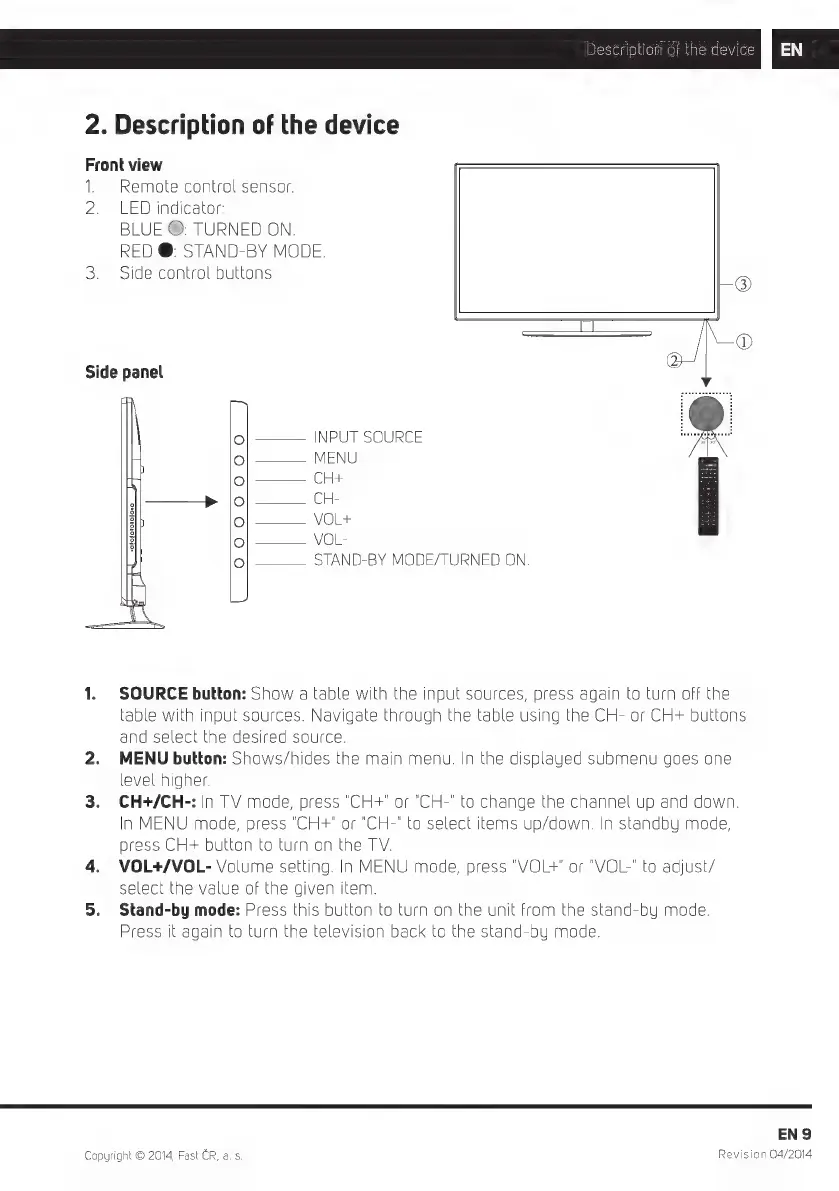
Front
view
1.
Remote
control
sensor.
2.
LED
indicator:
BLUE
O:
TURNED
ON.
RED
@:
STAND-BY
MODE.
3.
Side
control
buttons
NC
Side
panel
INPUT
SOURCE
——
MENU
CH4
C
=
VOL+
VOL-
STAND-BY
MODE/TURNED
ON.
1.
SOURCE
button:
Show
a
table
with
the
input
sources,
press
again
to
turn
off
the
able with
input
sources.
Navigate
through
the
table
using
the
CH-
or
CH+
buttons
and
select
the
desired
source.
2.
MENU
button:
Shows/hides
the
main
menu.
In
the
displayed
submenu
goes
one
evel
higher.
3.
CH+/CH-:
in
TV
mode,
press
"CH+"
or
'CH-'
to
change
the
channel
up
and
down.
n
MENU
mode,
press
"CH+"
or
"CH-"
to
select
items
up/down.
In
standby
mode,
press
CH-
button
to
turn
on
the
TV.
4.
VOL+/VOL-
Volume
setting.
In
MENU
mode,
press
"VOL+"
or
"VOL-"
to
adjust/
select
the
value
of
the
given
item.
5.
Stand-by
mode:
Press
this
button
to
turn
on
the
unit
from
the
stand-by
mode.
Press
it
again
to
turn
the
television
back
to
the
stand-by
mode.
ENS
Copyright
©
2014,
Fast
CR,
a. s.
Revision
04/2014

Related product manuals