EasyManua.ls Logo

Sencor SLE 1955M4 - Page 12

Sencor SLE 1955M4
36 pages
Print Icon
To Next Page IconTo Next Page
To Previous Page IconTo Previous Page
Loading...
Description
of
the
device
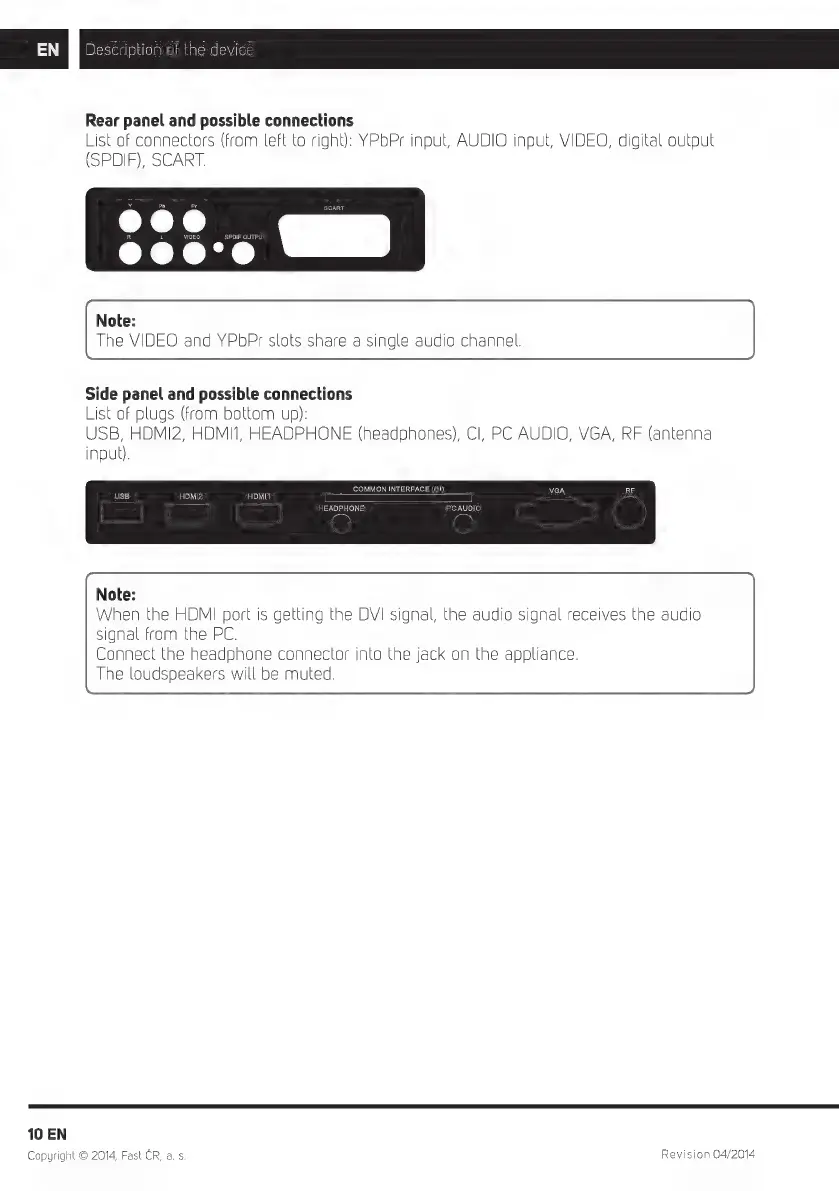
Rear
panel
and
possible
connections
List
of
connectors
(from
left
to
right):
YPbPr
input,
AUDIO
input,
VIDEO,
digital
output
(SPDIF),
SCART.
Note:
The
VIDEO
and
YPbPr
slots
share
a
single
audio
channel.
Side
panel
and
possible
connections
List
of
plugs
(from
bottom
up):
USB,
HDMI2,
HDMI1,
HEADPHONE
(headphones),
CI,
PC
AUDIO,
VGA,
RF
(antenna
input).
COMMON
INTERFACE
(CI)
HDMI2
HDMI1
|E
| |
HEADPHONE
PCAUDIO
Note:
When
the
HDMI
port
is
getting
the
DVI
signal,
the
audio
signal
receives
the
audio
signal
from
the
PC.
Connect
the
headphone
connector
into
the
jack
on
the
appliance.
The
loudspeakers
will
be
muted.
10
EN
Copyright
©
2014,
Fast
CR,
a.
s
Revision
04/2014

Related product manuals