EasyManua.ls Logo

Sencor SLE 1955M4 - Page 13

Sencor SLE 1955M4
36 pages
Print Icon
To Next Page IconTo Next Page
To Previous Page IconTo Previous Page
Loading...
Remote
control
EN
3.
Remote
control
—14/&€9
»»/E2
14/63
|
»»/&J——
>
lI
L]
-
TEXT
|
SUBTITLE
FREEZE
|
INFO
^m
RECALL
Copyright
©
2014,
Fast
CR,
a. s.
©
COOCOO
©
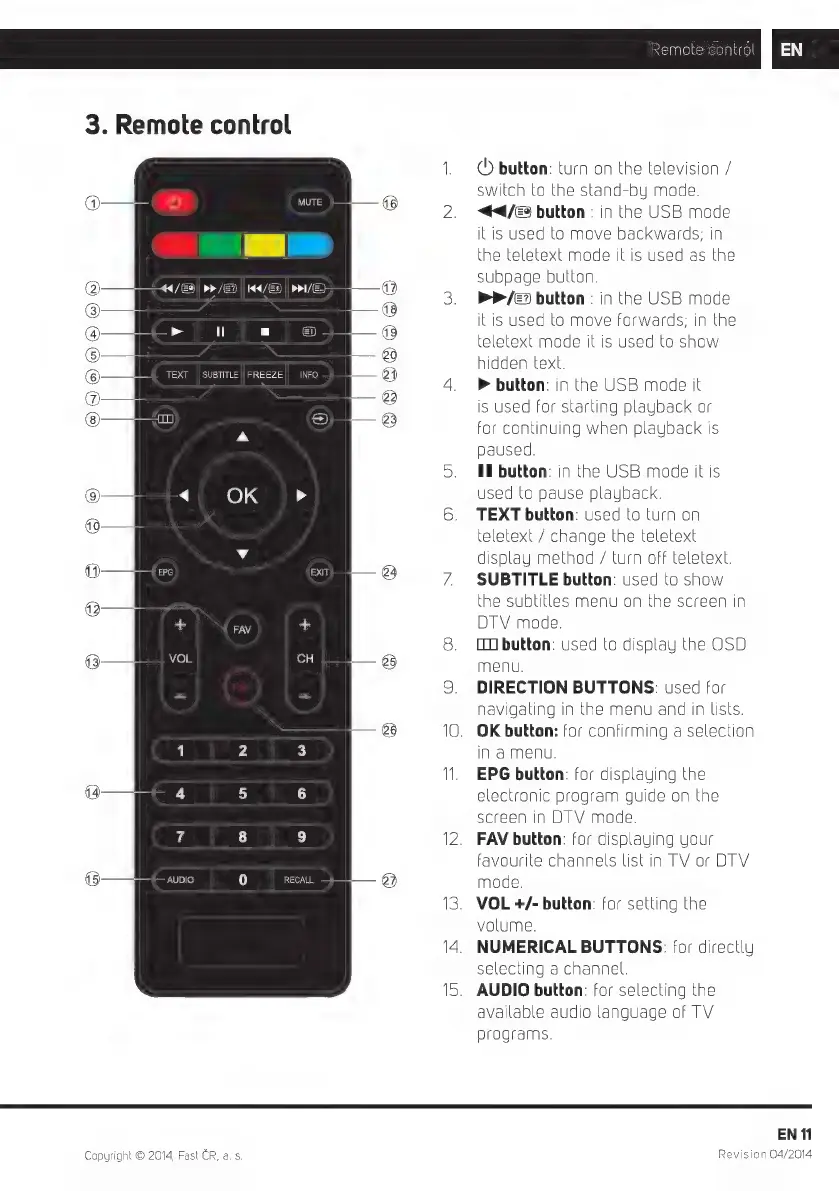
button:
turn
on
the
television
/
switch
to
the
stand-by
mode.
<4<4/@
button
:
in
the
USB
mode
itis
used
to
move
backwards;
in
he
teletext
mode
it
is
used
as
the
subpage
button.
P»/&»
button
:
in
the
USB
mode
itis
used
to
move
forwards;
in
the
eletext
mode
it
is
used
to
show
hidden
text.
>
button:
in
the
USB
mode
it
is
used
for
starting
playback
or
or
continuing
when
playback
is
paused.
IIl
button:
in
the
USB
mode
it
is
used
to
pause
playback.
TEXT
button:
used
to
turn
on
eletext
/
change
the
teletext
display
method
/
turn
off
teletext.
SUBTITLE
button:
used
to
show
he
subtitles
menu
on
the
screen
in
DTV
mode.
LIT]
button:
used
to
display
the
OSD
menu.
DIRECTION
BUTTONS:
used
for
navigating
in
the
menu
and
in
lists.
.
OK
button:
for
confirming
a
selection
in
a
menu.
EPG
button:
for
displaying
the
electronic
program
guide
on
the
screen
in
DTV
mode.
.
FAV
button:
for
displaying
your
favourite
channels
list
in
TV
or
DIV
mode.
.
VOL
+/-
button:
for
setting
the
volume.
NUMERICAL
BUTTONS:
for
directly
selecting
a
channel.
.
AUDIO
button:
for
selecting
the
available
audio
language
of
TV
programs.
EN
f1
Revision
04/2014

Related product manuals