EasyManua.ls Logo

Sencor SWM 170 RDS - Package Content; Functions of Buttons

Sencor SWM 170 RDS
5 pages
Print Icon
To Next Page IconTo Next Page
To Previous Page IconTo Previous Page
Loading...
Preface
Please
read
the
instructions
carefully
before
use.
All
information
in
the
manual
is
subject
to
change
without
previous
notice.
Features
-
1.5
inch
bright
LCD
display.
-
Built-in
full
frequency
FM
Transmitter(87.5-108.0MHz).
-
Supports
MP3&WMA
audio
formats
from
USB
stick/SD
card.
-
Supports
folder
function.
-
Supports
7
EQ
modes:
natural,
rock,
pop,
classic,
soft,
jazz
&
dbb.
-
Supports
multi-languages.
Display
of
file
names
using
RDS
The
device
can
display
fi
lenames/tracks
on
a
radio
display
equipped
with
the
RDS
system.
The
display
displays
8
alphanumeric
characters
(doesn’t
support
Eastern
European
diacritics),
which
roll
for
longer
titles.
When
naming
tracks
on
the
memory
medium
(SD
card,
USB
flash
disk)
it
is
appropriate
to
adjust
the
title
structure
into
8
character
blocks.
Then
the
display
of
the
titles
of
the
fi
les
that
are
played
back
will
easier
to
read.
Package
Content
-
FM
Transmitter;
-
Remote
control;
-
Audio
cable;
-
Spare
fuse.
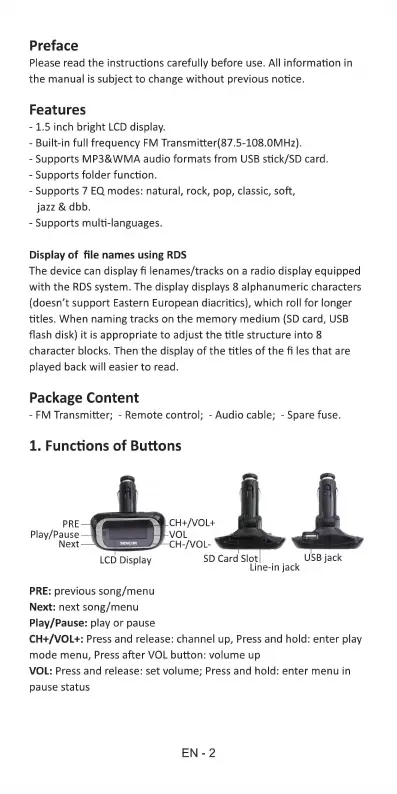
1.
Functions
of
Buttons
USB
jack
[CO
Display
a
jack
PRE:
previous
song/menu
Next:
next
song/menu
Play/Pause:
play
or
pause
CH+/VOL+:
Press
and
release:
channel
up,
Press
and
hold:
enter
play
mode
menu,
Press
after
VOL
button:
volume
up
VOL:
Press
and
release:
set
volume;
Press
and
hold:
enter
menu
in
pause
status
EN-2

Related product manuals