
 Need help?
Do you have a question about the Sennheiser HD 350BT and is the answer not in the manual?
Guidance on protecting hearing and avoiding accidents with the product.
Instructions to prevent damage, corrosion, or malfunctions of the product.
Safety warnings and precautions for the rechargeable lithium battery.
Meaning of LED indicators during normal product operation.
Meaning of LED indicators when receiving or during phone calls.
Instructions for charging the headphones' built-in rechargeable battery.
Guide to downloading and installing the Sennheiser Smart Control app.
Steps to establish a Bluetooth connection with your smartphone.
Information about the battery, charging cycle, and charging indicators.
Detailed steps for connecting the headphones to a power source for charging.
Steps to pair and connect the headphones with a Bluetooth-enabled device.
Details on Bluetooth version, range, and device compatibility.
Instructions for initiating a phone call from the smartphone.
Instructions for hygienically replacing the ear pads on the headphones.
Information on battery performance, errors, and warranty.
Explanation of sound quality deterioration and connection loss due to Bluetooth range.
Instructions on how to perform a factory reset on the headphones.
Details on the product's warranty period and conditions.
Statement of compliance with EU Radio Equipment Directive and RoHS.
Statement of compliance with UK RoHS Directive and Radio Equipment Regulations.
Guidelines for environmentally responsible disposal of the product and packaging.
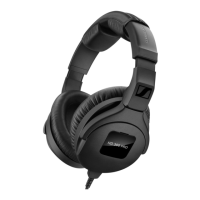
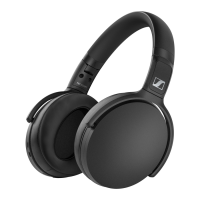
The Sennheiser HD 350BT are around-ear headphones (model SEBT3) designed for wireless audio communication, including music playback and phone calls, via Bluetooth wireless technology. These headphones offer a range of features for an enhanced listening experience and convenient control.
The HD 350BT headphones are equipped with a built-in rechargeable battery, providing up to 30 hours of music playback via Bluetooth on a full charge. They are compatible with Bluetooth 5.0 and support high-resolution audio encoding methods like aptX, aptX LL, and AAC, ensuring high audio quality when connected to a compatible source. If these methods are not supported, music will play in normal audio quality (SBC).
The headphones feature a 3-way multi-function button for controlling music playback and managing calls. This button allows users to play/pause music, skip to the next or previous track, accept/end calls, reject calls, redial, and toggle between active and on-hold calls. A dedicated voice assistant button activates the smartphone's voice assistant (e.g., Siri, Google Assistant) or voice dialing.
LED indicators provide visual feedback on the headphones' status, such as power on/off, Bluetooth connection status, pairing mode, and incoming calls. Voice prompts also guide users through various functions, announcing actions like "Power on," "Connected," "Call ended," and "Recharge headset." Acoustic signals, such as beeps, indicate when minimum or maximum volume levels are reached.
The Sennheiser Smart Control app, available for smartphones, allows users to access all functions and settings of the headphones, including adjusting sound with an equalizer. Sound effects and equalizer settings configured in the app are stored directly on the headphones, remaining active even when using other Bluetooth devices without the app.
To begin using the HD 350BT, users first need to charge the rechargeable battery. The headphones are not fully charged upon delivery, and a complete charging cycle takes up to 2 hours. The LED lights up during charging and flashes blue for 5 minutes before turning off when fully charged. The headphones can still be used for music or calls while charging, though this may extend the charging time.
Connecting the headphones to a Bluetooth device involves a pairing process. When switched on for the first time, the headphones automatically enter pairing mode. To manually pair, users press and hold the on/off button for 4 seconds until the LED flashes red and blue. The headphones can save connection profiles for up to eight Bluetooth devices, automatically attempting to connect to the last two paired devices upon switch-on. Audio playback is limited to one device at a time.
For optimal sound quality and wearing comfort, the headband is adjustable. Users should wear the headphones with the headband over the top of their head, ensuring the ear pads comfortably cover their ears and provide gentle, even pressure. The ear pads should completely surround the ears for the best sound.
Volume adjustment is possible for both music and phone calls using the volume buttons on the headphones. A beep indicates when minimum or maximum volume is reached. The volume can also be adjusted via the connected Bluetooth device.
Music playback is controlled by the 3-way multi-function button. A single press plays or pauses music, sliding the button backward skips to the next track, and sliding it forward plays the previous track.
Phone call functions, such as accepting, rejecting, or ending calls, are also managed via the 3-way multi-function button. When a call is received, a ring tone is heard, and music playback pauses. The voice assistant button activates the smartphone's voice assistant or voice dialing feature.
For storage and transport, the headphones can be folded up, making them compact and easy to carry.
The HD 350BT headphones require minimal maintenance. They should be kept dry and protected from extreme temperatures (0 to 40 °C / 32 to 104 °F for operation). Cleaning should be done with a soft, dry cloth, and no solvents or cleansing agents should be used. The product should be stored in a clean, dust-free environment.
The ear pads are replaceable for hygiene reasons, and spare ear pads are available from Sonova Consumer Hearing partners. The process involves peeling off the old ear pad, aligning the new one with the correct ear cup (right to right, left to left), and fixing it into the notch of the ear cup, ensuring the seam points downwards.
Firmware updates are available free of charge via the Sennheiser Smart Control app. Sonova Consumer Hearing recommends installing the latest firmware version to ensure optimal product performance. The app guides users through the update process when connected to the headphones via Bluetooth.
In case of functional disturbances, a reset can be performed by connecting the USB-C cable for charging and simultaneously pressing and holding the on/off button and the rear part of the volume button (Volume +) for at least 5 seconds. This reset does not delete individual settings like pairing information.
To delete the Bluetooth pairing list, users must first switch off the headphones, then enter pairing mode (press and hold on/off for 4 seconds). While in pairing mode, simultaneously press and hold the on/off button and the 3-way multi-function button for 3 seconds. The LED will flash purple 3 times, indicating the pairing list has been deleted, and the headphones will remain in Bluetooth pairing mode.
 General
| Control type | Buttons, Rotary |
|---|---|
| Headset type | Binaural |
| Product type | Headphones |
| Product color | Black |
| Wearing style | Head-band |
| Recommended usage | Music |
| Microphone type | Built-in |
| Microphone frequency | 80 - 6000 Hz |
| Microphone direction type | Omnidirectional |
| MEMS (Micro-Electro-Mechanical System) microphone | Yes |
| 3.5 mm connector | No |
| Bluetooth version | 5.0 |
| Bluetooth profiles | A2DP, AAC, AVRCP, HFP, HSP, SBC |
| Connectivity technology | Wireless |
| Battery type | Built-in battery |
| Battery voltage | 3.7 V |
| Battery capacity | 300 mAh |
| Battery recharge time | 2 h |
| Continuous audio playback time | 30 h |
| Storage temperature (T-T) | -20 - 60 °C |
| Operating temperature (T-T) | 0 - 40 °C |
| Storage relative humidity (H-H) | 10 - 90 % |
| Operating relative humidity (H-H) | 10 - 80 % |
| Quantity | 1 |
| Battery life | 1800 min |
 Weight and Dimensions
| Weight | 238 g |
|---|






 To Next Page
