Need help?
Do you have a question about the Sennheiser HD65 and is the answer not in the manual?
Details the Bluetooth version (5.3) and supported profiles like HFP, A2DP, HSP, and AVRCP.
Specifies the charging port as Type-C and outlines battery life and charging times.
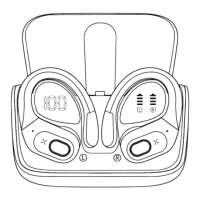
Illustrates and labels the main parts of the earbuds and charging case, including LED indicators and buttons.
Detailed steps for initial pairing, including auto-pairing, manual turn-on, and connecting to your phone via Bluetooth settings.
How earbuds automatically reconnect to the last paired device when powered on.
Steps to resolve pairing issues, including resetting and re-pairing earbuds, and using earbuds individually.
Controls for managing calls: answering, hanging up, and rejecting incoming calls.
Operations for music: play/pause, skip tracks, activate Siri, and adjust volume.
How to correctly place earbuds in the charging case for charging, indicator lights, and auto-stop charging.
Using the Type-C cable to charge the case, digital display for battery level, and full charge indication.
Addresses charging problems due to oxidation, and basic charging procedures.
Recommendations for long-term storage, safe charging, and device care to prevent damage.
Answers to common questions regarding pairing, music playback, charging, and water resistance.
Information on permanent replacement for defective items and the process for product activation.
The HD65 True Wireless Earbuds are designed for sports and running, offering a Hi-Fi audio experience with Bluetooth 5.3 connectivity.
The HD65 earbuds come with a charging case that displays the battery status of both the case and the individual earbuds. The earbuds feature LED indicator lights, charging contacts, a microphone (MIC), and a Multi-Function Button (MFB). The charging case itself has a Type-C charging port.
To pair the earbuds with a phone, ensure both earbuds and the charging case are fully charged. Take both earbuds out of the charging case; they will power on and start pairing automatically. If not connected to a device for more than 5 minutes, they will automatically turn off. To manually turn them on, press the MFB button for about 3 seconds. One earbud will flash a white light, while the other will flash a white light every three seconds, indicating successful pairing. Enable Bluetooth on your phone, search for "HD65," and select it to connect. A "Connected" voice prompt will confirm the connection. If the earbud indicator light is off, it means the phone is connected. The earbuds will automatically connect to the last paired phone upon power-on.
If you encounter pairing issues, place the earbuds back in the charging case and repeat the pairing steps. The earbuds can be used together or individually. To use a single earbud, simply take one out of the case and connect it to your phone. If using two earbuds and wanting to switch to one, manually turn off one earbud or place it back in the charging case.
The HD65 earbuds are designed for active lifestyles, offering sweatproof and IPX7 waterproof capabilities. However, it is not recommended to submerge them in water, expose them to hot water, or use them during a thunderstorm, as water vapor can damage components.
For permanent replacement of damaged, defective, or missing components, activate your warranty by emailing amazon.seller9966@gmail.com within 15 days of purchase.
 General
| Brand | Sennheiser |
|---|---|
| Model | HD65 |
| Category | Headphone |
| Language | English |

 To Next Page