22 | L 2015
Operating controls
LED indications
Each charging compartment has two LEDs which indicate the
following operating states:
No LED lit The charging compartment is ready
for operation (provided that the
charger is connected to the mains),
no accupack is identified.
All LEDs briefly light
up one after the
other
The charger has been connected to
the mains and is carrying out a self
test.
Red LED 1 lit The accupack is being charged.
Red LED 1 flashing A problem has occurred (see „If a
problem occurs“ on page 27).
Green LED 2 lit The accupack is fully charged and
the charger has switched to trickle
charging.
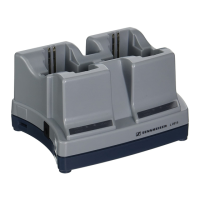
Cascading several chargers
Make sure that the charger is disconnected from the mains.
Unscrew the two screws 8 at the right bottom side of the
charger.
Slide the two rails 7 out of the guiding slots and screw them
tight using the two screws 8.
Unscrew the two screws 9 at the left bottom side of the
second charger.
Slide the second charger onto the rails of the first charger
and screw the rails tight using the two screws 9.
Up to three chargers can be cascaded together with the
rails and can by powered by a common mains unit.


 To Next Page