SP 30T Bluetooth Speakerphone
SETTING UP THE SPEAKERPHONE6
Setting up the Speakerphone
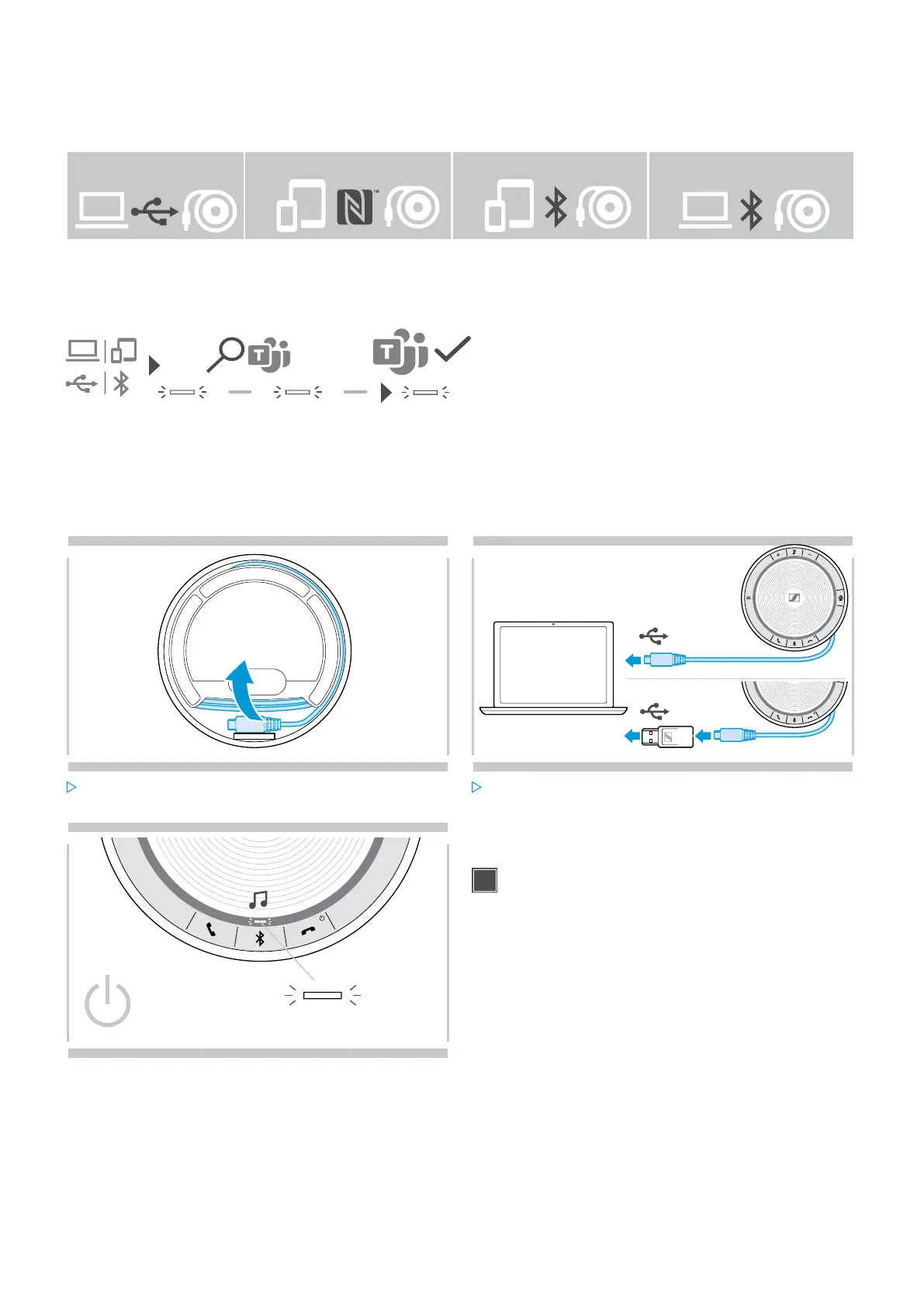
The speakerphone can be connected via:
USB NFC™ Bluetooth® BTD 800 USB
A: USB cable B: Bluetooth through NFC™ C: Bluetooth® D: Bluetooth® through
Sennheiser dongle
Automatic Microsoft Teams connect
Once the connection is successfully established to your USB or Bluetooth device, the speakerphone attempts to
connect to Microsoft Teams. The LED pulses white until the speakerphone and Microsoft Teams are connected.
Afterwards the speakerphone shows Microsoft Teams notifications (see page 21) and Cortana is ready to use (see
page 21).
A: Connecting via USB cable
1 2
USB-C
USB-A
Release the USB plug from the holder and unwind the
cable.
Connect the USB connector directly to a USB-C port or
to a USB-A port using the included adapter.
3
The speakerphone turns on automatically. The LED lights
up white.
The Speakerphone will be charged while connected
(device dependent) - see page 24.


 To Next Page