EasyManua.ls Logo

Sens S2201DVD - TV SETUP; PC Mode Specific Settings and Adjustments; Closed Caption Settings Configuration; Parental Menu Password Entry and Access

Default Icon
27 pages
Print Icon
To Next Page IconTo Next Page
To Previous Page IconTo Previous Page
Loading...
E - 18
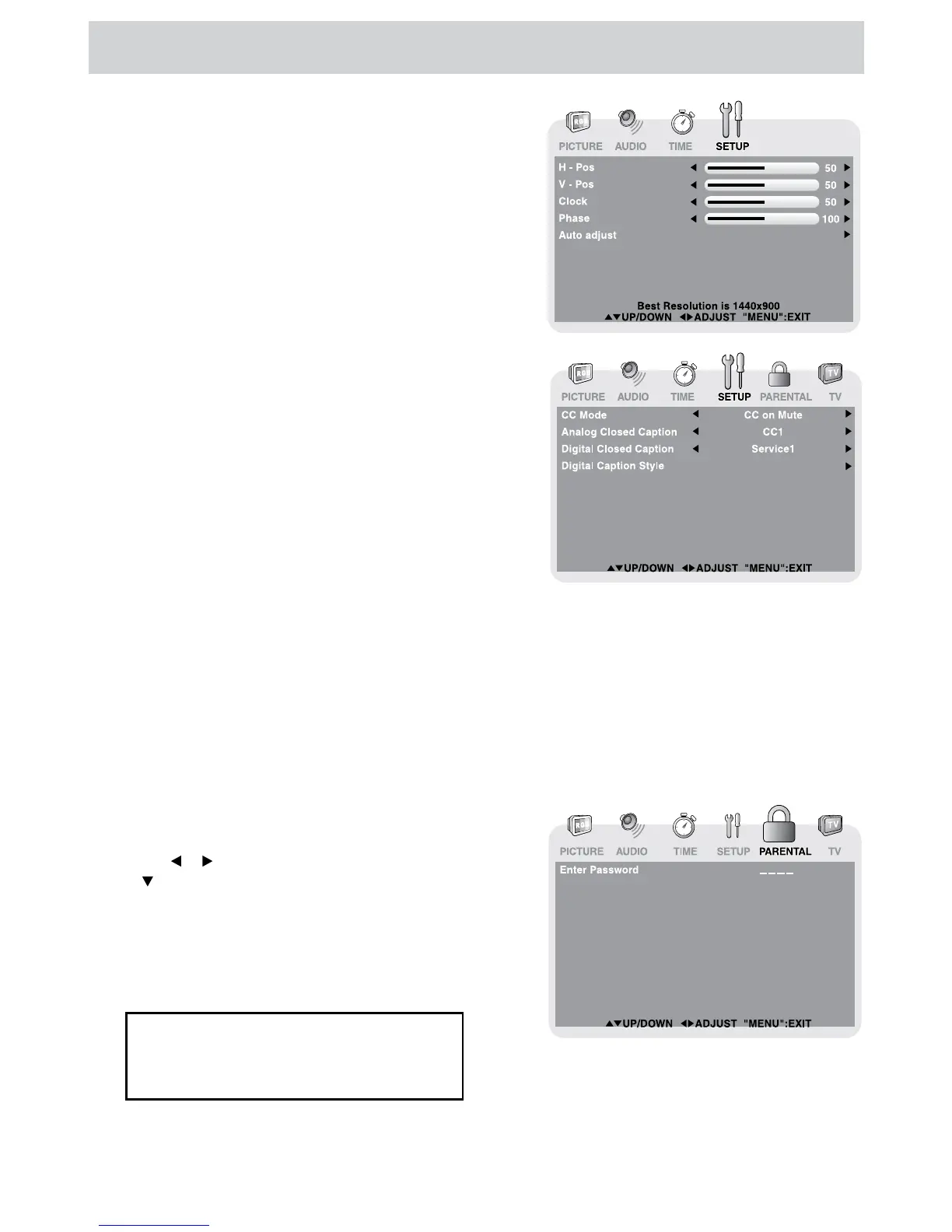
TV SETUP
PC Set Up (in PC mode only)
 (for S1901DVD)
    (for S2201DVD)
 
H - Pos 
V - Pos 
Clock     

Phase 

Closed Caption
CC Mode 
Analog Closed Caption 
Digital Closed Caption  
Digital Caption Style 



  

PARENTAL MENU
Password
MENU
   PARENTAL, 
       

     


If you forget the password,
enter “ 8888 “ to unlock parental
control.

Table of Contents

Related product manuals