EasyManua.ls Logo

Sensibo Air - User Manual

Sensibo Air
15 pages
Print Icon
To Next Page IconTo Next Page
Loading...
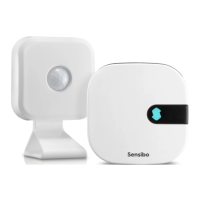
Sensibo Air Smarter than ever. Senses you better.
Save more energy
Your AC will never run in an empty room again, saving you even more money on energy bills.
Senses you better
Sensibo Air measures temperature and humidity in multiple locations in the room, sensing
you wherever you are.
More comfort and automation
Let Sensibo Air adjust the temperature automatically when you enter the room. Use our
Climate React tech with even more sensors.
Question and Answer IconNeed help?

Do you have a question about the Sensibo Air and is the answer not in the manual?

Summary

Sensibo Air Features

Save More Energy

Prevents AC operation in empty rooms, leading to significant energy cost savings.

Senses You Better

Measures temperature and humidity across multiple room locations for precise sensing.

Enhanced Comfort and Automation

Automatically adjusts temperature upon room entry; supports Climate React tech with extra sensors.

Getting Started with Sensibo Air

Install the Sensibo App

Download the free Sensibo app for iOS or Android to begin the installation process.

Account Creation and Login

Launch the app and choose to sign up for a new account or sign in if you already have one.

Enter Your Details

Provide your email, last name, and create a password to sign up for a new account.

Add Your First Device

After signing up, proceed to add your first Sensibo device through the app interface.

Select Sensibo Air

Choose 'Sensibo Air' from the list of available Sensibo devices to add to your account.

Power Connection

Plug the Sensibo Air device into a power source; it should blink once every few seconds.

Locate and Scan QR Code

Find the QR code on the back of the Sensibo device and prepare to scan or enter it.

Configure Device Settings

Set the location, room name, and preferred temperature unit (Celsius or Fahrenheit).

AC Remote Synchronization

Prepare your A/C remote control for synchronization with the Sensibo device.

Pair Remote Control

Point your A/C remote at the Sensibo device and press the power button to pair.

Certification Information

General Specifications and Safety

Overview

The Sensibo Air is a smart air conditioning (AC) controller designed to enhance comfort, automate temperature adjustments, and save energy. It works by integrating with your existing AC unit and providing intelligent control based on environmental sensing and user preferences.

Function Description:

The core function of Sensibo Air is to make your AC smarter. It allows for automatic temperature adjustments, ensuring your AC doesn't run in empty rooms, thereby saving energy. The device measures temperature and humidity in multiple locations within a room, enabling it to sense your presence and adjust settings accordingly. This capability is facilitated by its "Climate React tech" which utilizes data from multiple sensors for more precise control. The Sensibo Air aims to provide a more comfortable living environment through automation and optimized AC usage.

Important Technical Specifications:

  • Maximum Operating Temperature: 5°C - 55°C. This range indicates the environmental conditions in which the Sensibo Air is designed to function effectively.
  • Room Sensor Battery Type: 2 x AAA Alkaline. The room sensor component of the Sensibo Air uses easily replaceable AAA alkaline batteries for power.
  • Connectivity: The device connects to your mobile device via an app, which is available on both the Apple App Store for iOS devices and the Google Play Store for Android devices.
  • FCC Compliance: The Sensibo Air complies with part 15 of the FCC Rules, meaning it is designed to not cause harmful interference and must accept any interference received. It has been tested and found to comply with Class B digital device limits, providing reasonable protection against harmful interference in residential installations.

Usage Features:

  • Energy Saving: By detecting whether a room is empty, the Sensibo Air prevents unnecessary AC operation, leading to reduced energy consumption and lower electricity bills.
  • Enhanced Comfort: The device measures temperature and humidity in various locations, allowing it to sense your presence and adjust the AC to maintain optimal comfort levels wherever you are in the room.
  • Automation: Sensibo Air can automatically adjust the temperature when you enter a room, providing a seamless and comfortable experience. Its "Climate React tech" leverages multiple sensors for advanced automation capabilities.
  • Mobile App Control: The Sensibo app serves as the central control hub for the device. Users can sign up, sign in, add new devices, and manage settings through the app.
  • Device Setup Wizard: The app features an installation wizard that guides users through the setup process, including plugging in the device, scanning a QR code for identification, and pairing with the AC remote control.
  • Location and Room Naming: Users can specify the location and name of the room where the Sensibo Air is installed, allowing for organized management of multiple devices.
  • Temperature Unit Selection: The app allows users to choose their preferred temperature unit (Celsius or Fahrenheit).
  • AC Remote Synchronization: Sensibo Air synchronizes with your existing AC remote control. The setup process involves pointing the AC remote at the Sensibo device and pressing the power button to establish communication and learn the remote's signals.
  • Multi-Device Management: The app supports adding and managing multiple Sensibo devices, making it suitable for homes or offices with several AC units.
  • Geofencing: The app includes a geofencing feature, which likely allows for location-based automation, such as turning the AC on or off when you leave or arrive home.
  • Notifications: Users can receive notifications related to their Sensibo devices, keeping them informed about status changes or important events.
  • Support and Reporting: The app provides options to report issues and access support, ensuring users can get assistance when needed.
  • Sensibo Plus: There's a mention of "Sensibo Plus," which might indicate a premium service or additional features available through a subscription.
  • Language Selection: The app supports multiple languages, enhancing accessibility for a global user base.

Maintenance Features:

  • Replaceable Batteries: The room sensor uses 2 x AAA Alkaline batteries, which are user-replaceable, ensuring continuous operation of the sensing capabilities.
  • FCC Guidelines for Interference: The manual provides clear guidelines on how to address potential harmful interference with radio or television reception, including reorienting/relocating the antenna, increasing separation between equipment and receiver, connecting to a different circuit, and consulting a dealer or technician. These instructions empower users to troubleshoot and maintain optimal device performance in terms of electromagnetic compatibility.
  • Battery Safety Warnings: The manual includes important safety information regarding battery disposal and storage, warning against disposing of batteries in fire or hot ovens, mechanically crushing or cutting them, or leaving them in extremely high-temperature environments, as these actions can lead to explosions or leakage of flammable substances. This highlights the importance of safe battery handling for device longevity and user safety.

Sensibo Air Specifications

General IconGeneral
BrandSensibo
ModelAir
CategoryController
LanguageEnglish

Related product manuals