Page 2
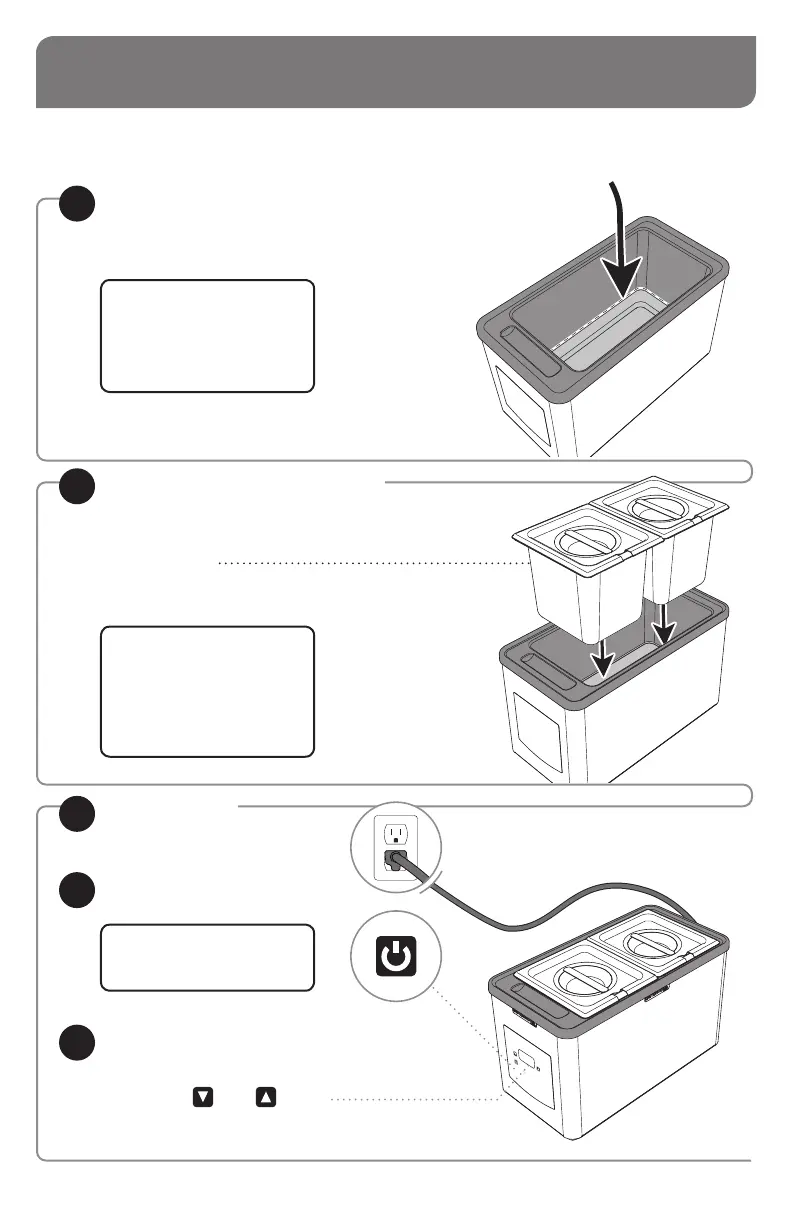
UNIT SET-UP
WASH ALL PARTS PROPERLY BEFORE EVERY USE. See page 5.
• Fill 1 liter of water up to
fill-line-ridge inside basin.
FILL UNIT BASIN WITH WATER
1
PLUG CORD
into power source.
3
PRESS POWER BUTTON
to turn unit on.
4
SET THERMOSTAT
5
to recommended
serving temperature.
• Press Down
or Up buttons
to set temperature.
• See page 6 for control function details.
• Product being served must always
be inside pan(s).
Never place food directly
into basin of unit.
PUT PAN(S) INTO BASIN
2
TIP: Check water levels
throughout the holding period
to ensure even heating.
Filtered water is recommended
to deter corrosion.
TIP: Food pan(s) not included–
modular design lets you
choose pan(s), pump(s) or
high-temp squeeze bottles for
your food application.
See page 11.
UNITS WITH 230 VOLTS
also have a power switch.
Press to ON position.


 To Next Page