14
Before using for the fi rst time
Remove any packaging materials and
clean the unit as described in the section
Cleaning and care.
Silicone pad
∙ If required, the silicone pad can be
used for the stable attachment of a
powerbank (see diagram).
∙ Remove the protective fi lms from the
silicone pad, place it (smooth side down)
on the lid, and then the powerbank on
top, pushing it lightly down.
∙ The contact surfaces on the pad and lid
must be free of dust or grease. A dirty
pad can be easily cleaned with water
end a little soap. Shake off the water
afterwards and allow the pad to dry.
∙ Always take the powerbank off the lid
before opening the box.
Lid
∙ The lid can be locked by folding the
carrying handle over towards the hinged
side of the lid. To unlock, move the
handle to the opposite side.
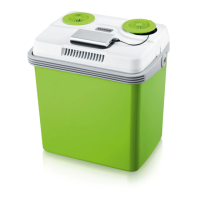
∙ The lid has two circular covers. The
right-hand one with the (|) arrow
markings can be opened by turning it.
The compartment below contains the
operating switches, indicator lights and
power supply cables.
Operation mode selector switch
COLD The cooling function is switched
on – the green indicator light is on.
OFF The appliance is switched off.
HOT The heating function is switched
on – the red indicator light is on.
Power mode selector switch
ECO The appliance is in power-saving
mode (can only be selected in
220-240 V mode). Recommended
if the cool-box is only partly fi lled.
OFF The appliance is switched off.
MAX Appliance operating at maximum
power.
Indicator lights
The ‘cooling’ function is indicated by the
green light.
The red indicator light shows that the
‘keep-warm’ function is enabled.
Operation
∙ Open right-hand cover on the lid by
turning it.
∙ Ensure that both switches are in the
Off-position.
∙ Connect the 12V plug to a 12V cigarette
lighter socket
or
insert the mains plug into a suitable wall
outlet (220-240 V~)
or
connect the USB plug to a mobile
charging unit or other USB outlet (eg
PC, TV).
∙ Set the left switch to COLD or HOT.
∙ Set the right switch to the desired power
mode ECO or MAX.
∙ The appropriate indicator light will come
on.
∙ Close the right-hand cover, ensuring that
the cable being used runs through the
guide in the cover.
∙ Place the items to be cooled into the
cool-box.


 To Next Page