6
Kitchen scales
Dear Customer,
Before using the appliance, please read the
following instructions carefully and keep this
manual for future reference. The appliance
must only be used by persons familiar with
these instructions.
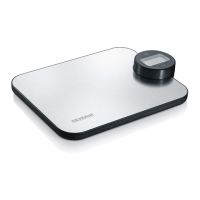
Familiarisation
1. Weighing platform
2. On/tare key
3. Digital display
4. Display selection key
5. Rating label (on underside)
6. Battery compartment (on underside)
Important hints
∙ If repairs are needed, please send the
appliance to one of our customer service
departments. The address can be found
in the appendix to this manual.
∙ Do not clean the scales with water and do
not immerse them in water.
∙ The display can be changed between
grams (gm), ounces (oz) and
millilitres (ml) by using the key.
The measurement of millilitres (ml) is
suffi ciently precise only when water
is being measured. When measuring
the weight of other types of liquid of a
different density, the results may deviate.
∙ These scales have a maximum load
capacity of 5300g. If this capacity is
exceeded, the symbol ‘EEEE’ appears in
the display.
∙ These scales are designed for household
use and are not suitable for medical or
commercial applications; they are not
offi cially calibrated.
Before using for the fi rst time
Before the scales are used for the fi rst
time, the batteries must be inserted as
described in the ‘Batteries’ section.
Operation
∙ Position the scales on a fi rm and level
surface.
∙ To weigh recipe ingredients, place a
suitable bowl or container on the platform.
Solid ingredients may be put directly onto
the scales.
∙ To switch the unit on, press the On/
tare key . At start-up the display
shows ‘0000’; it then changes to ‘0’
with the selected display format. Add
the ingredients to the bowl (or other
accessory) used, until the desired weight
is displayed.
∙ To add more ingredients without fi rst
emptying the container, the On/tare
key may be pressed again. The display
shows ‘0’ and ‘Tare’. In this way, only the
additional weight is displayed.
∙ If the fi rst measurement is below 50 g,
pressing the On/tare key will set the
weight back to ‘0’; however, the ‘Tare’
sign does not appear in the display.
∙ After use, the scales may be switched off
by holding down the On/tare key for 2-3
seconds. However, the unit will switch off
automatically if no key is pressed within a
60-second period.
Batteries
∙ The symbol appears if the batteries
need replacing.
∙ To insert or replace the batteries,
open the battery compartment located
underneath the unit. When inserting the
batteries, always observe the correct
GB



 To Next Page