26
GB GB
8 Troubleshooting
8.1 Troubleshooting by yourself
WARNING!
Risk of injury! The appliance does not contain any parts that
you can repair yourself.
– Never attempt to operate a defective appliance.
– Never attempt to repair the appliance by yourself. If your
appliance is defective, contact our customer service
department (see ►“Service Centres” on page 159).
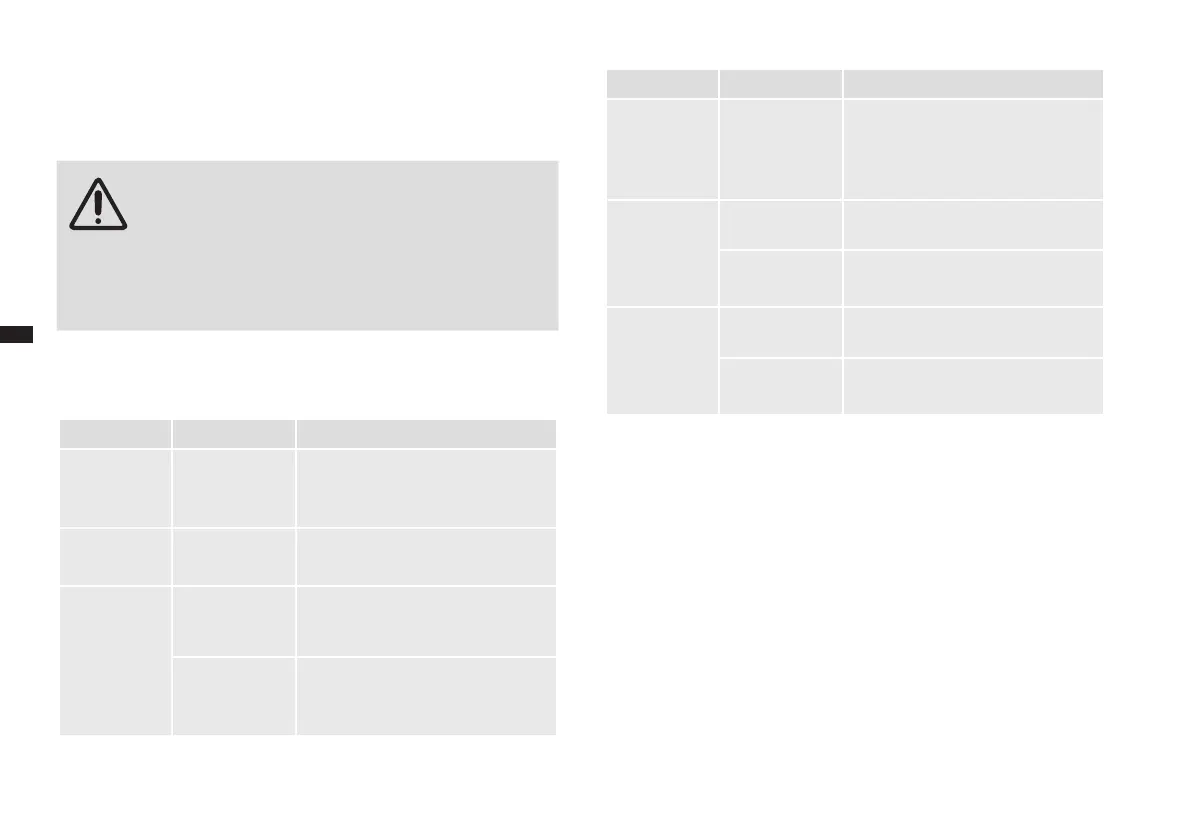
Before contacting our customer service, check with the aid of below table
whether you can remedy the problem by yourself.
Problem Cause Remedy
The appliance
will not turn
on.
Power cable
not plugged in
correctly.
Plug the power cable into the outlet.
Cooking does
not start.
The door is not
closed properly.
Close the door.
Sparks are ge-
nerated during
operation.
Wrong cook-
ware.
Use only microwave-safe cookware
without decorative metal edges.
Metallic objects
in the cooking
chamber.
Do not put any metal objects in the
cooking chamber when you are
cooking with microwaves.
Problem Cause Remedy
Turntable
turns with
a jerk.
Roller ring and
bottom of the
cooking cham-
ber soiled.
Clean the roller ring and bottom of
the cooking chamber, ►„Cleaning
and care“ on page 25.
Food/beve-
rage is too
cold/not coo-
ked through.
Power too low. Increase the power.
Cooking time
too short.
Set a longer cooking time.
Food/beve-
rage is too hot/
burned.
Power too high. Reduce the power.
Cooking time
too long.
Set a shorter cooking time.
8.2 Accessories and spare parts
You can order spare parts or accessories conveniently via the Internet on
our home page http://www.severin.com by using the “Service / Spare Parts
Shop” menu.


 To Next Page
 Loading...