
 Need help?
Do you have a question about the Sewell BlastIR Wireless and is the answer not in the manual?
Connect each unit to power using provided supplies or USB to DC cables, ensuring correct port usage.
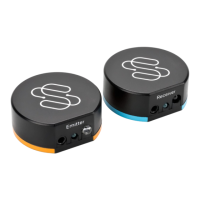
Place the blue unit next to your display for initial setup.
Position the orange unit in front of the device to control, ensuring line of sight for the IR emitter.
Use color-coded cables to extend reach or hide receiver/emitter, allowing remote pointing or attachment to device IR eyes.
Utilize AirStick for reusable placement or 3M adhesive for more permanent mounting.
BlastIR Wireless Receivers communicate with Emitters set to the same zone, supporting up to ten unique zones.
Details the status LED and optional IR emitter cable port on the IR Emitter unit.
Details the status LED and optional IR receiver cable port on the IR Receiver unit.
Follow instructions to avoid fire, electrical shock, damage, or injury; do not modify or expose to water.
Device complies with Part 15 of FCC Rules, subject to conditions regarding interference.
Provides phone, email, and chat support details, with live support hours Monday-Friday.
 General
| Frequency | 2.4 GHz |
|---|---|
| IR Frequency Range | 30-60 kHz |
| Frequency Range | 2.4 GHz |
| Power Supply | USB |
| Compatibility | Works with most IR-controlled devices |
| Power Source | USB |
| Range | Up to 100 feet (30 meters) |
| IR Receiver Cable Length | 6 feet (1.8 meters) |
| Wireless Range | Up to 100 feet (30 meters) |

 To Next Page