Need help?
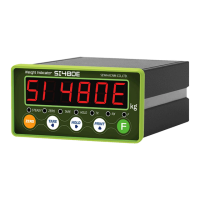
Do you have a question about the Sewhacnm SI 480E and is the answer not in the manual?
Describes warning symbols and their meanings for safe operation.
Outlines copyright and reproduction policies for the manual.
Provides contact details for customer support and inquiries.
Provides a general introduction to the weighing indicator.
Lists critical safety precautions to follow during operation.
Highlights the main functionalities and benefits of the indicator.
Comprehensive list of all technical parameters and their values.
Describes the visual layout, interactive keys, and indicator lamps on the front panel.
Details how to use buttons and explains shortcuts using the 'F' key.
Outlines the purpose and connection points of the rear panel terminals.
Provides exact measurements for mounting the indicator.
Lists all parts provided with the indicator for installation.
Instructions for correctly connecting the load cell.
Introduces the main setup functionalities.
Steps to access the setup menu with or without a password.
Guide on moving between different operational modes.
How to perform zero balance calibration.
Explains the function of each key during calibration.
Steps to begin the calibration using a test weight.
Procedure for defining the maximum capacity of the scale.
Configuring decimal places and division values.
Process for measuring the indicator's own weight.
Entering test weight and calculating the span.
Final steps for span calibration.
How to initiate calibration without test weights.
Inputting load cell capacity for simulation.
Configuring digit and division for simulation mode.
Measuring dead weight for simulation calibration.
Entering the load cell's rated output value.
Finalizing the simulation calibration process.
Steps to enter the F-FUNCTION configuration menu.
A summarized overview of available F-FUNCTIONS.
Detailed list of F-FUNCTION parameters (pages 24-26).
Detailed list of F-FUNCTION parameters (pages 27-29).
Detailed list of F-FUNCTION parameters (pages 30-32).
Guide to entering and managing hidden functions.
Instructions on how to access and switch between test modes.
Overview of tests available in Mode 1.
Overview of tests available in Mode 2.
How to perform tests on the serial interface.
Details for connecting via RS-485, RS-422, and RS-232 interfaces.
Explanation of different data transmission formats.
Understanding command mode, error codes, and command lists.
In-depth explanation of read and write command responses.
Steps for calculating the communication checksum.
Introduction to the Modbus memory structure.
Explanation of Modbus function codes and CRC check.
Specific details on various Modbus registers.
Setting up different printing layouts.
Common errors related to load cells and their fixes.
Explains error codes during calibration and how to resolve them.
Troubleshooting common error displays on the indicator.
Details on the warranty duration and what is covered.
Conditions under which the warranty is void.
Other important warranty-related information.
 General
| Brand | Sewhacnm |
|---|---|
| Model | SI 480E |
| Category | Accessories |
| Language | English |

 To Next Page