5
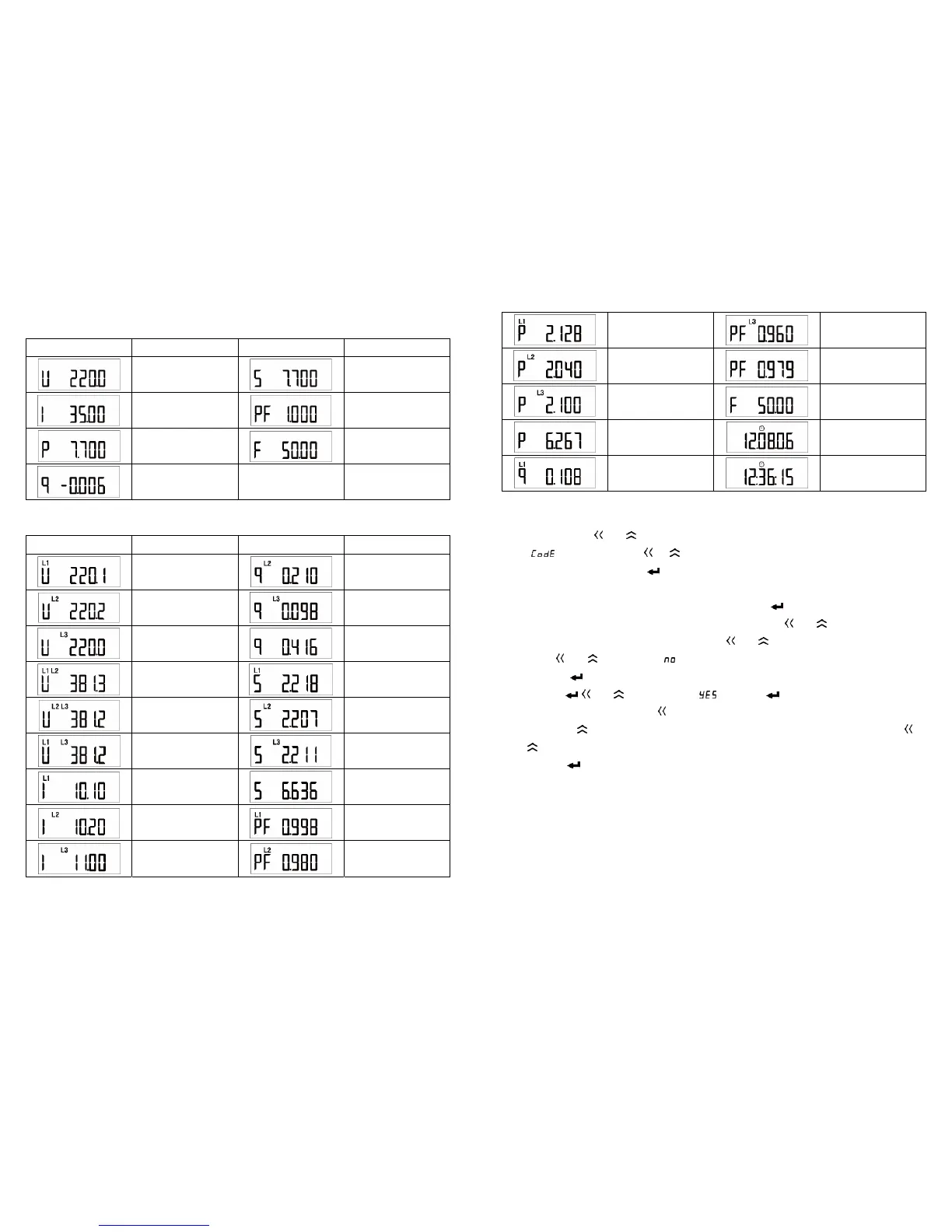
Electric quantity display interface of single phase meter:
Display interface Description Display interface Description
Voltage:
U = 220.0 V
Apparent power:
S = 7.700 kVA
Current:
I = 35.00 A
Power factor:
PF = 1.000
Active power:
P = 7.700 kW
Frequency:
F = 50.00Hz
Reactive power:
Q = -0.006 kW
Electric quantity interface of three phase meter (e.g. three phase four wiring mode)
Display interface Description Display interface Description
Phase voltage Ua
Ua = 220.1 V
Phase B reactive power
Qb = 0.210 kvar
Phase voltageUb
Ub = 220.2 V
Phase C reactive power
Qc = 0.098 kvar
Phase voltageUc
Uc = 220.0 V
Total reactive power
Q = 0.416 kvar
Line voltage Uab
Uab = 381.3V
Phase A apparent power
Sa = 2.218 kVA
Line voltage Ubc
Ubc = 381.2 V
Phase B apparent power
Sb = 2.207 kVA
Line voltage Uca
Uca = 381.2 V
Phase C apparent power
Sc = 2.211 kVA
Phase A current
Ia = 10.10A
Total apparent power
S = 6.636 kVA
Phase B current
Ib = 10.20A
Phase A power factor
PFa = 0.998
Phase C current
Ic = 11.00A
Phase B power factor
PFb = 0.980
6
Phase A active power
Pa = 2.128 kW
Phase C power factor
PFc = 0.960
Phase B active power
Pb = 2.040 kW
Total power factor
PF = .979
Phase C active power
Pc = 2.100 kW
Grid frequency
F = 50.00 Hz
Total active power
P = 6.267 kW
Time: year-month-day
2012, August 6th
Phase A reactive power
Qa = 0.108 kvar
Time: hour-minute-second
12: 36: 15
5. Setting
Enter programming mode
Keep pressing
and buttons for more than 3 seconds in electric energy display interface
until
appears. Then press or button to input password (defaulted as 0000). After
inputting correct password, press
button to enter setting interface.
Exit programming mode
After changing the data of items of third level menu, press
button to confirm the
modification. If user wants to cancel the modification, please press
and buttons at the same
time. After confirm or cancel the modification, press
and buttons to return to first level menu.
Now press
and buttons again, appears. There are two choices at this situation:
1)Press
button not to save setting parameters;
2)Press
and buttons to select , then press button to save setting parameters.
In parameter setting operation, button is used to switch between menus and select numbers
at different bits,
button is used to switch between menus and change the number at same bit,
and
buttons are used as combined buttons for returning to upper level menu or canceling
modification,
button is used to enter next level menu or confirm modification.
Setting menu


 To Next Page
 Loading...