shapertools.com 54
OverviewOverview
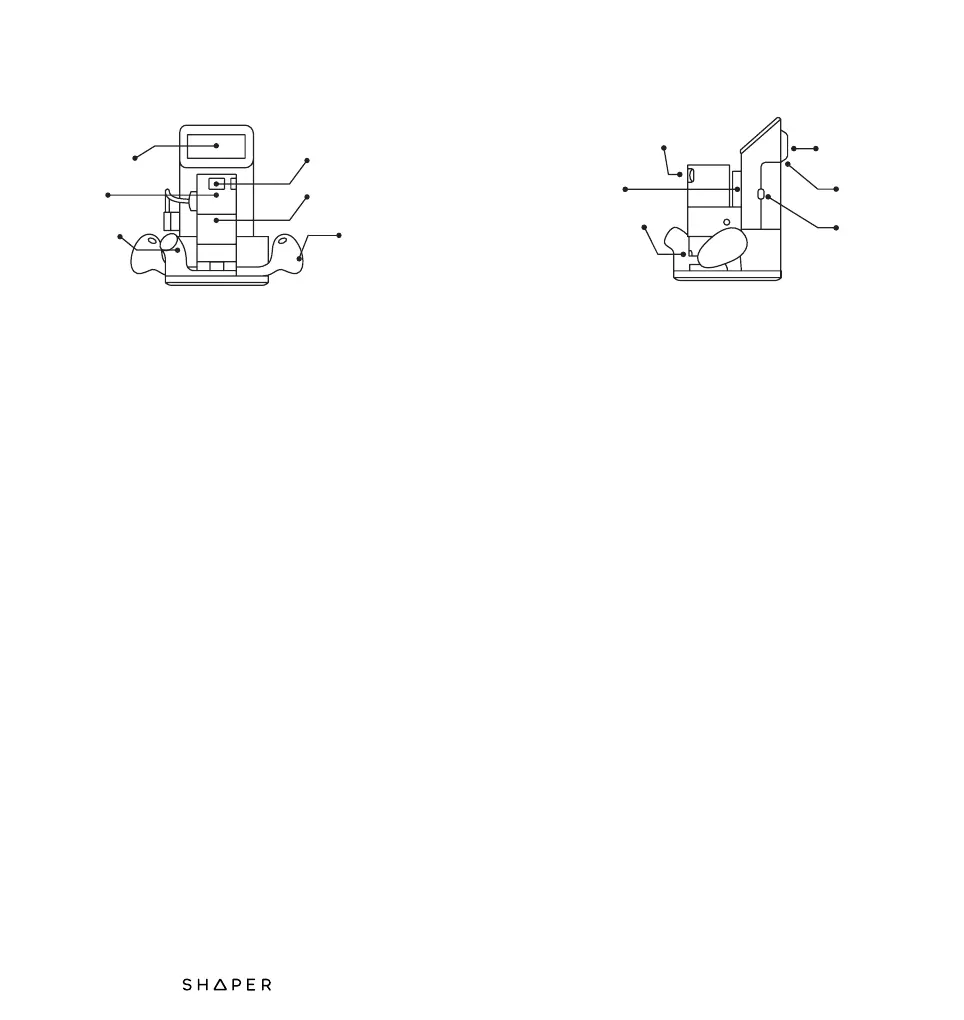
Touchscreen: Origin’s 5 inch multi-touch display
controls Origin’s many features.
SM1 Spindle: Origin is equipped with a powerful
720-Watt motor. It features variable speed control
and on-board electronics to deliver soft start,
thermal and overload protection, and constant
speed under load.
Dust Port: Origin is intended to be used with a
dust extraction system. Origin’s dust port accepts
many common vacuum hose sizes, or you may
use the hose that’s included with Origin.
Spindle Switch: You’re in control. For your
safety, Origin’s SM1 Spindle will never turn on
automatically. Use the spindle switch to turn on
the spindle when you’re ready to start cutting.
Spindle Mount: The SM1 Spindle is designed to
be removable for safe and easy router bit
changes. After loosening the spindle mount bolt,
simply remove or insert the SM1 Spindle.
Handles: Always firmly grasp both handles when
operating Origin. The buttons on each handle
map to the functions shown on the screen.
touchscreen
spindle
dust port
spindle switch
spindle mount
handle
Speed Control: The SM1 Spindle has adjustable
speed from 10 000 to 26 000 RPM, with the lowest
speed mapped to 1 on the dial, and the highest
speed mapped to 6. Use this dial to adjust the
spindle rotation speed. For a list of recommended
cut speeds for various materials and applications,
visit support.shapertools.com.
Z-Axis: Origin’s Z-Axis is responsible for plunging
and retracting the SM1 Spindle.
Collet Lock: Press the collet lock and use the
included 19mm wrench to change router bits in
the SM1 Spindle.
Back Handle: On the go? Carry Origin using the
back handle.
Camera: Origin uses a computer vision system
to track its location on your workpiece. Keep the
camera unobstructed and the lens cover glass
clean to ensure the best cutting experience.
USB Port: No network? No problem. If your Origin
is not in range of a Wi-Fi network, you can also
transfer design files using a USB flash drive.
speed control
z-axis
collet lock
back handle
camera
usb port


 To Next Page