MAINTENANCE/CLEANING
Reduction in Airflow or Overheating
A change in airflow or air power, airflow blockages,
and/or visible buildup on the inlet at the bottom of
the unit indicates your unit needs to be cleaned. We
recommend using a new toothbrush to clean o the
filter at the bottom of the unit.
ALCI OPERATION
Electricity flickers or trips circuit breaker during use.
This dryer is equipped with an Appliance Leakage
Circuit Interrupter (ALCI), a safety feature that renders
it inoperable under abnormal conditions. Should the
dryer turn o in use, press the red Reset button on
the plug and the dryer should function normally. If
the dryer does not reset, please check your circuit
breaker. If the issue persists, ensure there are no other
appliances plugged in within the room where the dryer
is being used. Do not use the dryer with a power strip.
OVERHEATING
Hair dryer is overheating or shuts o.
This unit is equipped with a temperature-protective
thermostat. If for some reason your hair dryer
overheats, the thermostat will automatically turn the
unit o. To prevent power-down recurrence, unplug
the hair dryer and set it aside to cool, or cool down
using the cool shot button during use. Overheating
may result if the unit is powered on for a long
duration, or can indicate a blockage or dust buildup.
We recommend using a new toothbrush to clean o
the filter at the bottom of the unit. If overheating
continues to occur, contact Customer Service at
855-522-0912.
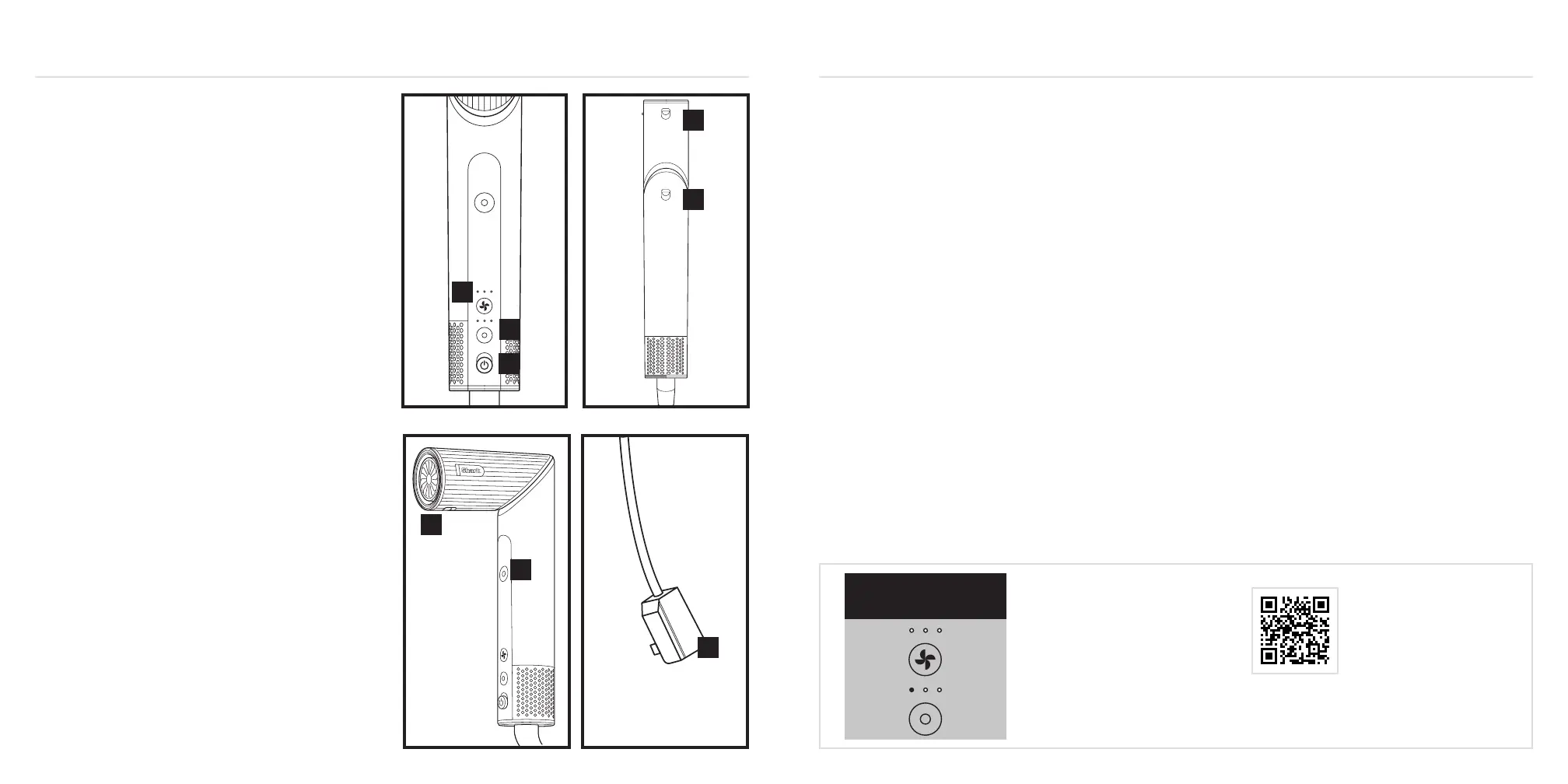
1. Turn the styler on and o.
2. Adjust the airflow. Pressing the button allows you to
choose a low, medium, or high airflow.
3. Adjust the temperature. Pressing the button
allows you to choose no heat, low, medium or high
temperature.
4. Press and hold the Cool Shot button for a cool burst
of air to set your style.
5. To attach any accessories included with your model,
press them into the nozzle outlet. You will know
they are properly attached when they click in place.
6. To remove any accessories included in your model,
slide the lock down and lift the accessory o of the
nozzle by holding onto the touchpoints identified in
your Style Guide.
7. To change from styling wand mode to hair dryer
mode, slide down the lock and rotate the nozzle left.
Keep rotating the nozzle until it clicks into place in
hair dryer mode. To change from hair dryer mode to
styling wand mode, slide down the lock and rotate
the nozzle right.
8. Press the ALCI button to rest the dryer. See
Troubleshooting & Error Codes for more
information.
For further operating instructions,
please consult the Styling Guide
or scan the QR code.
Storage, Cord Safety, and Maintenance/Cleaning:
• Ensure the cord is not knotted, twisted, or wrapped
around any nearby objects when in use.
• Store the unit in a dry location away from water
and other heat sources.
• Regularly clean the filer at the bottom of the unit.
To clean the filter, first slide the filter cover o the
bottom of the unit. Then use a new toothbrush to
brush o any dust or debris on the filter. Once the
filter is clean, slide the filter cover back on the unit
until it clicks in place.
TROUBLESHOOTING & ERROR CODESOPERATING INSTRUCTIONS
1
2
4
5
8
3
6
7
If you are experiencing a dierent error code,
please scan the QR code for additional troubleshooting
or contact Customer Service at 855-522-0912.
Overheating
Error Code


 To Next Page
 Loading...