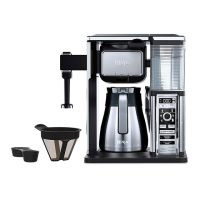
The Ninja Coffee Bar CF091 series is a versatile coffee brewing system designed to deliver a range of coffee experiences, from classic brews to specialty concentrates, all with an emphasis on flavor extraction and user convenience. Its primary function is to brew coffee into various vessel sizes, including single cups, travel mugs, and carafes, while offering different brew types to suit individual preferences.
Function Description:
The Ninja Coffee Bar utilizes Thermal Flavor Extraction® Technology, which involves precision water delivery, automated controls for calibrated temperature, pre-infusion, coffee saturation, and flavor richness. This technology aims to unlock the full flavor potential of your coffee. The device offers Custom Brews, allowing users to brew directly into their preferred cup, travel mug, or carafe. It also features several Brew Types:
- Classic Brew: For a smooth, balanced coffee flavor.
- Rich Brew: For a richer, never-bitter coffee that stands up well to milk, cream, or flavorings.
- Over Ice Brew: Designed to produce a smooth, rich iced coffee that isn't watered down.
- Specialty Brew: A super-rich concentrate ideal for hot milk-based, iced, and frozen coffeehouse-style drinks.
- Cafe Forte: A deep, full-bodied, and complex flavor that can be enjoyed black without milk or sweeteners.
The system also includes an integrated frother for creating frothed milk, adding another dimension to specialty coffee drinks.
Usage Features:
The Ninja Coffee Bar is designed with several features to enhance the user experience:
- Multi-Serve Dial: This dial allows users to select from various brew sizes: Cup, XL Cup, Travel Mug, XL Multi-Serve, Half Carafe, and Full Carafe.
- Multi-Serve Cup Platform: A pull-down platform accommodates smaller cups and mugs, allowing for direct brewing.
- Removable Water Reservoir with Easy Access Flip-Top Lid: This feature makes filling quick and easy.
- Auto-iQ™: This intelligent system automatically determines the correct amount of water needed for each selected size and brew type.
- LED Control Panels with Programmable Digital Clock: Provides clear display and control over settings.
- 24-Hour Programmable Delay Brew Button: Users can set the brewer to automatically start brewing at a specified time, perfect for waking up to fresh coffee.
- Drip Stop: A toggle that stops the flow of coffee from the brew basket, allowing users to pour a cup mid-brew. It also prevents dripping once the brew cycle is finished.
- Pre-Heat: After plugging in or turning on from Power Save mode, the brewer requires a 3-minute pre-heat period to ensure optimal brewing temperature. The brewer stays in a pre-warmed mode unless put into power save.
- Intelligent Warming Plate: This plate automatically turns on after brewing a carafe and adjusts its temperature to keep coffee at an ideal drinking temperature without burning it. It automatically shuts off after two hours but can be manually turned off or on within a two-hour window using the Stay Warm button.
- Audible Ready Signal: The brewer beeps to indicate when coffee is ready.
- Permanent Filter: A reusable filter that helps preserve natural coffee oils and small coffee particles, contributing to a robust flavor. Paper filters can also be used.
- Brew Basket: The brew basket slides out for easy access to place the filter and coffee grounds.
- Frother: An integrated frother with a removable whisk allows for easy milk frothing. The frother arm swings out for use and can be twisted off for cleaning.
- Brewing Process: Each brew type incorporates a pre-infusion cycle, where the brewer begins, pauses, and then resumes to evenly saturate coffee grounds. This process ensures optimal flavor extraction.
- Coffee Ground Measurements: The manual provides specific scoop measurements for different brew sizes, based on level scoops, with a recommendation for medium grind size.
Maintenance Features:
Proper care and maintenance are crucial for the longevity and performance of the Ninja Coffee Bar:
- Cleaning After Each Brew: After brewing, the Drip Stop should be closed. The permanent filter (or paper filter) and brew basket should be removed, rinsed, and washed with soap and warm water. The frother whisk should also be rinsed thoroughly or placed on the top rack of a dishwasher.
- Carafe Cleaning: The glass carafe and brew-through lid should be washed with soap and warm water, using a bottle brush or soft cloth for the inside. The glass carafe, brew-through lid, permanent filter, and water reservoir are top-shelf dishwasher safe. A soft brush or sponge is recommended for the glass carafe, avoiding wire brushes.
- Water Reservoir Cleaning: The water reservoir should be emptied, hand-washed with dish soap, rinsed, or placed on the top rack of a dishwasher. The water reservoir shelf should also be cleaned with a cloth and warm soapy water. It's important not to leave water in the reservoir unused for multiple days.
- Descaling the Brewing System (CLEAN Function): The CLEAN button illuminates when the brewer detects calcium buildup, which can affect coffee flavor. The cleaning cycle is a two-stage process:
- Cleaning Mixture Distribution: The reservoir is filled with a descaling solution (or white vinegar and water mixture) up to the Max Fill line. The brewer distributes a small amount of this mixture and then pauses for one hour, allowing the solution to work.
- Flush Stage: After the hour, the remaining mixture is discharged. The carafe and reservoir are then cleaned, and the reservoir is refilled with fresh water for a flush cycle to remove any residual cleaning solution. The CLEAN light turns off once the brewer is clean. If the light remains on, the descaling process should be repeated.
- General Cleaning: The machine's exterior should be wiped down with a warm cloth, soap, and water. The warming plate should be allowed to cool before cleaning. The showerhead, water reservoir shelf, and filter carrier components should also be cleaned. It is crucial not to immerse the base of the brewer in water or any other liquid.
- Troubleshooting: The manual provides solutions for common issues such as sediment in coffee, grounds in coffee, dripping brew basket, paper filter falling over, coffee not hot enough, weak/strong coffee, and slow brew cycles.
The Ninja Coffee Bar is designed for household use, emphasizing safety with clear warnings and instructions for handling hot liquids and components. It aims to provide a comprehensive and customizable coffee brewing experience for various preferences and occasions.


 To Next Page
 General