7
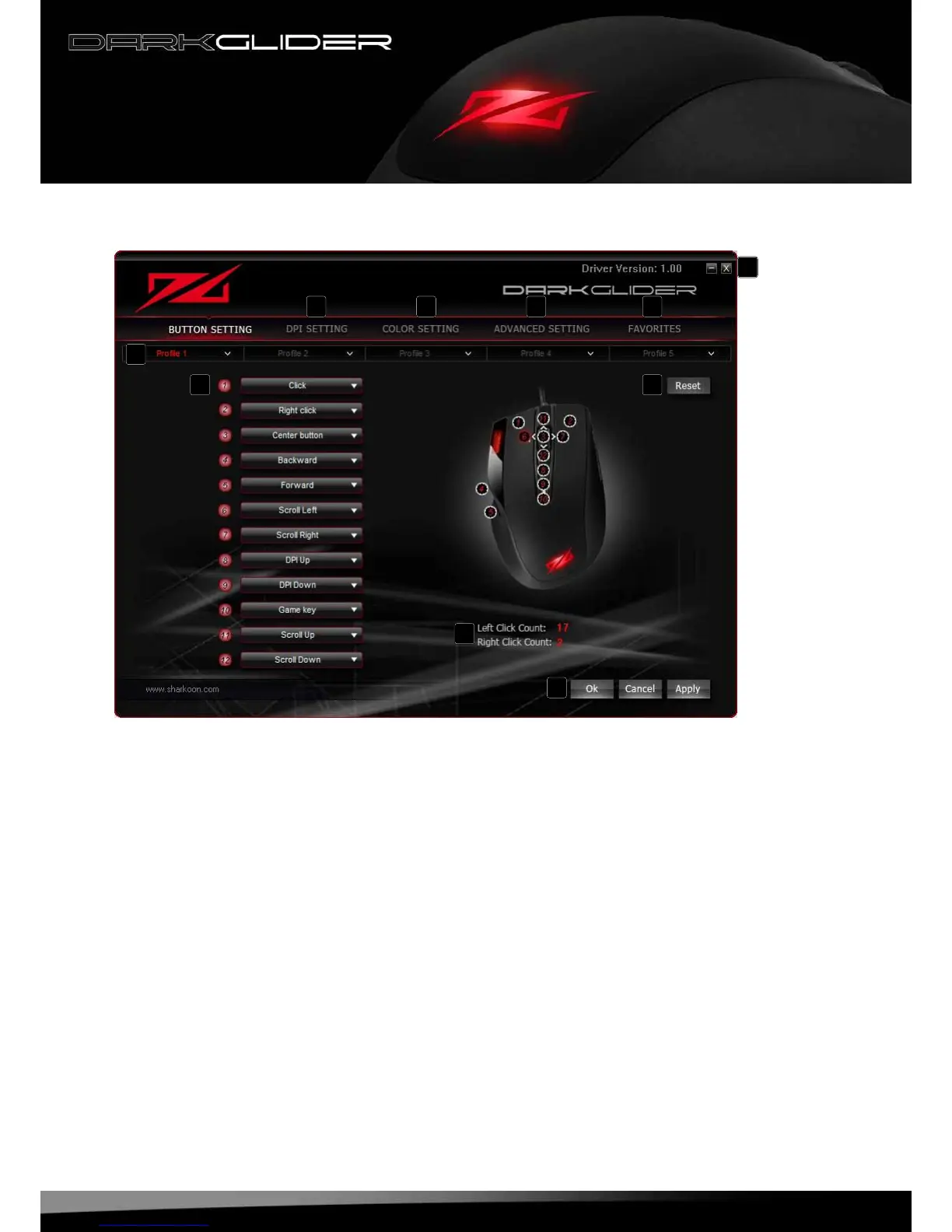
7.2 “Button Setting” window
A – “DPISetting“window:seebelow7.4
B – “ColorSetting“window:seebelow7.5
C – “AdvancedSetting“window:seebelow7.6
D – “Favorites“window:seebelow7.7
E – Minimizewindow/closeapplication
F – Proles:TheDarkGlidercanbeassigneduptovedifferentuserproles(seebelow7.3.5)
G– Buttonassignment:Everymousebuttonandthescrollwheelcanbeassigneddifferentfunctions,
whichyoucanselectfromtheaccordingpulldownmenu(seebelow7.3)
H – Viatheresetbuttonthecurrentbuttonassignmentcanbedeleted
I – Counter
J – “OK“transfersthesettingstothemouseandclosesthewindow;“Cancel“discardsthesettings;
“Apply“transfersthesettingstothemouse,andleavesthewindowopen
A B C D
E
F
G H
I
J






 To Next Page