18
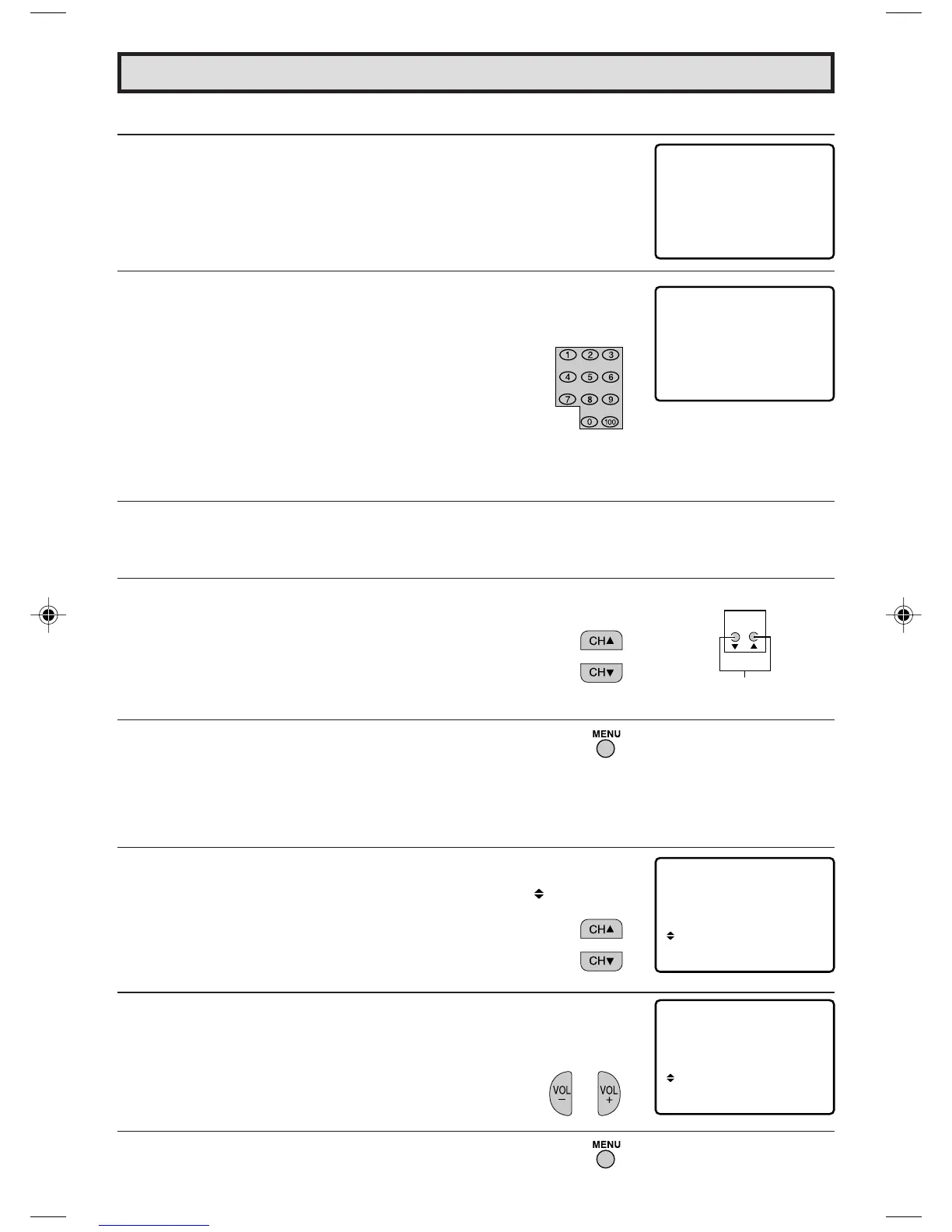
L To change the V-CHIP BLOCK setting. (Secret No. is registered.)
1 Repeat steps 1 to 3 of [1] MPAA RATING, then “INPUT SECRET
No.” will be displayed.
2 Enter the 4-digit SECRET No. using the
REMOTE KEYPAD
and the V-CHIP select mode will be displayed. Repeat
configuration of the V-CHIP BLOCK.
L If you intend to change or forget your Secret No., clear the original Secret No. and set
up a new one.
1 Repeat steps 1 to 3 of [1] MPAA RATING, or 1 to 2 of [L To
cancel the V-CHIP BLOCK screen while V-CHIP BLOCK has
been activated], then “INPUT SECRET No.” will be displayed.
2 Press and hold both
CH UP (
8
)
and
DOWN (
9
)
on the TV set
simultaneously until the message “INPUT SECRET No.”
disappears.
3 Press
MENU
two times to exit.
[3]-A. Additional mode (DOWNLOAD)
There will be an additional new rating system. In that case, please set up as follows.
Subsequently the new rating system will set up automatically.
1 Repeat steps 1 to 3 of [1] MPAA RATING.
2 Press
CH UP (
8
)
or
DOWN (
9
)
to move the “ ” mark to
“DOWNLOAD”.
3 Press
VOL (+)
or
(–)
to “DOWNLOAD : ON”.
4 Repeat pressing
MENU
to return exit.
(On the Set)
CHANNEL UP/DOWN
buttons
Parent Control (V-CHIP Operation Continued)
– – –
–
NIPUT SECRET No.
∗
∗
∗
∗
NIPUT SECRET No.
C
H
MP AA
TV GUIDELINES
AD : OFF
OFF
DO
W
NLO
STATUS :
MP AA
TV GUIDELINES
AD : ON
OFF
DO
W
NLO
STATUS :
17-19 13L-M100B/150B.p65e 4/23/99, 6:36 PM18



 To Next Page