12
25K-S100/180/S100/S180
CK25M10,CK25S18
SERVICE
NUMBER
DATA
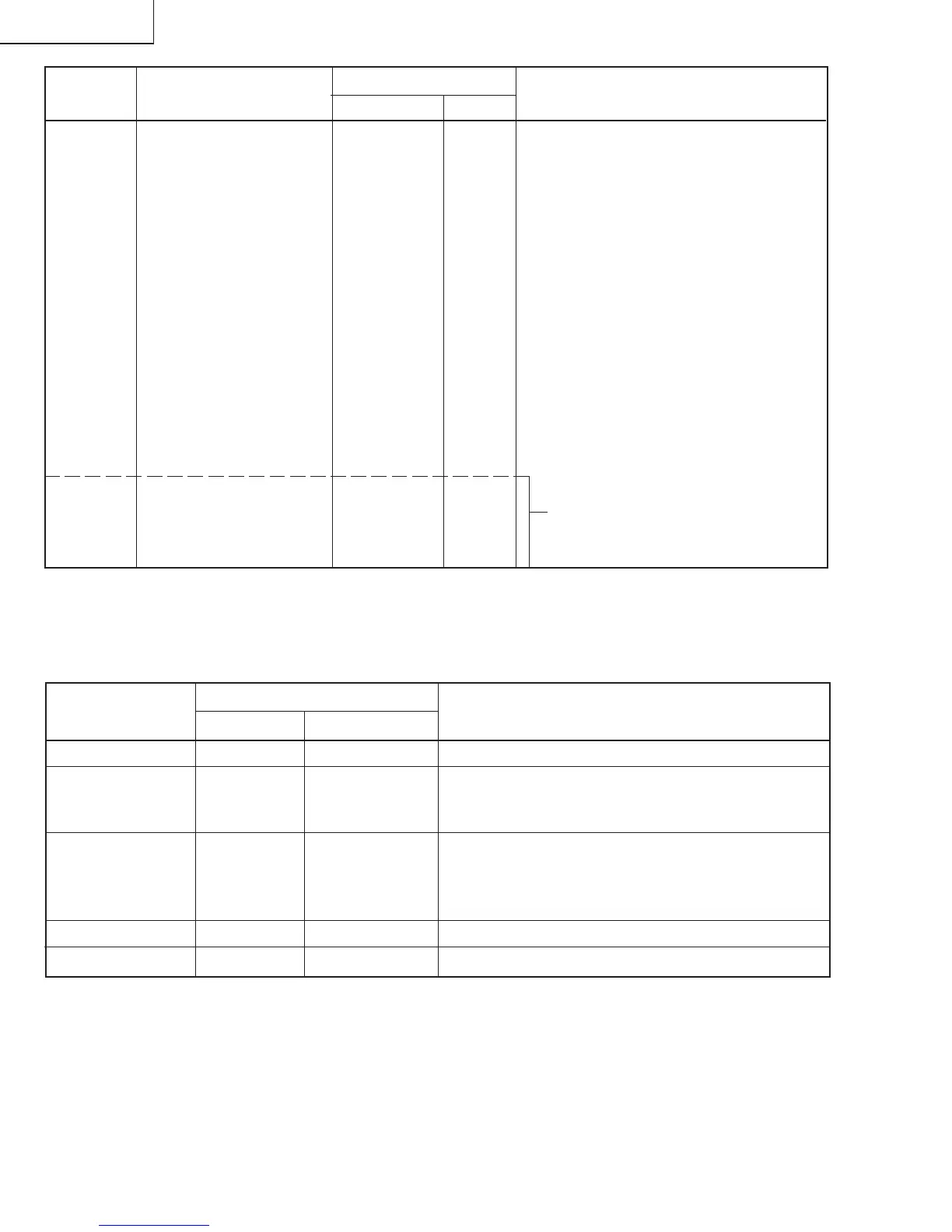
ADJUSTMENT CONTENTS
ADJUSTMENT ITEM
RANGE
INITIAL VALUE
S01 PICTURE 55 00-7F
S02 TINT 46 00-7F
S03 COLOR 32 00-7F
S04 BRIGHTNESS 40 00-7F
S05 SHARPNESS 24 00-3F Must be set to "28"
S06 VERTICAL PHASE 00 00-07 Must be set to "00"
S07 HORIZONTAL PHASE 12 00-1F
S08 RF-AGC 23 00-3F
S09 VERTICAL AMP 20 00-3F
S10 VCO 2C 00-7F
S11 R CUT-OFF 00 00-FF
S12 G CUT -OFF 00 00-FF
S13 B CUT-OFF 00 00-FF
S14 G GAIN 7F 00-FF
S15 B GAIN 7F 00-FF
S16 TRAP(3.58MHz) 00 00 or 01 Must be set to "00"
S17 BALANCE 20 00-3F Must be set to "20"
S18 C.C.POSITION 17 00-7F
S19 Y-MUTE 00 00,01,03 00= NORMAL, 01= No Y, 03= No VERTICAL
OP OPTION (Set to each mode) 80 00-FF "40"=25K-M180, "30"=25K-S100
"70"=25K-S180, CK25S18
M01 MTS LEVEL 0A 00-0F
M02 STEREO-VCO 20 00-3F
M03 FILTER 1C 00-3F
M04 LOW SEPARATION 20 00-3F
M05 HIGH SEPARATION 1B 00-3F
Table - A
NECESSARY
UNNECESSARY
ADJUSTMENT
NOTES
PART REPLACED
IC2001
IC2101
X
IC3001
X
CRT
X
IC201 X
X
Data is stored in IC2101.
The adjustment is needed to compensate for characteristics
of parts including IC201 and MTS level (M01).
Holding down both the CH-up/down buttons on the TV set in
the service mode for more than 2 seconds will automatically
write the above initial values into IC2101. Then perform a
complete adjustment.
Adjust items related to picture tube only.
Adjust items related to MTS only (M01~M05).
Holding down both the CH-up/down buttons on the TV set at service mode for more than 2 seconds will automatically
write the above initial values into IC2101.
Table - B
Only for Models
25K-S100/180, CK25S18



 To Next Page