13
Web-site: www.sharp.co.uk/support Help Line (office hours only): 0990-274277
Picture Adjustment
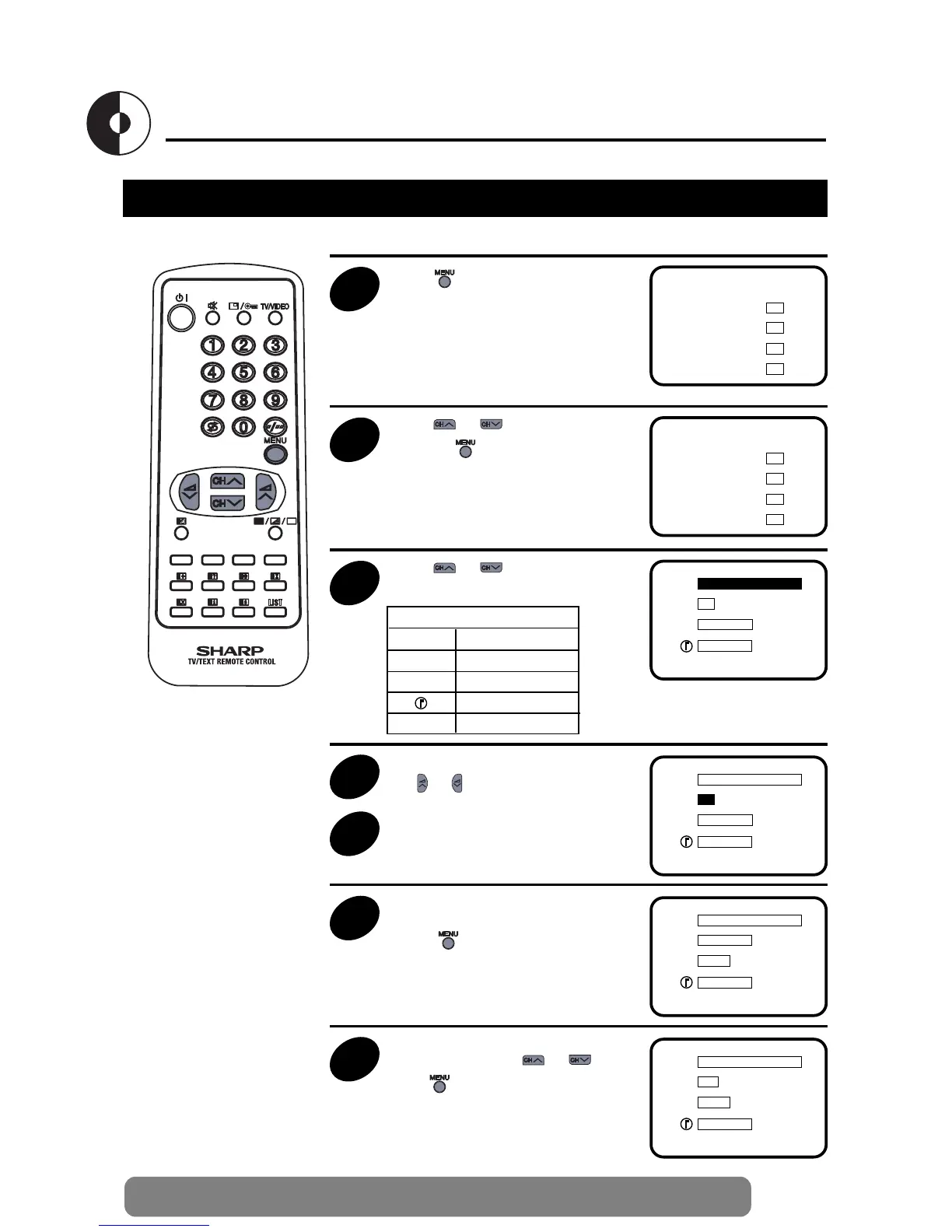
Adjusting the Picture
1
Press to call the MAIN menu
screen
EXIT
PICTURE
TIMER
LOCK
TUNING
➜
2
Press or to select “PICTURE”,
and press .
EXIT
PICTURE
TIMER
LOCK
TUNING
➜
3
Press or to select the items to
adjust.
B
C
A
lllllllllllllllllllllllllllllllllllll
llllllllllllllllllll
llllllllllllllllllll
Picture quality (CONTRAST, COLOUR, BRIGHTNESS, SHARPNESS) are adjustable in this menu.
B CONTRAST
C COLOUR
A BRIGHTNESS
SHARPNESS
N NORMAL
N OFF
EXIT
B
C
A
lllllllllllllllllllllllllllllllllllll
llllllllllllllllllll
llllllllllllllllllll
N OFF
EXIT
Selected item
4
Adjust the picture quality to your liking
with or
5
Repeat steps 3 and 4 above to adjust
other items.
B
C
A
llllllllllllllllllll
lllllllllllllllllllllllllllll
llllllllllllllllllll
N ON
EXIT
6
By selecting “N” you can reset the picture
parameters to the factory levels.
Press to restore the factory setting
“N ON” mode.
B
C
A
llllllllllllllllllllllllllllllllll
lllllllllllllllllllllllllllll
llllllllllllllllllll
N OFF
EXIT
7
You can clear the on-screen display by
selecting “EXIT” using or , and
press .


 To Next Page