EN-13
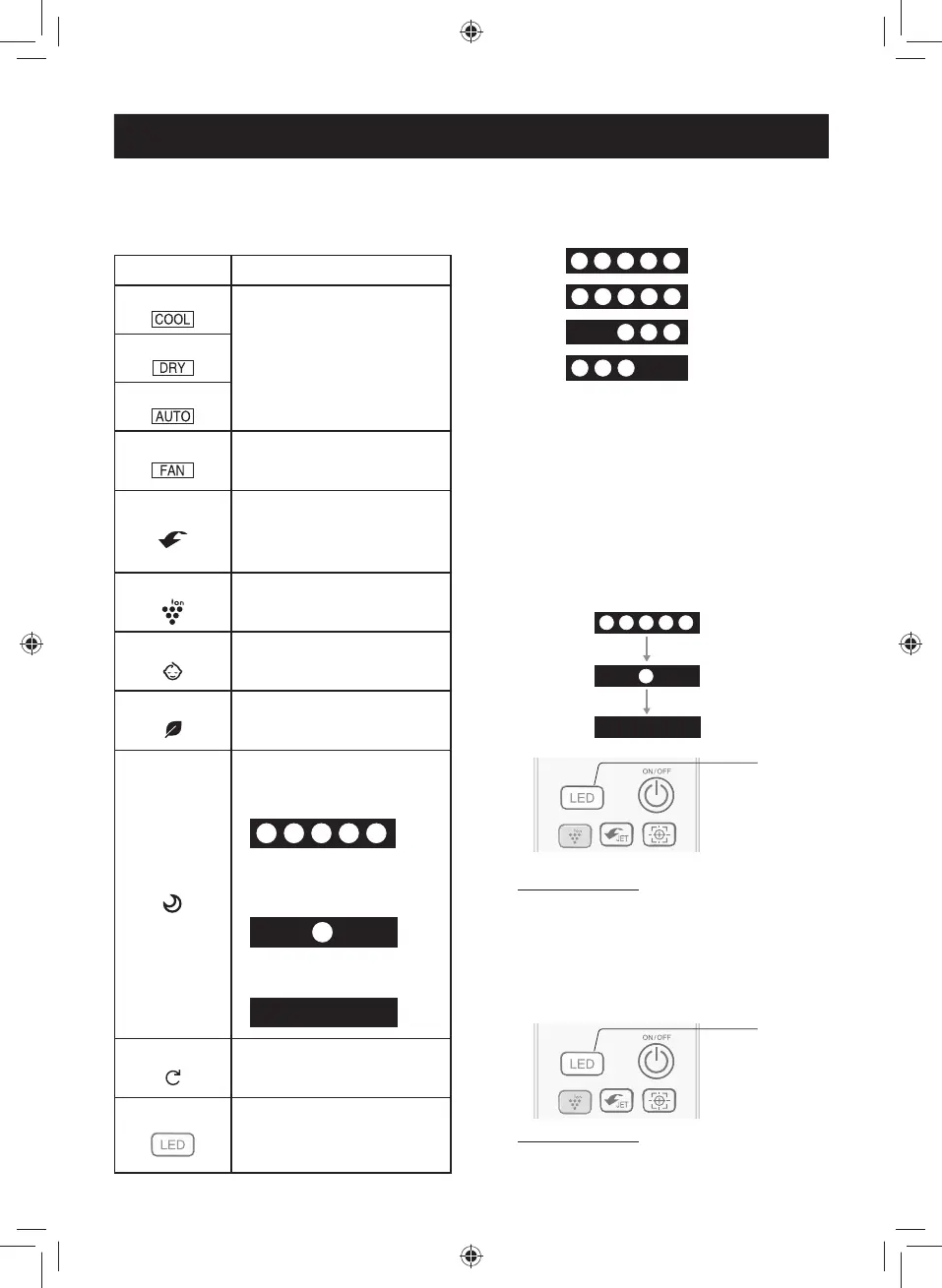
LIGHTING BAR
The lighting bar on the unit turns to
different colors to show the operation
situation.
OPERATION COLOR
COOL MODE
• Color:
Blue or Green
•
When the room temperature
is colse to the setting
temperature, it turns to green,
otherwise it's blue.
DRY MODE
AUTO MODE
FAN MODE
• Color:
Cool White
SUPER JET
• Color:
Blue
• When Super Jet function
is started, 5 lights blink 3
times.
PLASMACLUSTER
• Color:
Cool White
• Only in FAN only mode.
BABY MODE
• Color:
Pink
ECO MODE
• Color:
Green
BEST SLEEP
• Color:
Orange
• All of the 5 lights will turn on
in the fi rst 10 seconds.
After 10 seconds, just the 1
lights in the middle will keep
lighting.
After 20 minutes all the
lights will turn off.
SELF CLEAN
• Color:
Cool White
LED
• Color:
White
• Only after press the LED but-
ton when unit is not operating.
The lighting bar also can show the
horizontal airfl ow direction in each
mode.
• Swing:
• Center:
• Right:
• Left:
NOTE:
• When the horizontal airfl ow direction is swing-
ing, all of the 5 lights will turn on.
After the position is decided, the lighting bar
will wave to show the direction.
If you think the lighting bar is too bright.
1
Press the LED button and the light-
ing bar will just keep the middle
light in low bright.
2
Press the LED button again and all
the lights will turn off.
TO CANCEL
Press the LED button again.
If you need some light when the unit is
not operating.
1
Press the LED button and the light-
ing bar will turn on.
TO CANCEL
Press the LED button again.
(For XP10/13UXD, XP10/15UF models only)
1
2
1
2
1
TINSEB026JBRZ.indb EN-13TINSEB026JBRZ.indb EN-13 4/28/2560 BE 2:49 PM4/28/2560 BE 2:49 PM



 To Next Page