EasyManua.ls Logo

Sharp Aquos UQ17U - Page 105

Sharp Aquos UQ17U
156 pages
Print Icon
To Next Page IconTo Next Page
To Previous Page IconTo Previous Page
Loading...
CHANNEL
CC
DEVICE NAME
MODELNAME
DIRECT
CHANNEL
(DIGITAL)
CH UP C
CH DOWN C
D C
D C
1 0
1 1
U P
D W
C P
N M
R D
(0-9999)
(0-6383)
The channel
number of TV
+1
The channel
number of TV
-1
(Toggle)
DIGITAL Cable
(One-Part
numbers, 5-
digit, less than
10,000)
DIGITAL Cable
(One-Part
numbers, 5-
digit, more than
10,000)
If it is not TV
display, it will
input-switch to
TV. (same
function as CH
A)
If it is not TV
display, it will
input-switch to
TV. (same
function as CH
v)
Toggle
operation of a
closed caption.
The device
name set in
"TV Name
Setting" is
displayed.
The model
name of the TV
SOFTWARE S W V N 1
VERSION
IP PROTOCOL I P P V 1
VERSION
3D T D C
0: 3D Off,
1: 2D _'3D,
2: SBS,
3: TAB,
4: 3D'_2D (SBS),
5: 3D_2D (TAB),
6: 3D auto,
7: 2D auto
The current
version of the TV
software is
displayed.
The currently
supported version
of IP protocol is
displayed.
0,1,2,3,6,7:
For the UQ17U,
TQ15U, SQ17U,
SQ15U and
LE657U models.
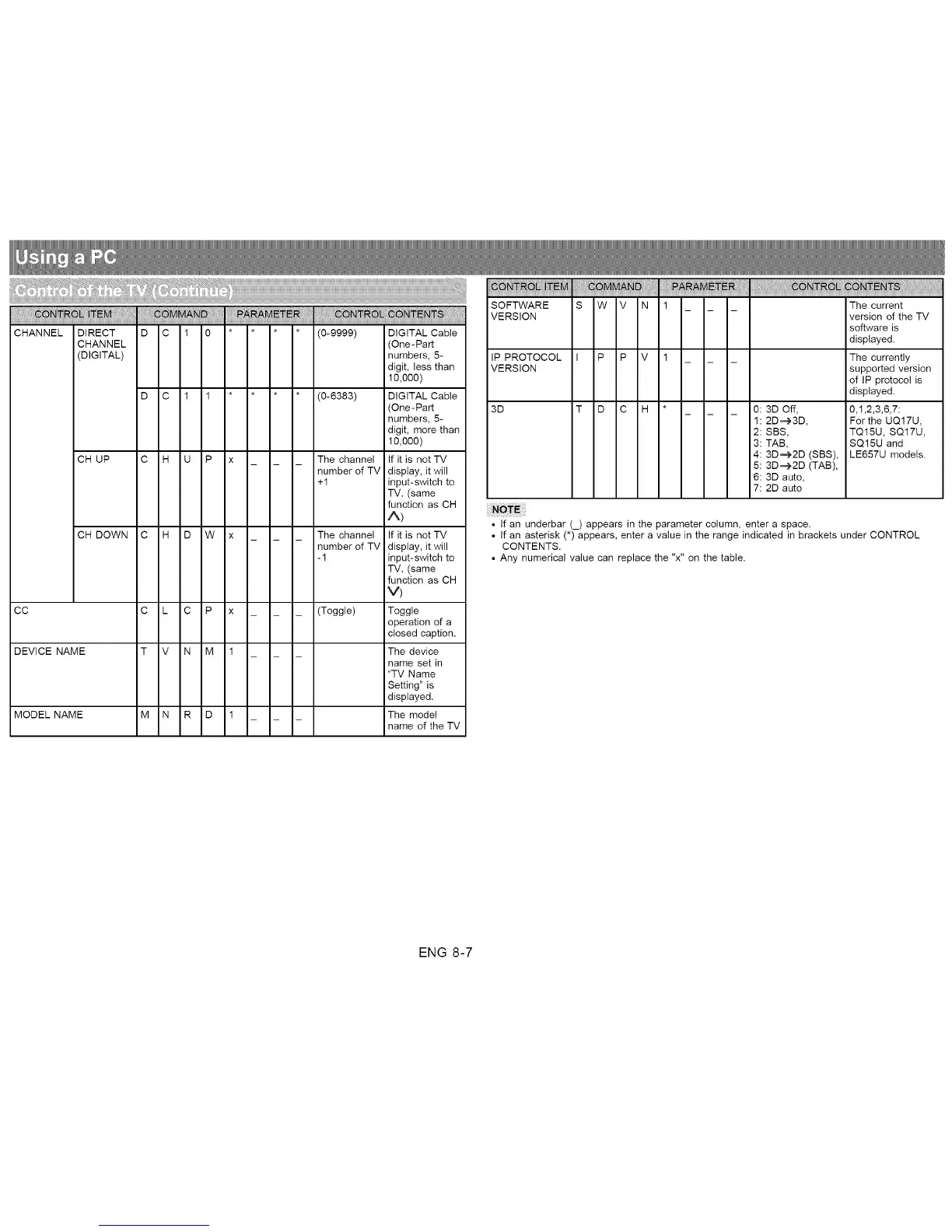
If an underbar (_) appears in the parameter column, enter a space.
If an asterisk (*) appears, enter a value in the range indicated in brackets under CONTROL
CONTENTS.
Any numerical value can replace the "x" on the table.
ENG 8-7

Related product manuals