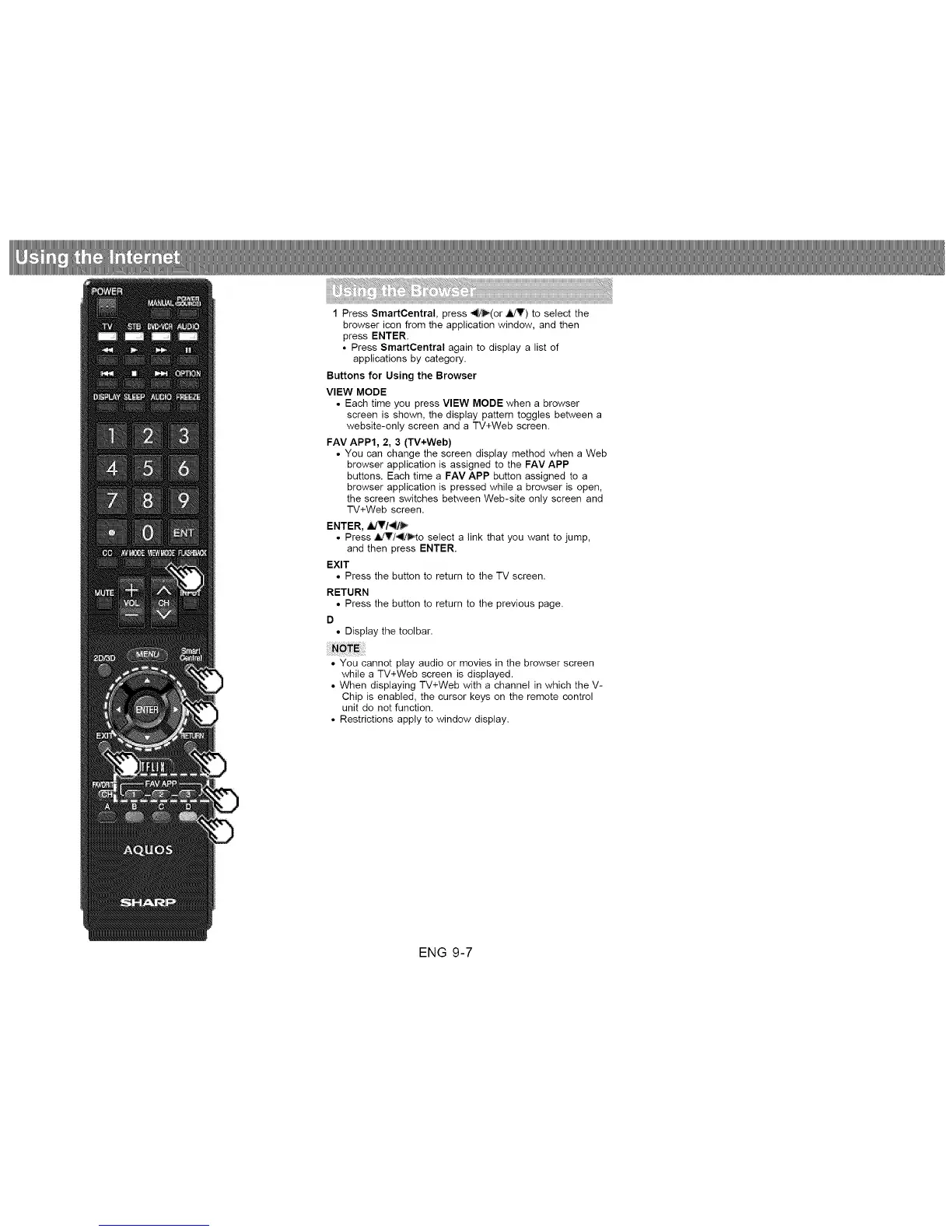
1 Press SmartCentral, press _'(or _) to select the
browser icon from the application window, and then
press ENTER.
• Press SmartCentral again to display a list of
applications by category.
Buttons for Using the Browser
VIEW MODE
• Each time you press VIEW MODE when a browser
screen is shown, the display pattern toggles between a
website-only screen and a TV+Web screen.
FAV APP1, 2, 3 (TV+Web)
• You can change the screen display method when a Web
browser application is assigned to the FAV APP
buttons. Each time a FAV APP button assigned to a
browser application is pressed while a browser is open,
the screen switches between Web-site only screen and
TV+Web screen.
ENTER, ,iJT/_
• Press ,_T/_/_,to select a link that you want to jump,
and then press ENTER.
EXIT
• Press the button to return to the TV screen.
RETURN
• Press the button to return to the previous page.
D
• Display the toolbar.
• You cannot play audio or movies in the browser screen
while a TV+Web screen is displayed.
• When displaying TV+Web with a channel in which the V-
Chip is enabled, the cursor keys on the remote control
unit do not function.
• Restrictions apply to window display.
ENG 9-7












 To Next Page