?iiiiii_;;? _:11+ ii++ ++]++i I_7+;E'd;:i' _+ ii _;__?,,, iii;Q_+1;,, ]i];;
iii_iiiii!_ii_ _4_S ¸,,i_i_!iii:_ii_:_+_ii!______ii_
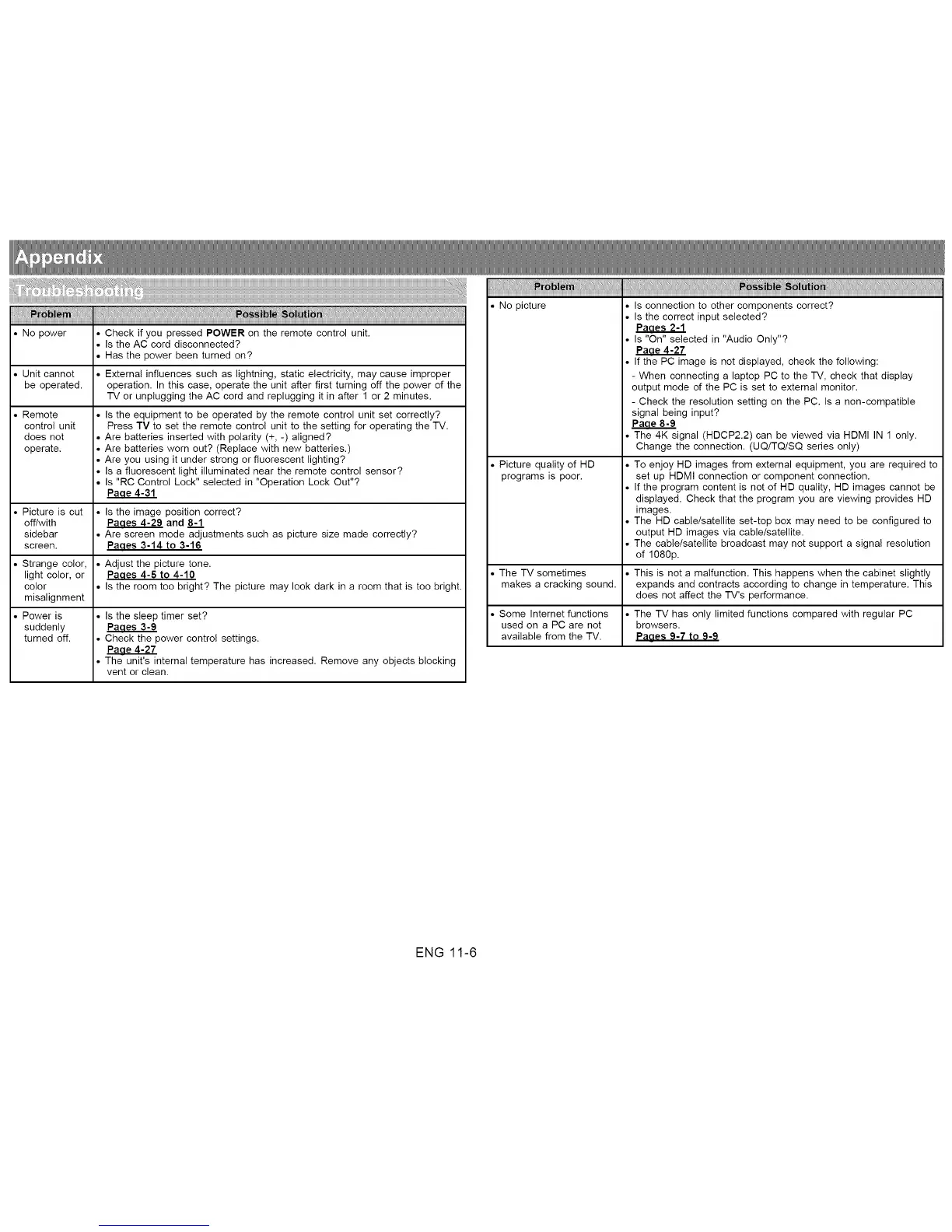
• No power • Check if you pressed POWER on the remote control unit.
• Is the AC cord disconnected?
• Has the power been turned on?
• Unit cannot * Externa! influences such as lightning, static electricity, may cause improper
be operated, operation. In this case, operate the unit after first turning off the power of the
TV or unplugging the AC cord and replugging it in after 1 or 2 minutes.
• Remote * Is the equipment to be operated by the remote control unit set correctly?
control unit Press TV to set the remote control unit to the setting for operating the TV.
does not • Are batteries inserted with polarity (+, -) aligned?
operate. * Are batteries worn out? (Replace with new batteries.)
• Are you using it under strong or fluorescent lighting?
• Is a fluorescent light illuminated near the remote control sensor?
• Is "RC Control Lock" selected in "Operation Lock Out"?
Paae4-31
• Picture is cut • Is the image position correct?
off/with _ and 8-'1
sidebar • Are screen mode adjustments such as picture size made correctly?
screen. Paaes 3-14 to 3-16
• Strange color, • Adjust the picture tone.
light color, or Paaes 4-6 to 4-10
color * Is the room too bright? The picture may look dark in a room that is too bright.
misalignment
• Power is * Is the sleep timer set?
suddenly Paaes 3-9
turned off. • Check the power control settings.
Paae 4-27
• The unit's internal temperature has increased. Remove any objects blocking
vent or clean.
• No picture • Is connection to other components correct?
• Is the correct input selected?
Paaes 2-1
• Is "On" selected in "Audio Only"?
Paae 4-27
• If the PC image is not displayed, check the following:
- When connecting a laptop PC to the TV, check that display
output mode of the PC is set to external monitor.
- Check the resolution setting on the PC. Is a non-compatible
signal being input?
Paae8-9
• The 4K signal (HDCP2.2) can be viewed via HDMI IN 1 only.
Change the connection. (UQ/TQiSQ series only)
• Picture quality of HD . To enjoy HD images from external equipment, you are required to
programs is poor. set up HDMI connection or component connection.
• If the program content is not of HD quality, HD images cannot be
displayed. Check that the program you are viewing provides HD
images.
• The HD cable/satellite set-top box may need to be configured to
output HD images via cable/satellite.
• The cable/satellite broadcast may not support a signal resolution
of 1080p.
• The TV sometimes • This is not a malfunction. This happens when the cabinet slightly
makes a cracking sound, expands and contracts according to change in temperature. This
does not affect the TV's performance.
• Some Internet functions • The TV has only limited functions compared with regular PC
used on a PC are not browsers.
available from the TV. Paaes 9-7 to 9-9
ENG 11-6


 To Next Page
 Loading...








