EasyManua.ls Logo

Sharp AY-X095E - Basic Operation Guide

Sharp AY-X095E
16 pages
Print Icon
To Next Page IconTo Next Page
To Previous Page IconTo Previous Page
Loading...
BASIC
OPERATION
|
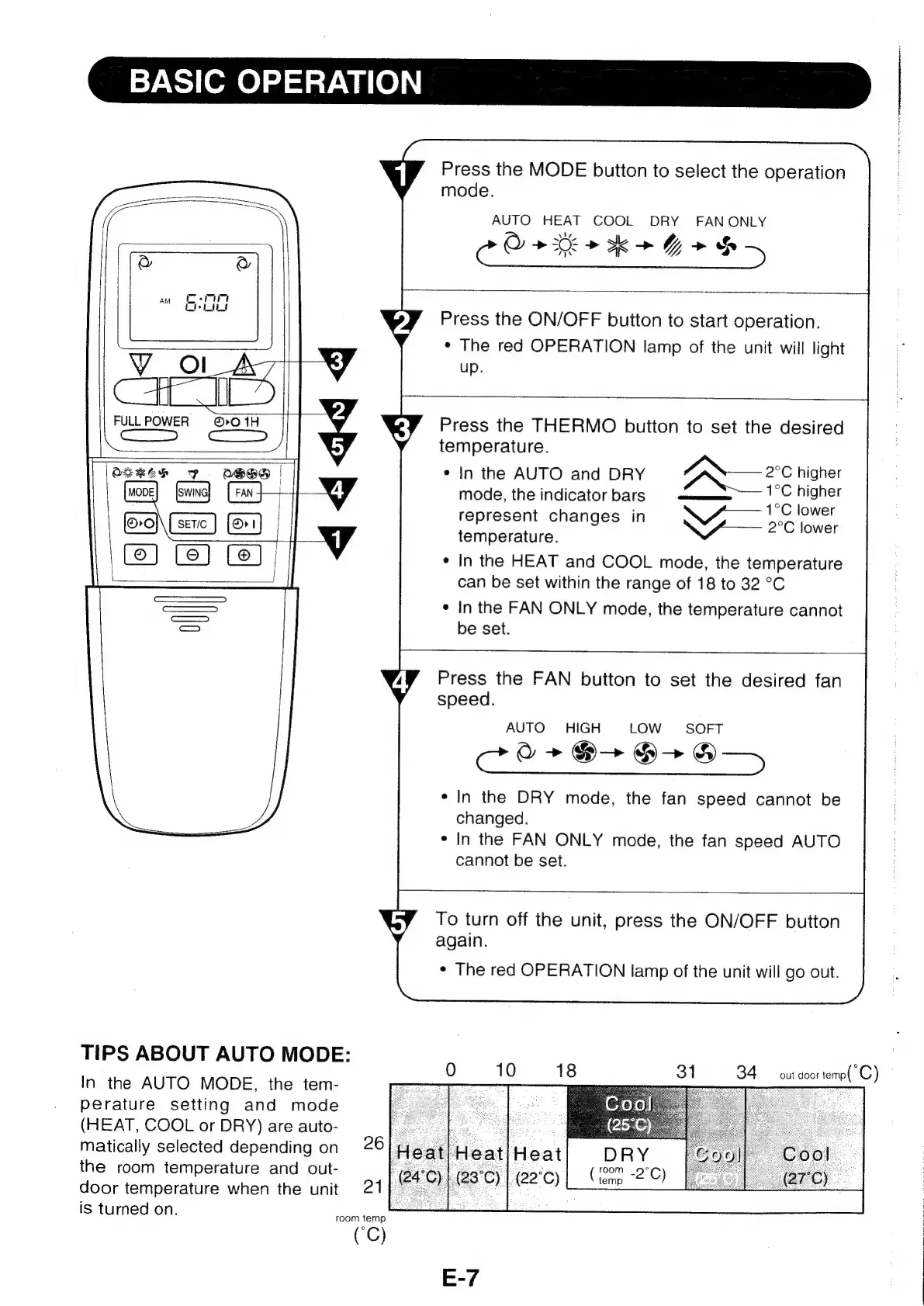
Press
the
MODE
button
to
select
the
operation
mode.
AUTO
HEAT
COOL
DRY
FANONLY
oO
ete
k+G
>
S-
Press
the
ON/OFF
button
to
start
operation.
*
The
red
OPERATION
lamp
of
the
unit
will
light
VY
oO
up.
ft
4
FULLPOWER
=
©©»0
1H
Press
the
THERMO
button
to
set
the
desired
H-
temperature.
oneee
ey
S50)
|
*
In
the
AUTO
and
DRY
ae
higher
[swing]
:
mode,
the
indicator
bars
i
ee
represent
changes
in
nee
er}
Se
al
W
temperature.
Saget
¢
In
the
HEAT
and
COOL
mode,
the
temperature
can
be
set
within
the
range
of
18
to
32
°C
——
°
In
the
FAN
ONLY
mode,
the
temperature
cannot
a)
be
set.
Press
the
FAN
button
to
set
the
desired
fan
speed.
AUTO
HIGH
LOW
SOFT
coo
+E
@+8-»
*
In
the
DRY
mode,
the
fan
speed
cannot
be
changed.
*
In
the
FAN
ONLY
mode,
the
fan
speed
AUTO
cannot
be
set.
To
turn
off
the
unit,
press
the
ON/OFF
button
again.
*
The
red
OPERATION
lamp
of
the
unit
will
go
out.
TIPS
ABOUT
AUTO
MODE:
In
the
AUTO
MODE,
the
tem-
perature
setting
and
mode
(HEAT,
COOL
or
DRY)
are
auto-
matically
selected
depending
on
the
room
temperature
and
out-
¢¢
aay
|r
AL
enn
(peice)
door
temperature
when
the
unit
,
is
turned
on.
0
1
0
1
8
31
34
out
door
temp(C)
room
temp
(C)
E-7

Other manuals for Sharp AY-X095E

Related product manuals