EasyManua.ls Logo

Sharp CE-122 - Page 5

Sharp CE-122
32 pages
Print Icon
To Next Page IconTo Next Page
To Previous Page IconTo Previous Page
Loading...
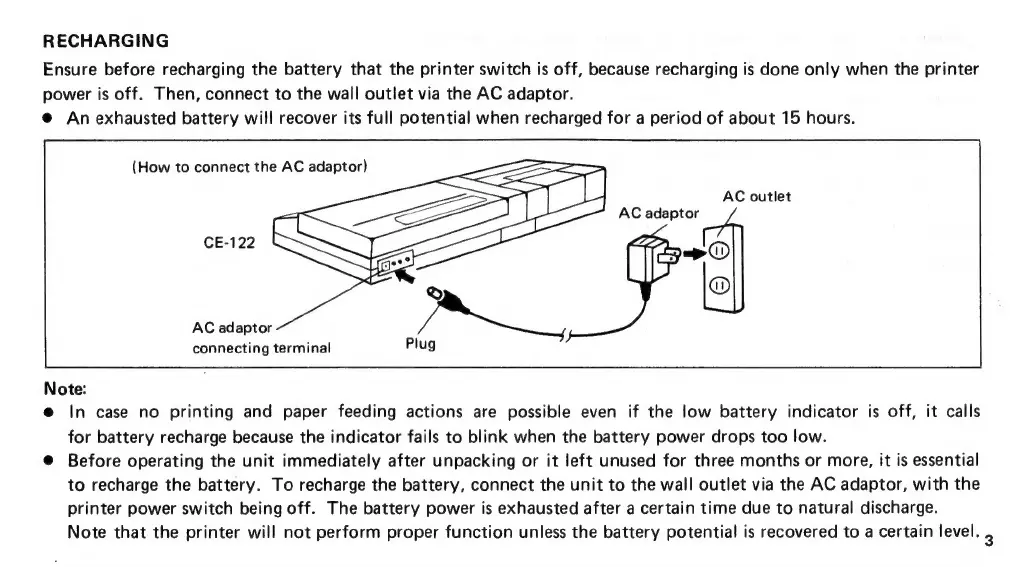
RECHARGING
Ensure
before
recharging
the
battery
that
the
printer
switch
is
off,
because
recharging
is
done
only
when
the
printer
power
is
off.
Then,
connect
to
the
wall
outlet
via
the
AC
adaptor.
@
An
exhausted
battery
will
recover
its
full
potential
when
recharged
for
a
period
of
about
15
hours.
(How
to
connect
the
AC
adaptor)
AC
outlet
AC
adaptor
AW)
@
AC
adaptor
connecting
terminal
Note:
@
In
case
no
printing
and
paper
feeding
actions
are
possible
even
if
the
low
battery
indicator
is
off,
it
calls
for
battery
recharge
because
the
indicator
fails
to
blink
when
the
battery
power
drops
too
low.
@
Before
operating
the
unit
immediately
after
unpacking
or
it
left
unused
for
three
months
or
more,
it
is
essential
to
recharge
the
battery.
To
recharge
the
battery,
connect
the
unit
to
the
wall
outlet
via
the
AC
adaptor,
with
the
printer
power
switch
being
off.
The
battery
power
is
exhausted
after
a
certain
time
due
to
natural
discharge.
Note
that
the
printer
will
not
perform
proper
function
unless
the
battery
potential
is
recovered
to
a
certain
level.
3

Related product manuals