CAMBIO DEL RODILLO ENTINTADOR
Si la impresión queda borrosa aunque esté bien
colocado el rodillo entintador, reemplace el rodillo.
Rodillo entintador: Tipó EA-781R-BK (Negro)
Tipó EA-781R-RD (Rojo)
ADVERTENCIA:
ECHANDO TINTA EN UN RODILLO ENTINTADOR
ROTO O USANDO UN RODILLO ENTINTADOR
NO AUTORIZADO PUEDE CAUSAR DETERIOROS
GRAVES EN LA IMPRESORA.
1) Poner el interruptor de corriente en “OFF”.
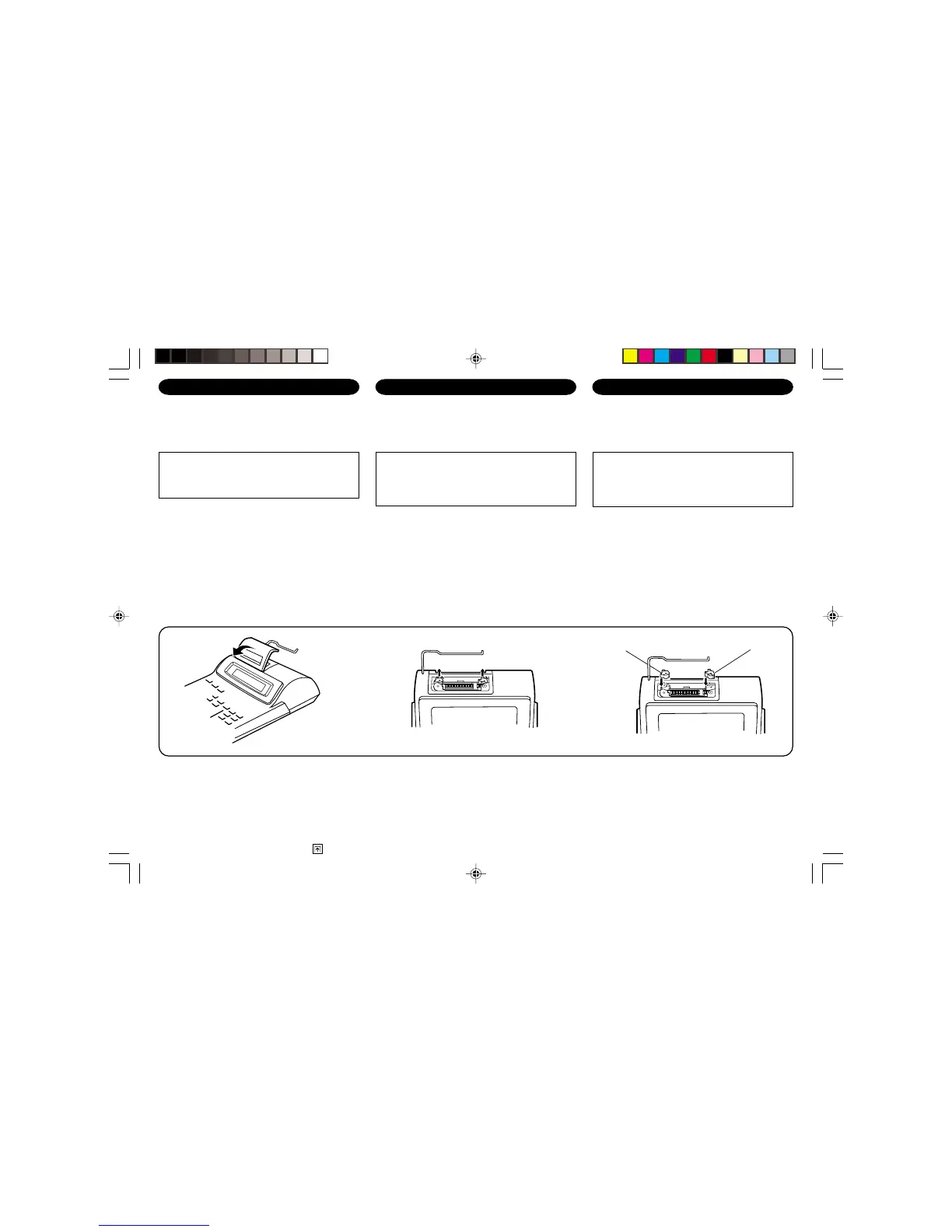
2) Sacar la tapa de la impresora. (Fig. 1)
3) Mover levemente el botón del rodillo entintador
hacia usted (en la dirección de la flecha) y luego
quitarlo. Tener cuidado para que el rodillo
entintador no se trabe debajo del estuche. (Fig. 2)
4) Instalar el nuevo rodillo entintador y empujar hacia
dentro el botón del rodillo entintador. Asegurarse
de que el rodillo entintador quede colocado
firmemente en su lugar. (Fig. 3)
5) Poner de nuevo en su lugar la tapa de la impresora.
Fig. 3
Limpieza del mecanismo de impresión
Si la impresión se debilita después de usar la
calculadora durante un largo tiempo, limpiar la
rueda de impresión de acuerdo con el siguiente
procedimiento:
1) Quitar la tapa de la impresora y el rodillo entintador.
2) Instalar el rollo de papel y hacerlo avanzar hasta
que salga por la parte delantera del mecanismo de
impresión.
REMPLACEMENT DU CYLINDRE ENCREUR
Si l’impression est floue bien que le cylindre encreur
soit dans la position convenable, remplacer ce cylindre.
Cylindre encreur: Type EA-781R-BK (Noir)
Type EA-781R-RD (Rouge)
AVERTISSEMENT:
LE FAIT D’APPLIQUER DE L’ENCRE A UN
CYLINDRE ENCREUR ABIME, OU D’UTILISER UN
CYLINDRE ENCREUR NON-APPROUVE PEUT
CAUSER DE GRAVES DEGATS A L’IMPRIMANTE.
1) Placer l’interrupteur sur la position OFF.
2) Retirer le couvercle de l’imprimante. (Fig. 1)
3) Retirer le cylindre en le tournant dans le sens
contraire des aiguilles d’une montre et en le tirant
vers le haut. (Fig. 2)
4) Installer le cylindre encreur neuf et pousser la
manette du cylindre encreur. Vérifier que le cylindre
encreur est bien en place. (Fig. 3)
5) Remettre en place le couvercle de l’imprimante.
Fig. 2
Nettoyage du mécanisme d’impression
Si l’impression devient faible après une longue
période d’utilisation, nettoyer la roue imprimante en
suivant les instructions ci-dessous:
1) Retirer le couvercle de l’imprimante et le cylindre
encreur.
2) Mettre le rouleau de papier en place et faire
avancer le papier jusqu’à ce qu’il sorte par l’avant
du mécanisme d’impression.
INK ROLLER REPLACEMENT
If printing is blurry even when the ink roller is in the
proper position, replace the roller.
Ink roller: Type EA-781R-BK (Black)
Type EA-781R-RD (Red)
WARNING:
APPLYING INK TO WORN INK ROLLER OR USE
OF UNAPPROVED INK ROLLER MAY CAUSE
SERIOUS DAMAGE TO PRINTER.
1) Set the power switch to OFF.
2) Remove the printer cover. (Fig. 1)
3) Remove the ink roller by turning it counterclockwise
and pulling it upward. (Fig. 2)
4) Install the correct color new ink roller and press it in
the correct position. Make sure that the ink roller is
securely in place. (Fig. 3)
5) Put back the printer cover.
Fig. 1
Cleaning the printing mechanism
If the print becomes dull after long time usage,
clean the printing wheel according to the following
procedures:
1) Remove the printer cover and the ink roller.
2) Install the paper roll and feed it until it comes out of
the front of the printing mechanism.
3) Put a small brush (like a tooth brush) lightly to the
printing wheel and clean it by pressing
.
Red
Rouge
Rojo
Black
Noir
Negro
EL-2902C(AAC/ABC/TLC)-1 00.11.7, 2:19 PM6


 To Next Page