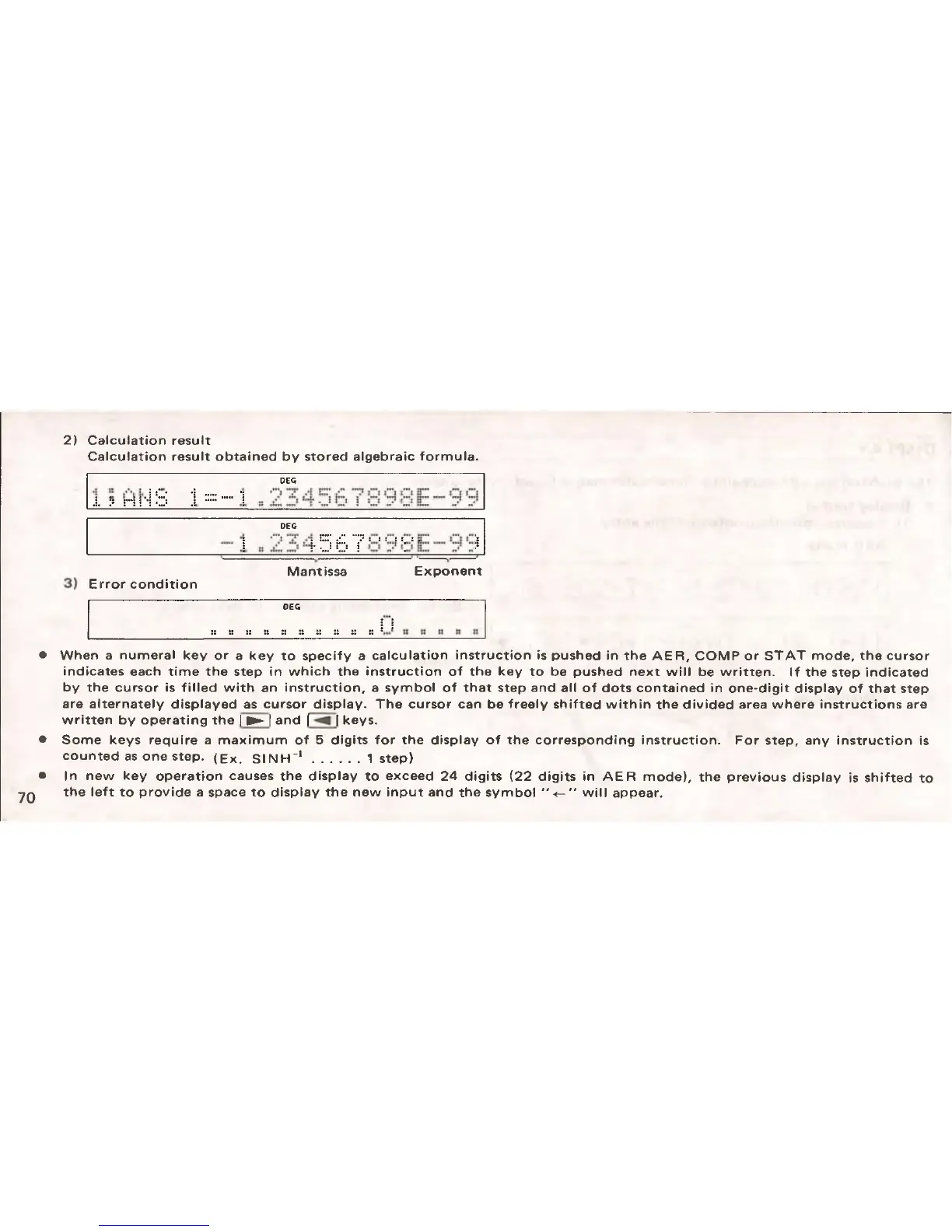
2) Calculation result
Calculation result obtained by stored algebraic formula.
.!. |s ri
DEG
••••! 7 O Ci O il!!!
...
Q Cl
DEG
CT ,
.......
• : f : i f f : f :
Mantissa Exponent
Error condition
DEO
:: :: :: :: :: :: :: s: :: ::
j
When a numeral key or a key to specify a calculation instruction is pushed in the A ER , COMP or ST A T mode, the cursor
indicates each time the step in which the instruction of the key to be pushed next will be written. If the step indicated
by the cursor is filled with an instruction, a symbol of that step and all of dots contained in one-digit display of that step
are alternately displayed as cursor display. The cursor can be freely shifted within the divided area where instructions are
written by operating the | ► 1 and | ^ | keys.
Some keys require a maximum of 5 digits for the display of the corresponding instruction. For step, any instruction is
counted as one step. (Ex. SSNH -1
............
1 step)
In new key operation causes the display to exceed 24 digits (22 digits in A ER mode), the previous display is shifted to
the left to provide a space to display the new input and the symbol will appear.


 To Next Page