11
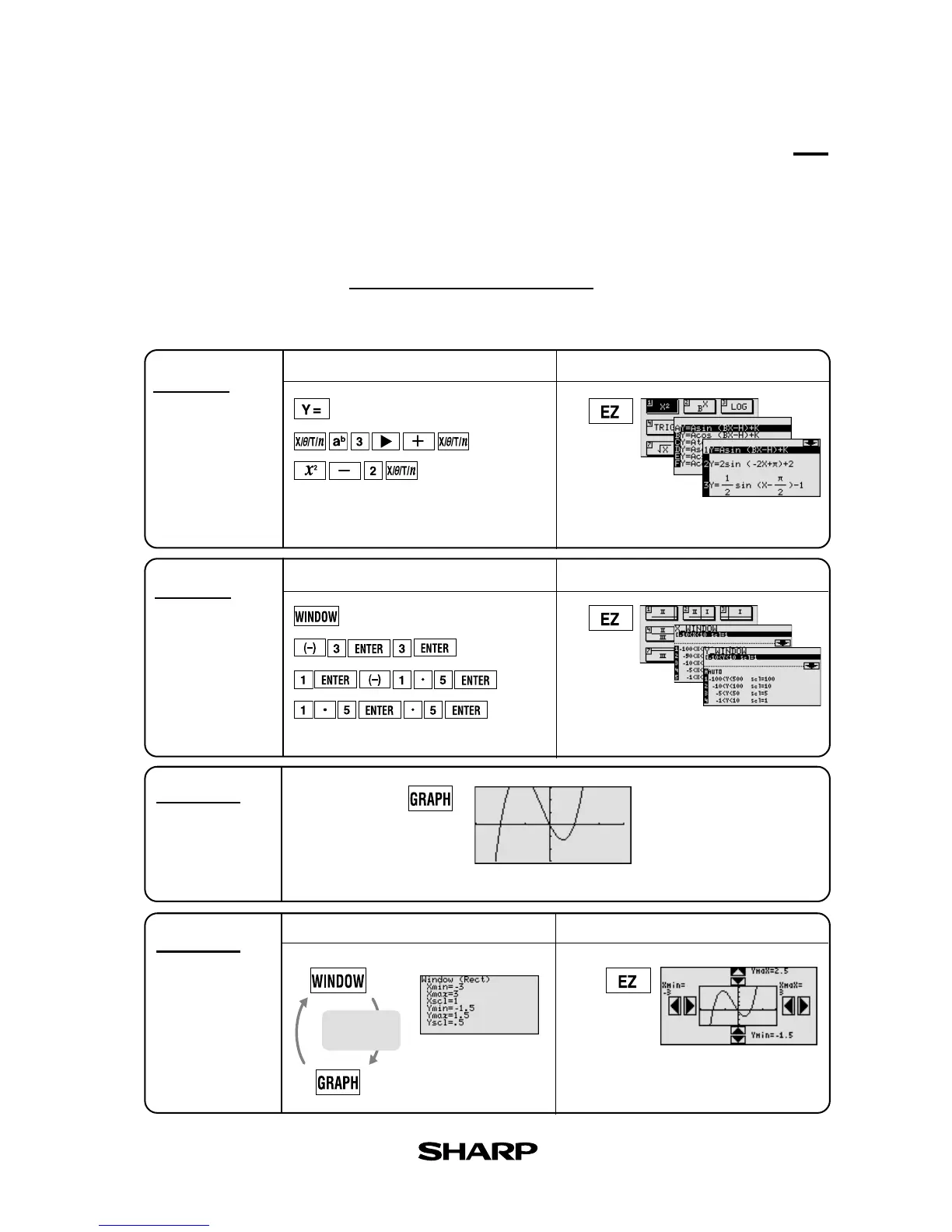
Graphing Procedures
Following outlines graphing procedures and indicates the steps where Sharp's unique functions can
be used to simplify operations. These functions are introduced on the following pages.
Step 1
Input equation
Step 2
Set X, Y range
Xmin =
Xmax =
Xscl =
Ymin =
Ymax =
Yscl =
Step 3
Draw graph
Step 4
Adjust viewing
window
Manual Input
Graphing Procedure
Rapid Graph
Manual Input
Rapid Window
Manual Input
Rapid Zoom
Press Graph button to draw graph.
Simply select from
built-in menu to
modify desired type of equation.
Simply select from
built-in menu to
set window size.
Use arrows to adjust window
size while viewing graph.
Go back to Step 2 to
readjust window size.
Features
Amending
range size
The EL-9650/9600c has three unique functions that simplify graphing procedures: Rapid
Graph, Rapid Window and Rapid Zoom. Of course, the EL-9650/9600c supports conventional
graphing procedures as well.



 To Next Page