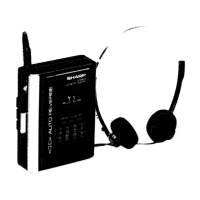
This document is an operation manual for the SHARP model JC-AV1, an AM/FM Stereo Cassette Player with LCD Television.
Function Description
The SHARP JC-AV1 is a portable entertainment device that combines an AM/FM stereo radio, a cassette player, and an LCD television. It allows users to listen to radio broadcasts, play cassette tapes, and watch television on the go. The device is designed for personal use, featuring a headphone jack for private listening.
Important Technical Specifications
- Power Source: The unit can be powered by DC 3V using two "AA" cell batteries or an external DC 3V power source.
- Maximum power output: 60 mW (30 mW + 30 mW) (DC operation).
- RMS power output: 40 mW (20 mW + 20 mW) (DC operation, 10% distortion).
- Dimensions:
- Width: 3-1/8" (80 mm)
- Height: 5-1/32" (128 mm)
- Depth: 1-1/4" (32 mm)
- Weight: 10.4 oz. (295 g) without batteries.
- TV/Radio Frequency Range:
- UHF: 14-69 channel
- VHF: 2-13 channel
- FM: 87.6-108 MHz
- AM: 526.5-1606.5 KHz
- Tape Deck:
- Tape type: Compact cassette tape
- Frequency response: 40-16,000 Hz (CrO2/Metal tape), 40-14,000 Hz (Normal tape)
- Signal/noise ratio: 54 dB
- Headphones:
- Impedance: 25 ohms
- Weight: 1.7 oz. (48 g)
- TV System: This LCD TV receives broadcasts in the "M.NTSC" format and cannot be used in areas where a different TV broadcast format is used.
Usage Features
General Precautions:
- Avoid high volumes and don't use headphones when operating a car, bicycle, or any such vehicle.
- Exercise common sense when viewing the TV while using the supplied TV telescopic rod antenna in crowded areas so as not to bother others.
- External DC power supply other than DC 3 volts can damage the unit.
- Listening at high volume can damage your ears.
- Do not expose the unit to extreme heat or cold, direct sunlight or dust, moisture, water or excessive humidity, oil, solvents or insecticides.
- Moving the unit from cold to warm places can cause malfunctions.
- Warm up to room temperature before operating.
- At temperatures below 5°C and above 40°C, the TV picture may not appear. This is not a sign of trouble. The picture will appear when proper operating temperature is restored (Operating temperature range: 5°C-40°C).
- Do not subject the LCD TV panel to impact.
- Sharp is not responsible for damage from improper use. Refer all servicing to qualified Sharp personnel.
Power Source:
- Battery Power: The unit uses two "AA" cell batteries. To install, remove the battery compartment cover, insert the batteries, and place the attached ribbon under the batteries. The ribbon helps in easily removing weakened batteries. Replace the battery compartment cover.
- External DC Power: Connect an external DC 3V power supply to the External DC Power Input Jack. The polarity of the center pin is negative.
Headphones:
- Connect headphones to the PHONES jack. Adjust volume using the VOLUME control.
- This unit is powered by connecting the headphones plug into the PHONES jack. The unit will not operate unless the headphones are connected.
TV Operation:
- The TV picture is displayed on the TV mirror screen by reflecting the light coming through the illumination window on the LCD TV panel.
- The TV picture will not appear in a dark place.
- To operate the TV:
- Plug headphones into the PHONES jack.
- Open the LCD TV panel.
- Set the FUNCTION switch to TV.
- Set the SELECT switch to VHF or UHF.
- Use the TUNING control to tune in the desired TV station.
- Use the BRIGHTNESS control to adjust the TV picture brightness.
- Adjust the VOLUME control to the desired listening level.
- The headphones cord also functions as a TV/FM antenna. Extend the cord to its full length and adjust its position for best reception.
- If satisfactory TV reception is not possible with the headphones cord, use the TV telescopic rod antenna.
- When finished viewing the TV, gently close the LCD TV panel and set the FUNCTION switch to TAPE (TV/RADIO OFF).
- Notes on TV Operation:
- Stereo sound is not available for TV.
- Gently open the LCD TV panel up to about 50°. Do not open it beyond this angle.
- Do not exert strong force on the illumination window, LCD TV panel or mirror screen. Doing so may result in trouble or damage.
- TV screen brightness may also depend on the angle of the unit.
- To listen only to the sound of a TV broadcast, simply close the LCD TV panel.
- TV Telescopic Rod Antenna: Insert the TV telescopic rod antenna into the ROD ANTENNA jack. Adjust its length, angle, and direction for best reception. If the TV telescopic rod antenna is retracted and folded, the unit can fit in the carrying case without the need for detaching the TV telescopic rod antenna. This unit does not use the TV telescopic rod antenna for FM broadcast reception.
- Poor Reception Locations: Difficult to receive broadcast signals in the following locations: mountains or buildings, underground centers or inside tunnels and buildings, locations susceptible to electromagnetic interference, and locations near railroad tracks or expressways or under air lanes. Inside vehicles such as trains, subways, and automobiles.
Radio Operation:
- To operate the radio:
- Plug headphones into the PHONES jack.
- Set the FUNCTION switch to RADIO.
- Set the SELECT switch to AM or FM.
- Use the TUNING control to tune in the desired station.
- Adjust the VOLUME control to the desired listening level.
- The headphones cord also functions as a TV/FM antenna. Extend the cord to its full length and adjust its position for best reception.
- For AM, move and rotate the unit for best reception.
- Set the FM MODE switch to STEREO for FM stereo; if sound is poor, set to MONO.
- When finished listening to the radio, set the FUNCTION switch to TAPE (TV/RADIO OFF).
- Note: Cassette tape with high metal content in housing (not so-called "metal tape") can interfere with radio reception. Remove the cassette from the unit when listening to radio.
Cassette Operation:
- General Information:
- Do not use C-120 tapes, tapes with internal reels, or poor-quality tapes, since they can cause malfunctions.
- Before loading a cassette, tighten any slack tape with a pencil.
- Do not press any control button (PLAY, etc.) when the cassette holder is open, or the unit could be damaged.
- Never press two or more operation buttons simultaneously. If this happens, press the STOP button immediately.
- When tape reaches the end during fast winding operations, press the STOP button immediately.
- Cassette Loading:
- Slide the CASSETTE OPEN button in the direction of the arrow. The cassette compartment opens about 2 or 3 mm.
- Gently open the cassette compartment.
- Slide the cassette all the way into the tape guides.
- Close the cassette compartment so it clicks.
- If it doesn't close easily, do not force; open it and try closing again.
- Playback:
- Plug headphones into the PHONES jack.
- Load the cassette into the cassette compartment.
- Set the FUNCTION switch to TAPE.
- Set the SELECT switch to NORM for Normal tape, METAL for Chrome or Metal tape.
- Set the REV MODE switch to ↄ to listen to both tape sides once, or to ∞ for endless playback of the entire tape.
- Press the PLAY button and adjust the VOLUME control to the desired listening level.
- Advance tape to where you want by pressing the STOP button, then the FAST buttons.
- When you find what you want, press the STOP button, then the PLAY button.
- Press the DIR button to listen to the other tape side. Do not press the DIR button repeatedly. Wait 3 seconds before pressing again.
- When finished listening to tape, press the STOP button to stop. Remove the tape, close the cassette compartment, and replace the tape in its case.
- Note: Using this unit near a radio may interfere with AM reception. Move the unit away from the radio.
Carrying Case:
- Use the carrying case when carrying the unit around to protect it from scratches.
Maintenance Features
Internal Care:
- Dirty head, capstans and pinch rollers: These can cause poor sound and tape jams. Clean with a cotton swab moistened with commercial head/pinch roller cleaner or isopropyl alcohol.
- Tape head and capstans become magnetized: This can cause poor sound. Demagnetize every 30 hours of playing time with a commercial tape deck demagnetizer. Read the demagnetizer's instructions carefully before using.
External Care:
- Periodically clean the cabinet with a soft cloth and dilute soap solution, then wipe with a dry cloth.
- Do not use chemically treated cleaning cloths or other chemicals.

 Need help?
 General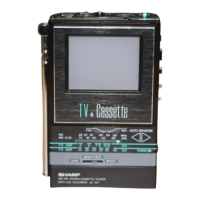

 To Next Page